

sqncr Build/Record Multitimers
David Marcus Productivity iPhoneiPadiPod touch
sqncr Build/Record Multitimers is a free Productivity app for iPhone and iPad by David Marcus. Rated 5.0/5 from 1 ratings. Requires iOS 26.1.
- Rating
- 5.0
- 1 ratings
- Price
- Free
- on the App Store
- Size
- 4 MB
- Age 4+
- Updated
- Sep 4
- 2026 · v1.0.1
Screenshots


About sqncr Build/Record Multitimers
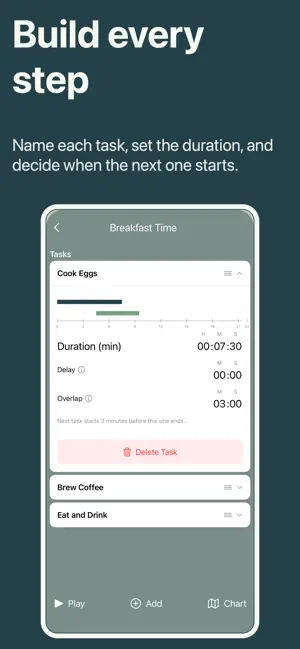
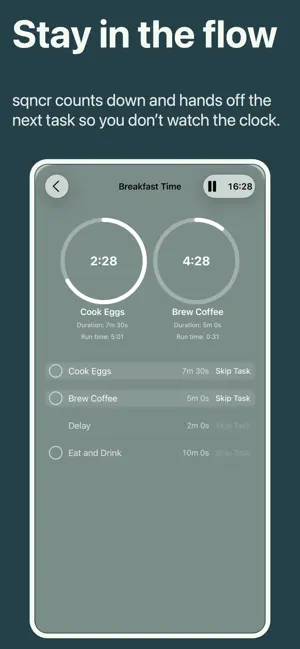
sqncr is a powerful yet simple productivity app that lets you build and follow a sequence of timers to stay focused, structured, and in flow—whether you’re working, studying, training, cooking, or managing a daily routine. Designed for anyone who works best with structure, sqncr is perfect for: • Students using time blocks or Pomodoro-style study • Professionals organizing deep work, meetings, or focus sprints • Athletes and coaches planning interval training • Creators building repeatable workflows • Anyone building better habits through routine Create your own sequence of timers in advance, or hit “Record” and build a routine as you go. sqncr adapts to your real-life workflow and then makes it repeatable with a single tap. Key features: • Build custom timer sequences step-by-step • Set specific durations for each stage (work, break, warm-up, rest, etc.) • Incorporate overlap (start next early) and delay (wait to start next) • Name and label each timer for clarity • Reorder steps instantly with drag-and-drop • Save unlimited routines for different activities • Record a session in real-time and convert it into a reusable sequence • Clean, distraction-free interface for focus • Visual and audio alerts for transitions • Background and Lock Screen support • Dark mode for night sessions Free version: • Create and run basic timer sequences (up to 4 tasks) • Save a limited number (3) of routines • Access essential tracking and alerts • Perfect for trying out structured time blocks Premium version: • Unlimited sequences and steps • Advanced customization • Detailed history and performance insights • Cloud sync across devices • Priority updates and new features • Ad-free experience Whether you’re building a morning routine, managing a focused work sprint, or structuring an entire training session, sqncr keeps you moving forward—one perfectly-timed step at a time. Download today and turn your time into a repeatable advantage. Contact us: Site: sqncr.app License Terms of Use (EULA): https://www.apple.com/legal/internet-services/itunes/dev/stdeula/ Privacy Policy: https://sqncr.app/privacy.html App Terms and Conditions: https://sqncr.app/terms.html Email: [email protected]
What’s new
Version 1.0.1 · Updated September 4, 2026
v1.0.1 - Adds the sqncr Premium annual subscription.
App privacy
The developer, David Marcus, reported these privacy practices to Apple.
Data Not Collected
The developer does not collect any data from this app.
Alternatives to sqncr Build/Record Multitimers
Looking for apps like sqncr Build/Record Multitimers? Here are 6 similar apps on the App Store. The highest rated is Prio: To Do List & Day Planner (5.0/5), and 5 of the 6 are free to download.
-
 Flow Timer: Tasks & Lofi
-
 Prio: To Do List & Day Planner
5.0
Prio: To Do List & Day Planner
5.0
-
 Pangu AI
1.0
Pangu AI
1.0
-
 Signal List
-
 CalendarNotes: Cute Reminder
-
 MyListen: Create Audio Offline
| App | Rating | Price | Last updated | Compare |
|---|---|---|---|---|
| sqncr Build/Record Multitimers | 5.0 / 5 (1 rating) | Free | September 4, 2026 | |
| Flow Timer: Tasks & Lofi | – | Free | Jul 4, 2026 | Compare |
| Prio: To Do List & Day Planner | 5.0 / 5 (1) | Free | Jun 10, 2026 | Compare |
| Pangu AI | 1.0 / 5 (1) | Free | Sep 24, 2026 | Compare |
| Signal List | – | Free | Sep 5, 2026 | Compare |
| CalendarNotes: Cute Reminder | – | Free | Sep 17, 2026 | Compare |
| MyListen: Create Audio Offline | – | 2.99 USD | Sep 20, 2026 | Compare |