

Keyframe Video
Muhammad Shabbir Productivity iPhoneiPadiPod touch
Keyframe Video is a free Productivity app for iPhone and iPad by Muhammad Shabbir. Rated 5.0/5 from 5 ratings. Requires iOS 16.4. Updated October 29, 2026.
- Rating
- 5.0
- 5 ratings
- Price
- Free
- on the App Store
- Size
- 181 MB
- Age 4+
- Updated
- Oct 29
- 2026 · v1.1.6
Screenshots



About Keyframe Video
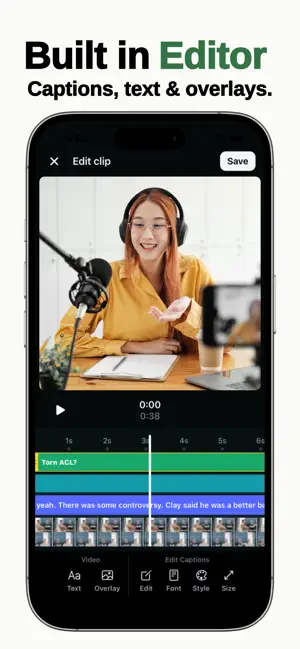
Turn your long videos into viral clips The fastest way to turn your long-form content into short, high-performing clips. Keyframe uses AI to find the best moments in your videos, automatically edit them, and format them for TikTok, Instagram Reels, and YouTube Shorts. No manual clipping. No timeline headaches. Just ready-to-post content. What you can do with Keyframe * Upload videos you own or have permission to use * Instantly generate multiple short clips * AI detects high-engagement moments * Auto captions and smart framing * Export in vertical format for social media Free trial * After the trial, a subscription is required to continue creating and exporting clips Built for creators Whether you're a: * Content creator * Podcaster * Founder building a personal brand * Agency managing content Keyframe helps you turn one video into dozens of clips — fast. Why Keyframe * Save hours of editing * Post more consistently * Grow faster with short-form content * Focus on creating, not cutting Made for modern content Optimized for: TikTok · Instagram Reels · YouTube Shorts Important Keyframe does not provide access to third-party video catalogs or downloading services. Users must only upload content they own or have rights to use. Start creating clips in seconds Download Keyframe and turn your videos into content that actually gets watched. Terms of Use (EULA): https://www.apple.com/legal/internet-services/itunes/dev/stdeula/ Privacy Policy: https://www.thebasedapp.org/privacy
Ratings & reviews
5.0
5 ratings
What’s new
Version 1.1.6 · Updated October 29, 2026
Meet the new Keyframe video editor. • Trim, split, rearrange, and frame your videos. • Find AI clips or select your own moments to create clips. • Add and edit captions, with on-device translation on iPhone. • Adjust brightness, contrast, color, and audio. • Import your own music and voiceovers. • Export individual clips or several at once. Plus smoother timeline controls, improved project storage, and bug fixes.
App privacy
The developer, Muhammad Shabbir, reported these privacy practices to Apple.
Data Used to Track You
The following data may be used to track you across apps and websites owned by other companies:
- Contact Info: Email Address
- Identifiers: User ID, Device ID
- Usage Data: Product Interaction, Advertising Data
Data Linked to You
The following data, which may be collected and linked to your identity, may be used for the following purposes:
- Contact Info: Email Address, Name
- Identifiers: User ID
- Usage Data: Product Interaction, Advertising Data
Used for: Third-Party Advertising, Developer’s Advertising or Marketing, Analytics, Product Personalization, App Functionality
Data Not Linked to You
The following data, which may be collected but is not linked to your identity, may be used for the following purposes:
- Identifiers: Device ID
- Diagnostics: Crash Data, Performance Data, Other Diagnostic Data
Used for: Third-Party Advertising, Developer’s Advertising or Marketing, Analytics, Product Personalization, App Functionality
Alternatives to Keyframe Video
Looking for apps like Keyframe Video? Here are 6 similar apps on the App Store. The highest rated is M&A Connect (5.0/5), and all 6 are free to download.
-
 M&A Connect
5.0
M&A Connect
5.0
-
 VPN Super Proxy by RedVPN
4.4
VPN Super Proxy by RedVPN
4.4
-
 Temp Mail - Temporary Mail Box
4.4
Temp Mail - Temporary Mail Box
4.4
-
 HMA Hotspot VPN & Proxy
4.6
HMA Hotspot VPN & Proxy
4.6
-
 Glo Café
2.2
Glo Café
2.2
-
 VPN Proxy OvpnSpider Pro
4.4
VPN Proxy OvpnSpider Pro
4.4
| App | Rating | Price | Last updated | Compare |
|---|---|---|---|---|
| Keyframe Video | 5.0 / 5 (5 ratings) | Free | October 29, 2026 | |
| M&A Connect | 5.0 / 5 (2) | Free | Oct 12, 2026 | Compare |
| VPN Super Proxy by RedVPN | 4.4 / 5 (295) | Free | Oct 17, 2026 | Compare |
| Temp Mail - Temporary Mail Box | 4.4 / 5 (558) | Free | Oct 13, 2026 | Compare |
| HMA Hotspot VPN & Proxy | 4.6 / 5 (19,557) | Free | Feb 28, 2026 | Compare |
| Glo Café | 2.2 / 5 (1,088) | Free | Oct 19, 2026 | Compare |
| VPN Proxy OvpnSpider Pro | 4.4 / 5 (11,063) | Free | Sep 2, 2026 | Compare |
Compare Keyframe Video with the top alternatives: ratings, updates, ASO score and keyword gaps →