

PickaTime: Find Shared Time
Shao Hung Lo Productivity iPhoneiPadiPod touch
PickaTime: Find Shared Time is a free Productivity app for iPhone and iPad by Shao Hung Lo. Requires iOS 17.6. Updated July 17, 2026.
- Price
- Free
- on the App Store
- Size
- 7 MB
- Age 4+
- Updated
- Jul 17
- 2026 · v1.5
Screenshots

About PickaTime: Find Shared Time
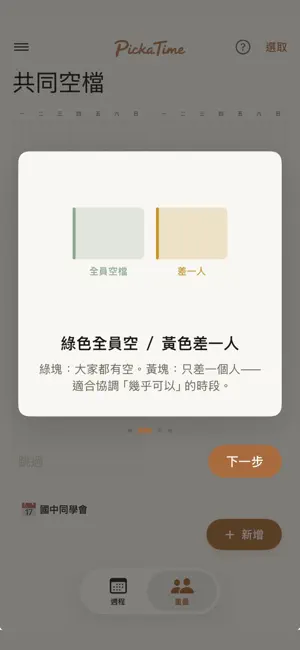
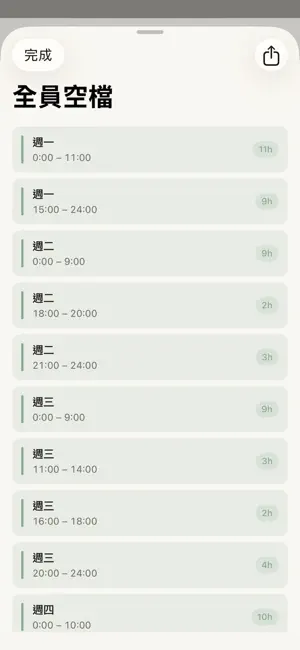
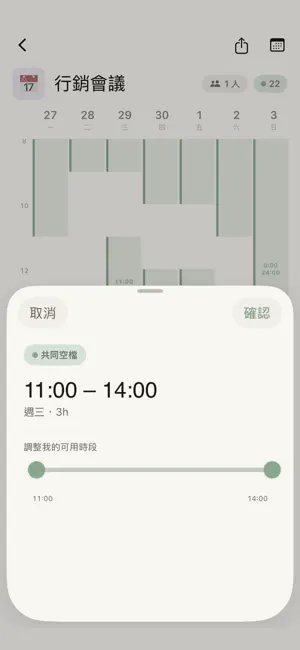
Find when everyone in your group is actually free — without sending another poll. PickaTime lays your friends', teammates', or family's busy times on top of each other and instantly shows the windows when you can all meet. No back-and-forth. No "let me check and get back to you." No survey links. How it works: - Sign in with Apple or Google. - Create a group and share the invite link. - Each person marks the times they're busy (or imports them from their calendar). - PickaTime overlays everyone's schedule and highlights the shared free slots — green when all of you are open, yellow when you're one person away. Designed for small groups: - Friends planning dinner. - Couples coordinating with in-laws. - Project teams scheduling a sync. - Study groups, book clubs, hobby crews. Privacy you can feel: - We never see your event titles, locations, or notes. - Only the time ranges you choose to share leave your device. - Delete your account or leave a group at any time and your data goes with you. Why it's different: - No polling. The overlap appears the moment everyone has marked their schedule. - The "nearly free" view shows times where just one person is unavailable — so you know when it's worth a quick "hey, can you move that 4pm?" - Built for iOS 17 with native gestures, smooth animations, and a calm, paper-textured design that's a pleasure to use. PickaTime is free to start, with optional auto-renewable Plus and Pro subscriptions for higher limits. No ads. No tracking. Just the answer to "when are we all free?" Privacy Policy: https://pickatime.co/privacy Terms of Use (EULA): https://www.apple.com/legal/internet-services/itunes/dev/stdeula/ PickaTime Terms of Service: https://pickatime.co/terms
What’s new
Version 1.5 · Updated July 17, 2026
Fixed an issue that prevented some users from signing in or connecting, and improved calendar sync reliability.
App privacy
The developer, Shao Hung Lo, reported these privacy practices to Apple.
Data Linked to You
The following data, which may be collected and linked to your identity, may be used for the following purposes:
- Identifiers: User ID, Device ID
- Usage Data: Product Interaction
- Contact Info: Email Address
- User Content: Other User Content
Used for: Analytics, App Functionality
Alternatives to PickaTime: Find Shared Time
Looking for apps like PickaTime: Find Shared Time? Here are 6 similar apps on the App Store. The highest rated is Jeejee: Markdown, LaTeX & Ink (5.0/5), and all 6 are free to download.
-
 ClockIN: Work Hours&Schedules
-
 不揪?- 儲存、分享課表
-
 Jeejee: Markdown, LaTeX & Ink
5.0
Jeejee: Markdown, LaTeX & Ink
5.0
-
 Scholarium: Student's Reminder
-
 讀痕
5.0
讀痕
5.0
-
 Studiary
| App | Rating | Price | Last updated | Compare |
|---|---|---|---|---|
| PickaTime: Find Shared Time | – | Free | July 17, 2026 | |
| ClockIN: Work Hours&Schedules | – | Free | Oct 21, 2026 | Compare |
| 不揪?- 儲存、分享課表 | – | Free | Aug 29, 2025 | Compare |
| Jeejee: Markdown, LaTeX & Ink | 5.0 / 5 (1) | Free | Oct 14, 2026 | Compare |
| Scholarium: Student's Reminder | – | Free | Sep 15, 2025 | Compare |
| 讀痕 | 5.0 / 5 (1) | Free | Jul 4, 2026 | Compare |
| Studiary | – | Free | Oct 15, 2026 | Compare |