

FuryPath for HDFury Devices
MiyaraHub Technologies LLC Utilities iPhoneiPadiPod touchMac
FuryPath for HDFury Devices is a paid Utilities app for iPhone and iPad by MiyaraHub Technologies LLC. Requires iOS 16.0. Updated October 19, 2026.
- Price
- 9.99 USD
- on the App Store
- Size
- 40 MB
- Age 4+
- Updated
- Oct 19
- 2026 · v2.3.2
Screenshots


About FuryPath for HDFury Devices
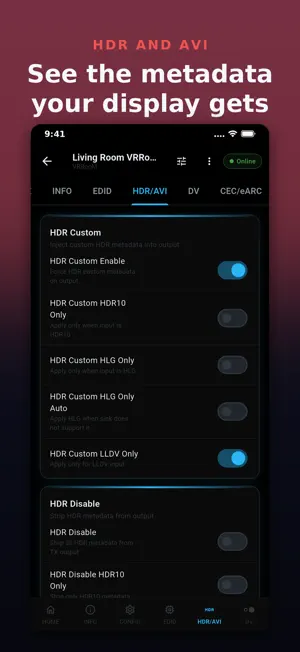
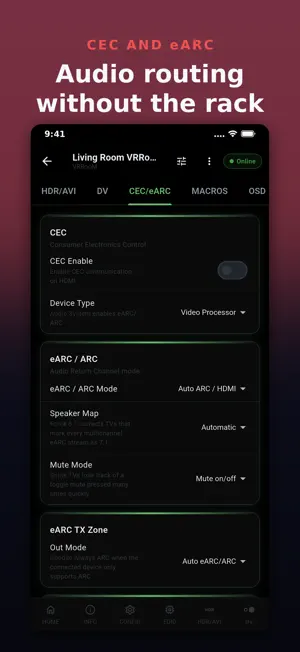
FuryPath is a controller for HDFury HDMI processors. It talks to your device over your own local network and puts every setting in one app, so you can see what your HDMI chain is actually doing and change it without opening a browser. WHAT YOU SEE Live signal readout for every input and output: resolution, colour space, bit depth, HDR format, audio codec and channel count, refreshed as the device reports them. WHAT YOU CAN CHANGE EDID: pick the mode, choose the audio source and set the advanced flags. The selected EDID is read from the device and written back, and the device re-syncs. A file with a wrong size, header or checksum is refused before it reaches the unit. HDR and Dolby Vision: HDR10, HLG, LLDV and infoframe control, including Automix. CEC, eARC and ARC: modes, speaker map, mute mode, RS232 baud rate and an ASCII and binary console. Source routing, JVC macros (VRRooM), OSD overlay, OLED panel and device configuration. Network changes such as DHCP, IP address and TCP port ask you to confirm first. YOUR APP, YOUR WAY Customizable Home: pin any card from any screen and arrange it as you like. Reorder the navigation bar. Rename devices and switch between several units quickly. Choose a colour theme. Back up and restore your settings and your device's own web portal configuration. TRY IT FIRST Demo Mode runs the whole app against a simulated device, so you can explore before you connect anything. HOME SCREEN On phones, widgets and shortcuts put input switching, output on and off, profile switching, EDID reset, HDR and LLDV toggles and a connection check one tap away. SUPPORTED DEVICES VRRooM, VERTEX2, VERTEX, DIVA, Maestro, ARCANA2, Arcana and Dr.HDMI 8K. Only the features each model really has are offered. PRIVATE BY DESIGN No account and no ads. FuryPath reaches your device directly on your local network. The mobile apps send crash logs and diagnostics through Firebase, not linked to you and not used for tracking, so a bug can be fixed. The desktop apps send nothing. Available in 29 languages. Questions: [email protected] FuryPath is made by MiyaraHub Technologies LLC and is not affiliated with or endorsed by HDFury.
What’s new
Version 2.3.2 · Updated October 19, 2026
Store listings added in 29 languages. No app changes.
App privacy
The developer, MiyaraHub Technologies LLC, reported these privacy practices to Apple.
Data Not Linked to You
The following data, which may be collected but is not linked to your identity, may be used for the following purposes:
- Identifiers: Device ID
- Diagnostics: Crash Data
Used for: App Functionality
Alternatives to FuryPath for HDFury Devices
Looking for apps like FuryPath for HDFury Devices? Here are 6 similar apps on the App Store. The highest rated is Data Manager Classic (5.0/5), and all 6 are free to download.
-
 Data Manager Classic
5.0
-
 Go232
-
 SignaScan: Signature Creator
5.0
-
 Koda Remote
5.0
-
 Screenshot-Maker
-
 NVG APP
4.0
| App | Rating | Price | Last updated | Compare |
|---|---|---|---|---|
| FuryPath for HDFury Devices | – | 9.99 USD | October 19, 2026 | |
| Data Manager Classic | 5.0 / 5 (1) | Free | Oct 17, 2026 | Compare |
| Go232 | – | Free | Jan 31, 2026 | Compare |
| SignaScan: Signature Creator | 5.0 / 5 (1) | Free | Sep 16, 2026 | Compare |
| Koda Remote | 5.0 / 5 (1) | Free | Oct 16, 2026 | Compare |
| Screenshot-Maker | – | Free | May 5, 2026 | Compare |
| NVG APP | 4.0 / 5 (1) | Free | Nov 11, 2025 | Compare |