

Screen Time Control: Luaro
Yaroslav Lishchynskyi Productivity iPhoneiPadiPod touch
Screen Time Control: Luaro is a free Productivity app for iPhone and iPad by Yaroslav Lishchynskyi. Requires iOS 17.6. Updated October 20, 2026.
- Price
- Free
- on the App Store
- Size
- 58 MB
- Age 4+
- Updated
- Oct 20
- 2026 · v1.5
Screenshots
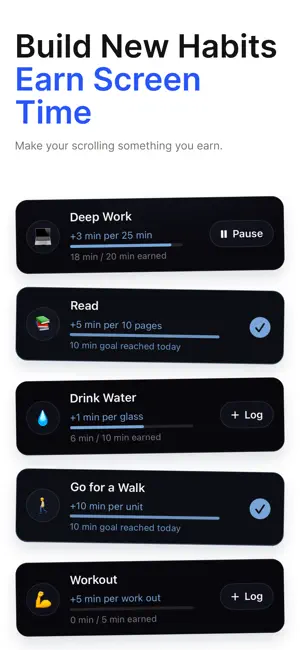


About Screen Time Control: Luaro
People don't lose hours to their phones. They lose weeks, months, and years. Luaro helps you earn your screen time. Distracting apps stay locked until you complete productive habits — then you spend only the time you've earned. Unlike traditional app blockers, Luaro ties access to something you did on purpose. You create Rules for what stays blocked, earn screen time by completing habits, and open those apps only when the time is yours. EARN SCREEN TIME: Log a habit. Add to your balance. Spend it on the apps you chose to lock. Rules in Earn mode stay locked until your balance covers the unlock, and that time comes off your balance when you open them. FEATURES • Block distracting apps, categories, and websites • Earn screen time by completing productive habits • Create custom friction before an unlock • Change the order and duration of the friction steps • Schedule the friction • Schedule the blocks • Set usage limits • Set a delay for editing or deleting Rules, so bypassing them takes longer • Limit unlock duration • Limit daily unblocks • Set a grayscale requirement to unblock apps • Get a notification before Luaro re-blocks apps • View detailed screen time reports • Filter apps in your reports • Track app usage, pick-ups, and notifications • Visualize your screen time with Life in Weeks • See long-term screen time projections FRICTION STEPS • Breathing exercises: 5 modes • Physical exercise: 6 options • Reflection Message: read any text you write • Typed Phrase: type any text you write • Written Reflection: 4 exercises • Life in Weeks visualization • Media: a photo or video you add SEE THE BIGGER PICTURE Your daily screen time adds up. Luaro shows where your time goes, and what the months and years ahead look like if nothing changes. Earn mode turns that into a daily trade: do something that matters, then spend the time you earned. Whether you want less time on social media, fewer distractions, or more control over your attention, every unlock is a decision you worked for. PERFECT FOR ANYONE LOOKING TO • Earn screen time instead of opening apps on autopilot • Take control of daily screen time • Block addictive apps and websites • Build habits that pay off in attention • Improve deep focus and productivity • Reduce phone addiction and dopamine loops • Shift toward conscious daily behavior Take control of your attention today. Download Luaro. Privacy Policy: https://privacy.luaro.app/ Terms of Use (EULA): https://terms.luaro.app/
What’s new
Version 1.5 · Updated October 20, 2026
• UI/UX improvements • Updated subscription policy • Added German and Spanish localizations • Onboarding update • Updated Privacy Policy
App privacy
The developer, Yaroslav Lishchynskyi, reported these privacy practices to Apple.
Data Not Linked to You
The following data, which may be collected but is not linked to your identity, may be used for the following purposes:
- Purchases: Purchase History
- Identifiers: User ID
- Usage Data: Product Interaction
- Diagnostics: Crash Data, Other Diagnostic Data
- User Content: Photos or Videos, Other User Content
Used for: Analytics, Product Personalization, App Functionality
Alternatives to Screen Time Control: Luaro
Looking for apps like Screen Time Control: Luaro? Here are 6 similar apps on the App Store. The highest rated is Dopamine Swap - Screen Time (5.0/5), and all 6 are free to download.
-
 Get A Password
-
 chapter lock - screen time
3.5
-
 Pause - The Focus App
-
 Dopamine Swap - Screen Time
5.0
-
 Bloka: AI Screen Time Control
4.0
-
 Screen Time Control - Blucky
4.5
| App | Rating | Price | Last updated | Compare |
|---|---|---|---|---|
| Screen Time Control: Luaro | – | Free | October 20, 2026 | |
| Get A Password | – | Free | Feb 9, 2024 | Compare |
| chapter lock - screen time | 3.5 / 5 (2) | Free | Jun 9, 2026 | Compare |
| Pause - The Focus App | – | Free | Aug 22, 2026 | Compare |
| Dopamine Swap - Screen Time | 5.0 / 5 (2) | Free | Mar 23, 2026 | Compare |
| Bloka: AI Screen Time Control | 4.0 / 5 (4) | Free | Oct 25, 2026 | Compare |
| Screen Time Control - Blucky | 4.5 / 5 (14) | Free | Aug 17, 2026 | Compare |