

Raw To HEIC
Sandro Gumz Photo & Video iPhoneiPadiPod touchMac
Raw To HEIC is a free Photo & Video app for iPhone and iPad by Sandro Gumz. Rated 5.0/5 from 3 ratings. Requires iOS 18.0. Updated October 22, 2026.
- Rating
- 5.0
- 3 ratings
- Price
- Free
- on the App Store
- Size
- 30 MB
- Age 4+
- Updated
- Oct 22
- 2026 · v2.15
Screenshots


About Raw To HEIC
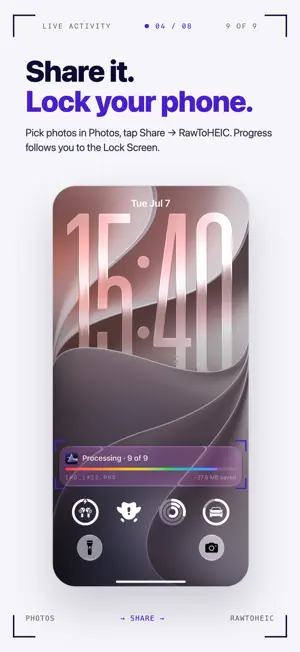
RAWtoHEIC turns the camera RAW files filling up your library into compact HEIC photos — without ever leaving your device. No uploads, one-time purchase available — no subscription required, no account. One purchase covers iPhone, iPad, and Mac. KEY FEATURES • Convert from the Photos share sheet. Select your RAWs, tap Share → RAWtoHEIC, hit Start. The app processes in the background and writes the new HEICs back into your Photos library, keeping favorite, album, and date-taken metadata intact. • HDR done right. RAWtoHEIC synthesizes ISO 21496-1 gain maps so converted photos render with full HDR on capable displays while remaining beautifully tone-mapped on SDR ones. ProRAW DNGs keep their original HDR aux data. • Original metadata preserved. EXIF, XMP, ICC, GPS, lens info, capture date — all carried into the HEIC output. Your photos remain searchable, sortable, and faithful. • Optionally remove the originals. After verification, you choose whether to keep both copies or reclaim the space. Deletion is batched and confirmed through the standard Photos prompt. • Live progress everywhere. On iPhone the Lock Screen and Dynamic Island show conversion progress in real time. On Mac, a status-bar item; on iPad, notifications when each batch finishes. • Files & Finder too. Drop loose RAW files from the Files app or Finder onto RAWtoHEIC and they're converted in place — the HEIC lands next to the source. • Wide RAW support. Canon CR3 / CR2, Nikon NEF, Sony ARW, Fuji RAF, Olympus ORF, Panasonic RW2, Adobe DNG (including iPhone ProRAW). HEIC, HEIF, JPEG, PNG, and TIFF can also be re-encoded. PRIVACY FIRST RAWtoHEIC has zero analytics, zero telemetry, zero third-party SDKs, and zero network requests for your photo data. Every byte of every conversion stays on your device. WHO IT'S FOR If you shoot RAW with a mirrorless, DSLR, or your iPhone in ProRAW mode and find your Photos library bloating into tens of gigabytes, this app turns that storage cost into compact HEIC files that Photos, Quick Look, and modern web browsers all read natively — without sacrificing HDR or color accuracy. UNIVERSAL PURCHASE Buy once on any platform, use on all your Apple devices: iPhone, iPad, and Mac. One-time purchase available — no subscription required. No ads. No upsells. REQUIREMENTS iOS 18, iPadOS 18, or macOS 15 Sequoia or later. Privacy Policy URL: https://rawtoheic.app/privacy/ Terms of Use: https://rawtoheic.app/terms/
What’s new
Version 2.15 · Updated October 22, 2026
Small background activity bug fixed :)
App privacy
The developer, Sandro Gumz, reported these privacy practices to Apple.
Data Linked to You
The following data, which may be collected and linked to your identity, may be used for the following purposes:
- Usage Data: Product Interaction
- Identifiers: User ID, Device ID
Used for: Analytics, App Functionality
Alternatives to Raw To HEIC
Looking for apps like Raw To HEIC? Here are 6 similar apps on the App Store. The highest rated is Pulso Convert: RAW Converter (5.0/5), and 5 of the 6 are free to download.
-
 RAW to HEIC Pro
-
 NO RAW
4.4
NO RAW
4.4
-
 Pulso Convert: RAW Converter
5.0
Pulso Convert: RAW Converter
5.0
-
 Rawly: RAW to JPG
-
 RAW Batch - RAW Converter
-
 MakeHDR: Ultra HDR Photo+Video
5.0
MakeHDR: Ultra HDR Photo+Video
5.0
| App | Rating | Price | Last updated | Compare |
|---|---|---|---|---|
| Raw To HEIC | 5.0 / 5 (3 ratings) | Free | October 22, 2026 | |
| RAW to HEIC Pro | – | Free | Aug 5, 2026 | Compare |
| NO RAW | 4.4 / 5 (9) | 1.99 USD | Nov 6, 2025 | Compare |
| Pulso Convert: RAW Converter | 5.0 / 5 (1) | Free | Sep 24, 2026 | Compare |
| Rawly: RAW to JPG | – | Free | Oct 13, 2026 | Compare |
| RAW Batch - RAW Converter | – | Free | Oct 15, 2026 | Compare |
| MakeHDR: Ultra HDR Photo+Video | 5.0 / 5 (2) | Free | Aug 29, 2026 | Compare |
Compare Raw To HEIC with the top alternatives: ratings, updates, ASO score and keyword gaps →