

Filto
Masashi Yasaka News iPhoneiPadiPod touch
Filto is a free News app for iPhone and iPad by Masashi Yasaka. Requires iOS 15.1. Updated October 10, 2026.
- Price
- Free
- on the App Store
- Size
- 56 MB
- Age 4+
- Updated
- Oct 10
- 2026 · v1.5.6
Screenshots


About Filto
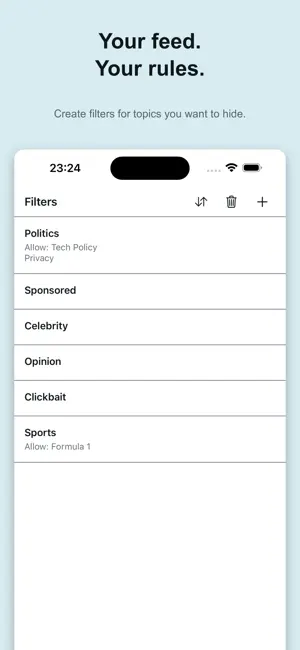
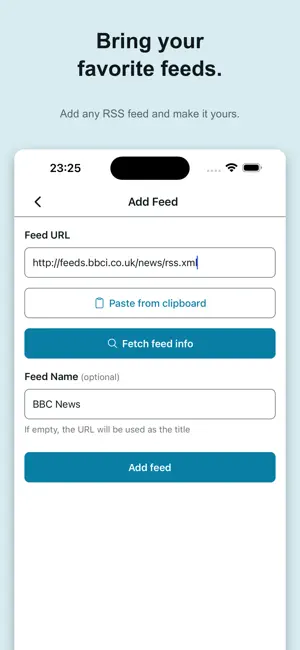
See less of what you don't want. Filto is an RSS reader for deciding what you read — instead of letting an algorithm decide for you. Gather the sources you like, mute unwanted topics with keywords, and hide the articles and sites you don't want as you read. Little by little, you shape a feed that fits you. --- MUTE UNWANTED TOPICS Just like muting words on social media, you can organize RSS articles with keywords. Add names of people, shows, companies, products, or any other topics you do not want to see. Articles containing those keywords are hidden from your feed. --- KEEP WHAT YOU WANT TO READ Set allowed keywords as exceptions to your block rules. For example: Hide sports news — but keep Formula 1. Hide politics — but keep technology policy. Fine-tune your feed to match what you want to read. --- SHAPE YOUR FEED AS YOU READ Beyond keyword rules, you can hide any article the moment you decide "not this one." Swipe an article to hide it, or hide an entire site with a long press. Changed your mind? Restore it anytime. You don't need to build the perfect feed up front. Read, hide, read again — and gradually make it your own. --- FOLLOW ONLY THE SOURCES YOU CHOOSE Your feed contains articles from the RSS sources you add. Follow news sites, blogs, tech publications, hobby sites, and more — all in one place. --- NO NEED TO SET IT UP PERFECTLY No account required. Default feeds are set up on first launch, so you can start reading right away. As you read and remove what you don't need, your feed naturally becomes quieter and more yours. Tune it later, as you go. --- FEATURES · Hide unwanted topics with block keywords · Keep exceptions with allowed keywords · Hide articles or entire sites with a swipe or long press (restorable) · Subscribe to any RSS / Atom sources in one place · Hide feeds from your home list (without deleting) · Prioritize must-see topics · Filter the home list by title or text · Save favorite articles · "Read often" badge and sort feeds by read count · Switch feed layouts · Auto-refresh and article retention · Light and dark themes · English and Japanese support --- Shape your feed as you read. Your feed. Your rules. --- [About Filto Pro (subscription)] · Name: Filto Pro (monthly) · Length: 1 month, auto-renewing · Price: $0.99 / month · Includes: removes ads, and unlocks the limits on filters and global allow keywords Your subscription renews automatically and is billed to your App Store account unless auto-renew is turned off at least 24 hours before the end of the current period. You can manage or cancel it at any time in your App Store account settings. Terms of Use (EULA): https://www.apple.com/legal/internet-services/itunes/dev/stdeula/ Privacy Policy: https://yskms.github.io/filto-app/privacy-policy
What’s new
Version 1.5.6 · Updated October 10, 2026
• Updated the app icon with a new design
App privacy
The developer, Masashi Yasaka, reported these privacy practices to Apple.
Data Not Linked to You
The following data, which may be collected but is not linked to your identity, may be used for the following purposes:
- Identifiers: Device ID
- Usage Data: Product Interaction, Advertising Data
- Purchases: Purchase History
- Diagnostics: Crash Data, Performance Data
Used for: Third-Party Advertising, Analytics, App Functionality
Alternatives to Filto
Looking for apps like Filto? Here are 6 similar apps on the App Store. The highest rated is FeedLyst - RSS News Reader (5.0/5), and 5 of the 6 are free to download.
-
 The FeedIn
-
 RSS-Filter – News Feed Reader
4.5
RSS-Filter – News Feed Reader
4.5
-
 Simplio RSS Reader
3.0
Simplio RSS Reader
3.0
-
 FeedLyst - RSS News Reader
5.0
FeedLyst - RSS News Reader
5.0
-
 RSS - News & Article Reader
4.0
RSS - News & Article Reader
4.0
-
 Sakura Reader
4.6
Sakura Reader
4.6
| App | Rating | Price | Last updated | Compare |
|---|---|---|---|---|
| Filto | – | Free | October 10, 2026 | |
| The FeedIn | – | Free | Oct 6, 2026 | Compare |
| RSS-Filter – News Feed Reader | 4.5 / 5 (2) | 4.99 USD | Oct 5, 2026 | Compare |
| Simplio RSS Reader | 3.0 / 5 (4) | Free | Aug 26, 2026 | Compare |
| FeedLyst - RSS News Reader | 5.0 / 5 (2) | Free | Oct 22, 2025 | Compare |
| RSS - News & Article Reader | 4.0 / 5 (2) | Free | Oct 13, 2026 | Compare |
| Sakura Reader | 4.6 / 5 (5) | Free | Oct 14, 2026 | Compare |
Compare Filto with the top alternatives: ratings, updates, ASO score and keyword gaps →