

Useful Video Editor
katapu.net Photo & Video iPhoneiPadiPod touch
Useful Video Editor is a free Photo & Video app for iPhone and iPad by katapu.net. Requires iOS 15.6. Updated September 28, 2026.
- Price
- Free
- on the App Store
- Size
- 91 MB
- Age 4+
- Updated
- Sep 28
- 2026 · v1.1.0
Screenshots
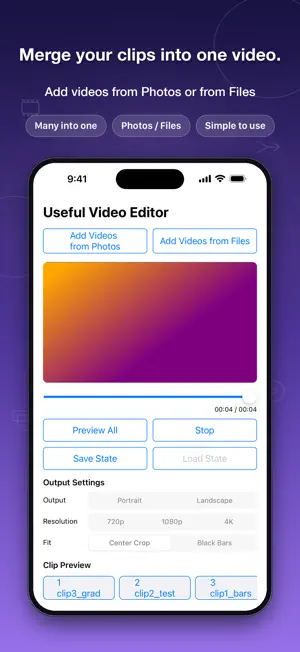


About Useful Video Editor
Useful Video Editor is a simple video editing app that lets you import multiple videos, keep only the parts you need, and export them as one finished video. Import videos from Photos or Files, preview them, and adjust the start point and the length you want to use. You can trim unwanted parts from the beginning or end, split a video at a chosen point, or delete clips you do not need before merging. It is useful when you want to combine short videos, remove unwanted parts from a recording, or rearrange several clips into one video. In addition to the full preview, each video and each clip has its own individual preview. You can check each part in place while editing without scrolling through the whole project to find it. Clip order can be changed with the up and down buttons. You can also save the current editing state, load it later, and continue from where you left off. When editing is finished, export the merged video and save it to Photos. Main features: - Import multiple videos - Adjust the start point and length of each video - Split a video at a chosen point - Delete unwanted clips - Reorder clips - Individual preview and full preview - Save and load editing state - Export the merged video and save it to Photos How to use: 1. Tap "Add Video" and select the videos you want to connect. 2. Imported videos are merged in the order shown in the list. 3. Adjust the start point and length of each video as needed. 4. If you want to split a video, split it at the chosen point. 5. Delete unwanted clips and reorder the clips as needed. 6. Check the result with the individual preview or full preview. 7. Tap "Export Video" to save the merged video.
What’s new
Version 1.1.0 · Updated September 28, 2026
• Added support for iOS 27. • Made changes to address an issue that could cause the app to close when displaying certain ads, and improved stability.
App privacy
The developer, katapu.net, reported these privacy practices to Apple.
Data Used to Track You
The following data may be used to track you across apps and websites owned by other companies:
- Identifiers: Device ID
Data Linked to You
The following data, which may be collected and linked to your identity, may be used for the following purposes:
- Location: Coarse Location
- Identifiers: Device ID
- Usage Data: Product Interaction, Advertising Data
- Purchases: Purchase History
Used for: Third-Party Advertising, Developer’s Advertising or Marketing, Analytics, App Functionality
Data Not Linked to You
The following data, which may be collected but is not linked to your identity, may be used for the following purposes:
- Location: Coarse Location
- Identifiers: User ID
- Usage Data: Product Interaction, Advertising Data, Other Usage Data
- Diagnostics: Performance Data, Other Diagnostic Data, Crash Data
- Other Data: Other Data Types
- Purchases: Purchase History
Used for: Third-Party Advertising, Developer’s Advertising or Marketing, Analytics, App Functionality
Alternatives to Useful Video Editor
Looking for apps like Useful Video Editor? Here are 6 similar apps on the App Store. The highest rated is Video Merger: Join Clips (3.5/5), and all 6 are free to download.
-
 Video Merger: Join Clips
3.5
-
 Video Trimmer, Merger & Joiner
-
 VideoConcatenation
-
 GIF Slideshow MP4 Maker
2.0
-
 Vezumi: Easy Video Editor
-
 SimpleCut - シンプルな動画編集・カバー画像作成
| App | Rating | Price | Last updated | Compare |
|---|---|---|---|---|
| Useful Video Editor | – | Free | September 28, 2026 | |
| Video Merger: Join Clips | 3.5 / 5 (2) | Free | Jun 13, 2026 | Compare |
| Video Trimmer, Merger & Joiner | – | Free | Aug 21, 2026 | Compare |
| VideoConcatenation | – | Free | Sep 21, 2026 | Compare |
| GIF Slideshow MP4 Maker | 2.0 / 5 (4) | Free | Aug 11, 2026 | Compare |
| Vezumi: Easy Video Editor | – | Free | Sep 17, 2026 | Compare |
| SimpleCut - シンプルな動画編集・カバー画像作成 | – | Free | Jul 14, 2026 | Compare |