

Planner: Plan Your Day
James Prochnow Productivity iPhoneiPadiPod touch
Planner: Plan Your Day is a paid Productivity app for iPhone and iPad by James Prochnow. Rated 5.0/5 from 2 ratings. Requires iOS 26.4. Updated May 19, 2026.
- Rating
- 5.0
- 2 ratings
- Price
- 4.99 USD
- on the App Store
- Size
- 7 MB
- Age 4+
- Updated
- May 19
- 2026 · v1.10.1
Screenshots

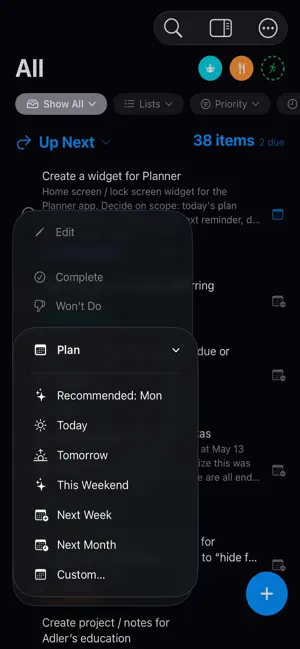

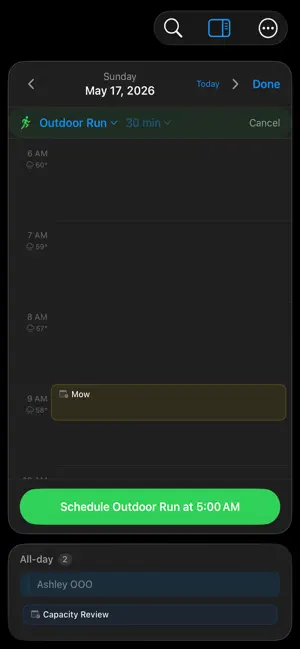
About Planner: Plan Your Day
The no subscription task manager. Planner is a smarter way to work through your tasks—without the pressure of overdue reminders. Built on top of your existing reminders and lists, Planner helps you decide when to actually work on things. No migrations, no duplicate systems, and no subscriptions required. Just a better way to plan your time using what you already have. Instead of letting tasks pile up with overdue badges, Planner keeps everything visible and actionable. You choose what to focus on and when—whether that’s between meetings, after work, or around your kids’ soccer game. And if plans change, your tasks don’t turn into guilt-inducing red text. They simply stay available until you’re ready to reschedule or move on. Planner is designed for real life: • Use your existing reminders and lists • Plan tasks around your actual schedule • Avoid overdue clutter and unnecessary pressure • Stay flexible when plans change • Focus on what matters, when it makes sense • Nudge your health goals forward with gentle reminders Stop managing deadlines. Start planning your time.
What’s new
Version 1.10.1 · Updated May 19, 2026
Share to Planner: A new Share Extension lets you compose a reminder from any app's share sheet — pick a list, optionally set a planned date, and shared URLs land in the reminder so they're shown inline with the source. There's also a one-tap "Add to Planner Inbox" action in the share sheet's actions row that saves to your focus mode's inbox — perfect for quick capture. Tailored Notifications: A new Notifications section in Settings lets you customize what counts: previously planned, ongoing recurring, overdue items, or health reminders. Redesigned List Editor: Lists are now grouped by account with icons for iCloud, Exchange, and other sources. Tap a list to edit its name, color, and type — with helper text explaining Standard, Inbox, and Health lists. Fixes: - Performance updates for updating the planning view and list editor - Right-click suggested reminders for the full action menu - Picking a single list auto-broadens the planning filter to "Show All"; clearing it returns to "Today's Plans" - Previously Planned items sort to the bottom of each tier (today first, then most-recent past) - Planner panel remembers its state when you visit Settings or the List Editor - Performance improvements with list view
App privacy
The developer, James Prochnow, reported these privacy practices to Apple.
Data Not Collected
The developer does not collect any data from this app.
Alternatives to Planner: Plan Your Day
Looking for apps like Planner: Plan Your Day? Here are 6 similar apps on the App Store. The highest rated is Simply Things: To-Do List (5.0/5), and 5 of the 6 are free to download.
-
 Simply Things: To-Do List
5.0
Simply Things: To-Do List
5.0
-
 Quadrix
5.0
Quadrix
5.0
-
 Day Focus
5.0
Day Focus
5.0
-
 PDF Tools - SystemPort
-
 Appoint - Smart Calendar
4.5
Appoint - Smart Calendar
4.5
-
 SSHButton
5.0
SSHButton
5.0
| App | Rating | Price | Last updated | Compare |
|---|---|---|---|---|
| Planner: Plan Your Day | 5.0 / 5 (2 ratings) | 4.99 USD | May 19, 2026 | |
| Simply Things: To-Do List | 5.0 / 5 (3) | Free | Sep 24, 2026 | Compare |
| Quadrix | 5.0 / 5 (2) | Free | Aug 30, 2026 | Compare |
| Day Focus | 5.0 / 5 (1) | Free | Aug 30, 2026 | Compare |
| PDF Tools - SystemPort | – | 12.99 USD | Apr 20, 2026 | Compare |
| Appoint - Smart Calendar | 4.5 / 5 (4) | Free | Oct 20, 2026 | Compare |
| SSHButton | 5.0 / 5 (1) | Free | Aug 10, 2026 | Compare |