

Clarity: Expense Tracker
DANIEL BENITO DIAZ Finance iPhoneiPadiPod touch
Clarity: Expense Tracker is a free Finance app for iPhone and iPad by DANIEL BENITO DIAZ. Requires iOS 17.0. Updated October 4, 2026.
- Price
- Free
- on the App Store
- Size
- 29 MB
- Age 4+
- Updated
- Oct 4
- 2026 · v2.4.3
Screenshots

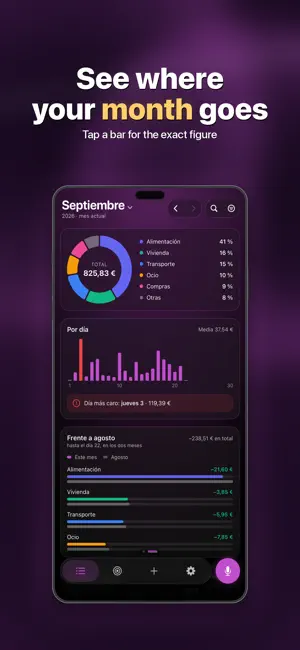


About Clarity: Expense Tracker
Say "20 euros on gas" and that's it: logged, categorised and counted against your budget. Clarity is the expense app you use by talking, so that logging stops being the chore that makes you quit after two weeks. LOG EXPENSES IN SECONDS • By voice: say "20 euros on gas" and you're done • From Siri without opening the app • By hand with a fast keypad • Categorised automatically, learning from what you log A CLEAR MONTHLY BUDGET • Set your salary and your budget builds itself • See what you've spent and what's left • Alerts as you approach the limit • Past months with comparisons AUTOMATIC RECURRING EXPENSES • Subscriptions (Netflix, Spotify, gym) • Rent, mortgage, bills • Logged on the right date, every month • You'll never forget a fixed payment SAVINGS GOALS • Create goals: a trip, a car, an emergency fund • Put money in whenever you like • Watch your progress CHARTS THAT MAKE SENSE • Monthly and weekly trends • Spending by category, donut and bars • Tap a category for the full breakdown • See exactly where the money goes GIFT MODE: WHO OWES YOU • Flag an expense you fronted • Add people by name, or just say how many • Split evenly with one tap • See what you're owed and tick it off when they pay THE HABIT, SOLVED • A weekly summary, on the day and at the time you choose • A streak for days logged in a row • A nudge if you go a week without logging HOME SCREEN WIDGET • This month at a glance, without opening the app • What's left, instantly • Quick access to add an expense EXPORT • Export to CSV for Excel or your accountant • Your data stays yours REAL PRIVACY • Encrypted sync with your account • No tracking, no ads, no selling your data • Your finances are never shared with third parties Download Clarity and start understanding your money today.
What’s new
Version 2.4.3 · Updated October 4, 2026
What's new in this version: • Piggy banks: the "Sacar" (withdraw) and "Alimentar" (add) buttons now display properly when the piggy bank has money. The text used to get cut off. Since 2.4.2, money you set aside in a piggy bank doesn't count as spending or toward your limits, and you can withdraw it whenever you want. If something isn't working, write to us from Settings → "Algo no funciona".
App privacy
The developer, DANIEL BENITO DIAZ, reported these privacy practices to Apple.
Data Linked to You
The following data, which may be collected and linked to your identity, may be used for the following purposes:
- Location: Coarse Location
- Identifiers: Device ID, User ID
- Usage Data: Product Interaction
- Financial Info: Other Financial Info
- Contact Info: Email Address, Name
- User Content: Other User Content
Used for: Analytics, App Functionality
Data Not Linked to You
The following data, which may be collected but is not linked to your identity, may be used for the following purposes:
- Identifiers: User ID
Used for: Analytics
Alternatives to Clarity: Expense Tracker
Looking for apps like Clarity: Expense Tracker? Here are 6 similar apps on the App Store. The highest rated is Flujo: Track Your Expenses (5.0/5), and all 6 are free to download.
-
 COOPER — Budget & Savings
-
 Flujo: Track Your Expenses
5.0
-
 Cuentio: AI Expense Tracker
-
 Budget Habit - Expense Tracker
-
 AhorrAR: Finanzas Personales
-
 Budget App & Money Manager
| App | Rating | Price | Last updated | Compare |
|---|---|---|---|---|
| Clarity: Expense Tracker | – | Free | October 4, 2026 | |
| COOPER — Budget & Savings | – | Free | Aug 18, 2026 | Compare |
| Flujo: Track Your Expenses | 5.0 / 5 (1) | Free | Jul 8, 2026 | Compare |
| Cuentio: AI Expense Tracker | – | Free | Oct 18, 2026 | Compare |
| Budget Habit - Expense Tracker | – | Free | Oct 9, 2026 | Compare |
| AhorrAR: Finanzas Personales | – | Free | Oct 15, 2026 | Compare |
| Budget App & Money Manager | – | Free | Oct 19, 2026 | Compare |