

My Passport Photo AI
Icons8 LLC Photo & Video iPhoneiPadiPod touch
My Passport Photo AI is a free Photo & Video app for iPhone and iPad by Icons8 LLC. Rated 5.0/5 from 1 ratings. Requires iOS 18.0. Updated October 7, 2026.
- Rating
- 5.0
- 1 ratings
- Price
- Free
- on the App Store
- Size
- 36 MB
- Age 4+
- Updated
- Oct 7
- 2026 · v1.4
Screenshots


About My Passport Photo AI
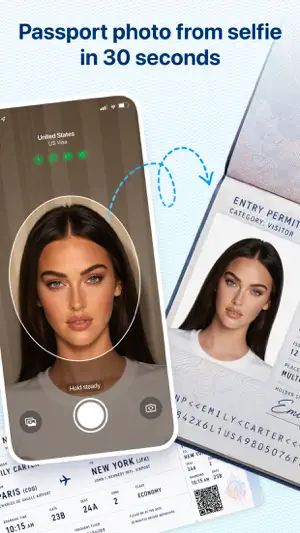
Photo booths charge $16.99 or more. Online government portals reject your upload after you've already paid. You drive to a drugstore, wait in line, and still end up with a photo that doesn't meet requirements. My Passport Photo AI fixes this. Point your camera, and AI validates your photo in real time - before you press the shutter. No guessing, no retakes. HOW IT WORKS 1. Choose your country and document type (passport, visa, or national ID). 2. Point the camera at your face. AI checks head position, size, expression, eye line, background, and lighting - all live on screen. 3. When every check turns green, take the shot. 4. Export a print-ready PDF with 4-up layout, or save the digital file for online submissions. WHAT AI CHECKS IN REAL TIME - Face centered in the frame - Head-to-photo ratio matching your country's official spec - Neutral expression (blocks capture if you're smiling for a US passport) - Eye line position - Glasses and head covering detection - Background uniformity - Lighting and shadow balance 30+ COUNTRIES SUPPORTED United States, United Kingdom, Canada, Australia, Germany, France, Italy, Spain, Netherlands, India, China, Japan, South Korea, Brazil, Mexico, Turkey, Poland, Czech Republic, Russia, Ukraine, and more. Each country's requirements come from official government sources and are updated with every app release. BACKGROUND REMOVAL The app automatically removes your background and replaces it with the solid color required by your country - white, light gray, or blue. No white wall needed. No green screen. PRINT AT HOME OR SUBMIT ONLINE Export a 4-up PDF sized for standard photo paper (4x6 in / 10x15 cm). Print at home on any AirPrint-compatible printer, or take the file to a local print shop. Digital exports work for online government portals, visa applications, and job submissions. BUILT FOR PRIVACY Everything runs on your device. No photos are uploaded to any server. No account required. --- This app is not affiliated with any government agency. Requirements are based on official published specifications and may change. Always verify with the relevant authority before submitting documents.
What’s new
Version 1.4 · Updated October 7, 2026
Bug fixes and performance improvements.
App privacy
The developer, Icons8 LLC, reported these privacy practices to Apple.
Data Used to Track You
The following data may be used to track you across apps and websites owned by other companies:
- Usage Data: Advertising Data
Data Not Linked to You
The following data, which may be collected but is not linked to your identity, may be used for the following purposes:
- Usage Data: Advertising Data, Product Interaction
Used for: Third-Party Advertising, Developer’s Advertising or Marketing, Analytics
Alternatives to My Passport Photo AI
Looking for apps like My Passport Photo AI? Here are 6 similar apps on the App Store. The highest rated is Superpose: AI Pose Camera (4.8/5), and all 6 are free to download.
-
 Image Upscaler - AI Upscale
4.4
Image Upscaler - AI Upscale
4.4
-
 Superpose: AI Pose Camera
4.8
Superpose: AI Pose Camera
4.8
-
 PromoCut: AI Video Editor
4.8
PromoCut: AI Video Editor
4.8
-
 ID Photo: Passport Photo Maker
4.7
ID Photo: Passport Photo Maker
4.7
-
 Biometric Passport Photo
4.6
Biometric Passport Photo
4.6
-
 Smartphone iD - Passport photo
4.7
Smartphone iD - Passport photo
4.7
| App | Rating | Price | Last updated | Compare |
|---|---|---|---|---|
| My Passport Photo AI | 5.0 / 5 (1 rating) | Free | October 7, 2026 | |
| Image Upscaler - AI Upscale | 4.4 / 5 (90) | Free | Oct 30, 2026 | Compare |
| Superpose: AI Pose Camera | 4.8 / 5 (310) | Free | Oct 29, 2026 | Compare |
| PromoCut: AI Video Editor | 4.8 / 5 (387) | Free | Oct 24, 2026 | Compare |
| ID Photo: Passport Photo Maker | 4.7 / 5 (828) | Free | Oct 29, 2026 | Compare |
| Biometric Passport Photo | 4.6 / 5 (4,247) | Free | Aug 30, 2026 | Compare |
| Smartphone iD - Passport photo | 4.7 / 5 (1,533) | Free | Oct 15, 2026 | Compare |