

Keyboard Translator – KeyPad
Roval Apps Inc. Utilities iPhoneiPadiPod touch
Keyboard Translator – KeyPad is a free Utilities app for iPhone and iPad by Roval Apps Inc. Rated 4.3/5 from 9 ratings. Requires iOS 18.0.
- Rating
- 4.3
- 9 ratings
- Price
- Free
- on the App Store
- Size
- 16 MB
- Age 4+
- Updated
- Oct 7
- 2026 · v1.10
Screenshots

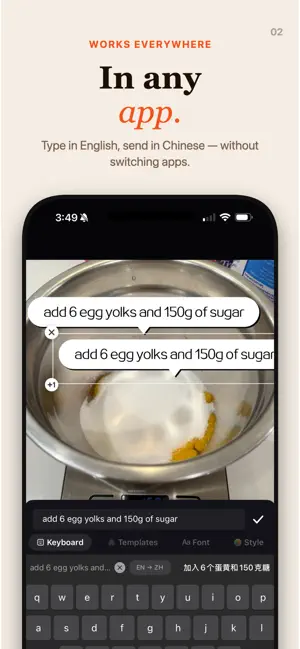


About Keyboard Translator – KeyPad
KeyPad is a custom iOS keyboard that translates your text as you type - in Messages, Mail, Safari, WhatsApp, Notes, or anywhere else you can type. No copy-paste. No switching apps. No internet connection required. Powered by Apple’s on-device Translation framework, KeyPad runs every translation locally on your iPhone. Your words never touch a server. HOW IT WORKS Type naturally in your language See the live translation above the keys as you type Tap the orange Translate key to replace your text with the translation Send your message - that’s it AI REPLY — NEW Copy any message, then tap the sparkles key KeyPad drafts a reply on-device in the tone you choose - Smart, Flirty, or Recommended Add a little context and it tailors the reply to the conversation Tap Insert to drop it straight into the chat Runs entirely on-device. Requires iOS 26 and Apple Intelligence. TRANSLATE FROM PHOTOS — NEW Share a photo of a sign, menu, or screenshot to KeyPad On-device text recognition reads the words, then translates them. Built for travel - still 100% offline WHY KEYPAD FULLY OFFLINE. Works on airplanes, on the subway, abroad without data. PRIVATE BY DESIGN. Zero network calls from the keyboard. Nothing is logged, nothing is sent. WORKS IN EVERY APP. Not a sandboxed translator you copy-paste out of. The keyboard goes where you go. NATIVE FEEL. Pixel-matched to the iOS system keyboard. Same key sizes, same haptics, same muscle memory. LIVE PREVIEW. See the translation appear as you type, with a 300ms live update. MORE LANGUAGES. Native layouts for QWERTY, QWERTZ, and AZERTY, plus Korean (Hangul) and Japanese (Romaji to Hiragana). Long-press any key for accented characters. SMART AUTOCORRECT. A system-style suggestion bar with inline typo correction when you type in English. INSTANT LANGUAGE SWAP. Tap the language pair above the keys to change source or target without leaving your app. LOCAL HISTORY. Your last 100 translations stay on your device. PERFECT FOR Texting friends or family in a different language Replying to emails from international clients Chatting on WhatsApp with someone abroad Travel, without worrying about roaming data Translating signs, menus, and screenshots on the go Language learners who want to write, not just read PRIVACY YOU CAN VERIFY Full Access is required only to enable Apple’s on-device Translation framework. KeyPad never logs your keystrokes, never sends them anywhere, and makes zero network calls from the keyboard itself. Translations happen entirely on your device using Apple’s private Translation daemon. Your language preferences and translation history are stored locally - never synced, never uploaded. REQUIREMENTS iOS 18 or later (AI Reply requires iOS 26 and Apple Intelligence) iPhone with A12 Bionic chip or newer Language packs downloaded on first use (one-time, offline afterward) GETTING STARTED 1. Install KeyPad and complete the quick setup 2. Choose your languages and download the pack 3. Enable the keyboard in Settings, General, Keyboards 4. Grant Full Access (required for Apple’s Translation bridge) 5. Switch to KeyPad with the globe key in any app and start typing KeyPad is free to use, with daily limits on translations and AI replies. KeyPad Pro unlocks unlimited translations, unlimited AI replies, photo translation, and additional language packs. KeyPad Pro is an auto-renewable subscription: Monthly: $2.99/month (auto-renews until cancelled in your Apple ID Settings) Lifetime: $14.99 (one-time, non-renewing) Payment is charged to your Apple ID at confirmation. Subscriptions renew automatically unless cancelled at least 24 hours before the end of the current period. Manage or cancel in Settings, Apple Account, Subscriptions. Privacy Policy: https://keypad.rovalapps.com/privacy Terms of Use (EULA): https://www.apple.com/legal/internet-services/itunes/dev/stdeula/ Made by Roval Apps. Questions or feedback? Email [email protected]
Ratings & reviews
4.3
9 ratings
What’s new
Version 1.10 · Updated October 7, 2026
• Paste works with KeyPad: text you paste while the keyboard is open now previews and translates like typed text. • Text already in a message field is picked up when you open KeyPad, so you can translate it right away. • Fixed the keyboard occasionally clearing what you had typed mid-sentence. • More reliable translation startup right after opening the keyboard.
App privacy
The developer, Roval Apps Inc., reported these privacy practices to Apple.
Data Not Linked to You
The following data, which may be collected but is not linked to your identity, may be used for the following purposes:
- Contact Info: Email Address
Used for: App Functionality
Alternatives to Keyboard Translator – KeyPad
Looking for apps like Keyboard Translator – KeyPad? Here are 6 similar apps on the App Store. The highest rated is TypeTranslate: AI Translator (5.0/5), and all 6 are free to download.
-
 Full Screen Camera Viewer
-
 TypeTranslate: AI Translator
5.0
-
 AI Translator Keyboard - iKey
4.7
-
 Subscription Manager - Censo
3.7
-
 Timezone Converter - Celeste
5.0
-
 Voice Reminders Alarm Clock
4.6
| App | Rating | Price | Last updated | Compare |
|---|---|---|---|---|
| Keyboard Translator – KeyPad | 4.3 / 5 (9 ratings) | Free | October 7, 2026 | |
| Full Screen Camera Viewer | – | Free | Apr 24, 2026 | Compare |
| TypeTranslate: AI Translator | 5.0 / 5 (2) | Free | Sep 29, 2026 | Compare |
| AI Translator Keyboard - iKey | 4.7 / 5 (3) | Free | Aug 29, 2026 | Compare |
| Subscription Manager - Censo | 3.7 / 5 (6) | Free | Jun 10, 2026 | Compare |
| Timezone Converter - Celeste | 5.0 / 5 (10) | Free | Apr 23, 2026 | Compare |
| Voice Reminders Alarm Clock | 4.6 / 5 (10) | Free | Aug 20, 2026 | Compare |