

Docsly: Smart Document Vault
Denys Kotenko Productivity iPhoneiPadiPod touch
Docsly: Smart Document Vault is a free Productivity app for iPhone and iPad by Denys Kotenko. Requires iOS 16.0. Updated October 25, 2026.
- Price
- Free
- on the App Store
- Size
- 20 MB
- Age 4+
- Updated
- Oct 25
- 2026 · v1.3.0
Screenshots



About Docsly: Smart Document Vault
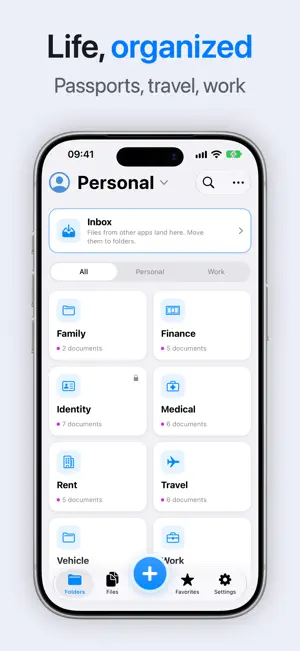
Docsly keeps the documents you actually need — passports, contracts, insurance, warranties, receipts — in one app on your phone, sorted the way you think about them. ORGANIZE • Profiles for yourself, family and work — each with its own documents, folders and tags • Folders inside folders, as deep as you need • Folders by category: identity, finance, medical, home, work • Tag documents by family member, so everyone's papers stay findable • Search by name, filter by tag, star the ones you reach for • Photos, PDFs and video live side by side in the same folder ADD FROM ANYWHERE • Scan with the camera • Import from Photos and Files • "Save to Docsly" from any app's share sheet • Several photos become one document — an album, not a mess • Turn photos into a single PDF SHARE • Send one document, or a whole folder with its structure, in a couple of taps • Or as a .docsly file that another Docsly opens with a tap — with a password if you set one • AirDrop, Messages, Mail — anything on the share sheet PROTECT • PIN, Face ID and Touch ID • Document contents, names and previews are encrypted on your device with AES-256 • A second PIN opens a separate, hidden vault • Encrypted backups under a passphrase you choose, kept in your own cloud account or exported to a file — everything, or only what you pick NO ACCOUNT, NO SERVER Docsly has no backend. Nothing is uploaded, there is nothing to sign up for, and the app works with no connection at all. Backups go to your cloud account, not ours — we do not have one. Terms of Service: https://www.apple.com/legal/internet-services/itunes/dev/stdeula/ Privacy Policy: https://denyskt.github.io/docsly/privacy.html How the encryption works: https://denyskt.github.io/docsly/security.html
What’s new
Version 1.3.0 · Updated October 25, 2026
Share documents as a .docsly file • Open the “…” menu of a folder or a document — or select several items and share them together • With a password, only someone who knows it can open the file. Without one, anyone who has Docsly can Receive .docsly files • Open a .docsly file from a messenger or from your files in Docsly — it asks for a password only if the file has one • Imported documents are added to yours; what you already have stays as it is Restore all or just a part • Restore the whole backup, or pick profiles, folders and documents from it Inbox: filed in one tap • Select documents, tap the move button, then tap a folder — they move right away, no extra step • Moved the wrong one? For a few seconds after a move there is an Undo — the document comes back to the Inbox And also • “Select all” now takes folders and documents together • A locked folder always asks for its PIN • Bug fixes and stability improvements
App privacy
The developer, Denys Kotenko, reported these privacy practices to Apple.
Data Not Linked to You
The following data, which may be collected but is not linked to your identity, may be used for the following purposes:
- Identifiers: Device ID
- Usage Data: Product Interaction
- Diagnostics: Crash Data, Other Diagnostic Data
Used for: Analytics, App Functionality
Alternatives to Docsly: Smart Document Vault
Looking for apps like Docsly: Smart Document Vault? Here are 6 similar apps on the App Store. The highest rated is Paperbox – Document Manager (5.0/5), and all 6 are free to download.
-
 Document Vault - Scanner PDF
-
 Found: Home Memory
-
 MyDocs Wallet: Scan & Remind
-
 Paperbox – Document Manager
5.0
-
 MyDoc Files
-
 Twelve: Quarterly Goal Planner
| App | Rating | Price | Last updated | Compare |
|---|---|---|---|---|
| Docsly: Smart Document Vault | – | Free | October 25, 2026 | |
| Document Vault - Scanner PDF | – | Free | Oct 2, 2026 | Compare |
| Found: Home Memory | – | Free | Sep 13, 2026 | Compare |
| MyDocs Wallet: Scan & Remind | – | Free | Aug 25, 2026 | Compare |
| Paperbox – Document Manager | 5.0 / 5 (2) | Free | Jul 14, 2026 | Compare |
| MyDoc Files | – | Free | Jul 15, 2026 | Compare |
| Twelve: Quarterly Goal Planner | – | Free | Feb 20, 2026 | Compare |