

Cove Browser - Video Saver
JIANMING GUO Utilities iPhoneiPadiPod touch
Cove Browser - Video Saver is a free Utilities app for iPhone and iPad by JIANMING GUO. Requires iOS 18.2. Updated October 21, 2026.
- Price
- Free
- on the App Store
- Size
- 37 MB
- Age 17+
- Updated
- Oct 21
- 2026 · v1.27.103
Screenshots



About Cove Browser - Video Saver
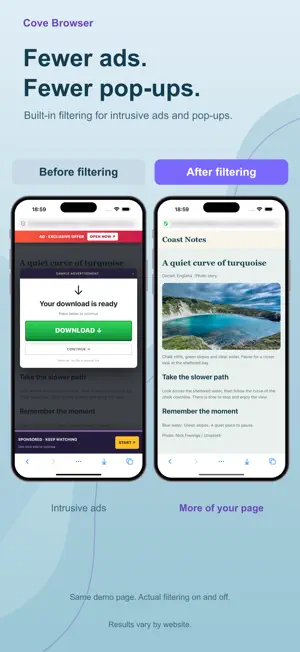
Save supported web videos, keep their titles, and browse with fewer ads and pop-ups. Open a supported webpage in Cove Browser and play the video. Touch and hold it to save, or choose it from the detected-media panel. VIDEO SAVING - Save supported web videos for offline playback - Save supported MP4 videos and HLS streams (M3U8) - Automatically convert supported saves when needed for playback on iPhone - Keep saved videos organized in the built-in file manager BROWSE WITH FEWER INTERRUPTIONS - Reduce ads, pop-ups and unwanted redirects while browsing in Cove - A separate content blocker is available for Safari; enable it in system settings AUTOMATIC VIDEO TITLES Cove Browser uses detected video and page titles to name supported saves automatically, so files are easier to recognize in your library. Title availability and accuracy depend on the source page. You can rename a saved file when needed. CHECK THE SOURCE Saving is not offered on major video and social platforms, including YouTube, Netflix, TikTok, Instagram, Facebook, X and Vimeo, or for protected content. A playable video is not always downloadable. Availability depends on the website, media format and access requirements. Only save content you own or have permission to save. OFFLINE FILES AND PLAYBACK - Open saved videos from your file library with the standard player, included without Pro - Search saved files by name and browse videos, images and documents in one place - Import files shared from other apps - Keep files you choose to save, even after closing private tabs SAVE WEB IMAGES Save a single image for free. With Pro, select several detected images from a supported webpage and save them together to Cove’s file library. Image availability depends on the page and source restrictions. PRIVATE BROWSING - Private tabs stay out of browsing history and iCloud tab sync - Close all private tabs to clear their website data - Lock Cove with Face ID or a passcode FREE EXPERIENCE Video saving starts with 3 available saves. After use, 1 save returns every 24 hours, up to a maximum of 3 available saves. Failed saves do not use a save. Saved files remain available when your allowance runs out. The free plan downloads one video at a time. Additional accepted tasks are queued and start automatically when the active task finishes. Ad filtering, private tabs, standard video playback and automatic compatibility conversion for supported saves are included. COVE PRO Pro removes the free video-save limit and adds simultaneous video downloads, batch image saving, HEVC output and gesture playback controls. Enable Gesture Player in Settings > Playback Settings to use brightness, volume and seeking gestures for saved videos. Turn it off to use the standard player. These controls do not replace website video players. Pro does not remove website restrictions or enable saving protected content. Subscriptions renew automatically unless canceled at least 24 hours before the end of the current period. Manage or cancel subscriptions in your App Store account settings. Privacy Policy: https://i9394.github.io/Viohold/legal/privacy-en.html Terms of Use (EULA): https://www.apple.com/legal/internet-services/itunes/dev/stdeula/ Terms of Service: https://i9394.github.io/Viohold/legal/terms-en.html
What’s new
Version 1.27.103 · Updated October 21, 2026
- Improved gesture controls, progress scrubbing and guidance in Gesture Player (Pro). - Improved transitions between Gesture Player and your file library. - Fixed an issue that could open the wrong video in Gesture Player after saving while a file search was active.
App privacy
The developer, JIANMING GUO, reported these privacy practices to Apple.
Data Linked to You
The following data, which may be collected and linked to your identity, may be used for the following purposes:
- User Content: Customer Support
- Diagnostics: Other Diagnostic Data
Used for: App Functionality
Data Not Linked to You
The following data, which may be collected but is not linked to your identity, may be used for the following purposes:
- Diagnostics: Crash Data
Used for: App Functionality
Alternatives to Cove Browser - Video Saver
Looking for apps like Cove Browser - Video Saver? Here are 6 similar apps on the App Store. The highest rated is 畅游浏览器极速版 (5.0/5), and all 6 are free to download.


| App | Rating | Price | Last updated | Compare |
|---|---|---|---|---|
| Cove Browser - Video Saver | – | Free | October 21, 2026 | |
| Vigatamala Browser | – | Free | Oct 19, 2026 | Compare |
| WikBrowser | – | Free | Sep 5, 2026 | Compare |
| Umbric: Private Web Browser | – | Free | Oct 5, 2026 | Compare |
| 畅游浏览器极速版 | 5.0 / 5 (1) | Free | Apr 21, 2026 | Compare |
| Vadax PRO | – | Free | Sep 8, 2026 | Compare |
| Show Browser. | – | Free | Oct 22, 2026 | Compare |