

Passport Photo: ID Photo Booth
Mohamed Shili Photo & Video iPhoneiPadiPod touch
Passport Photo: ID Photo Booth is a free Photo & Video app for iPhone and iPad by Mohamed Shili. Requires iOS 15.5. Updated October 13, 2026.
- Price
- Free
- on the App Store
- Size
- 176 MB
- Age 4+
- Updated
- Oct 13
- 2026 · v1.2.0
Screenshots

About Passport Photo: ID Photo Booth
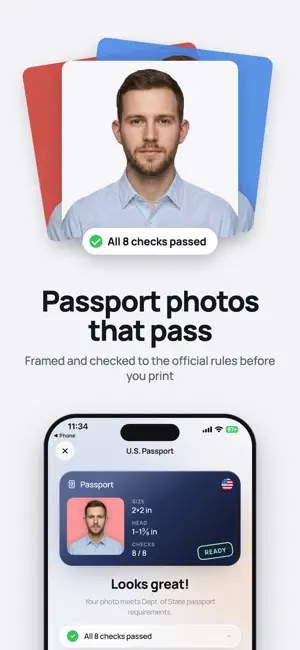
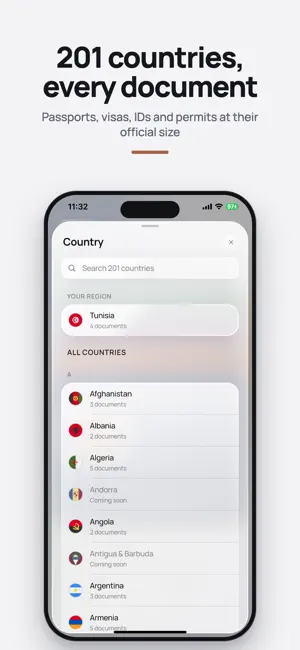
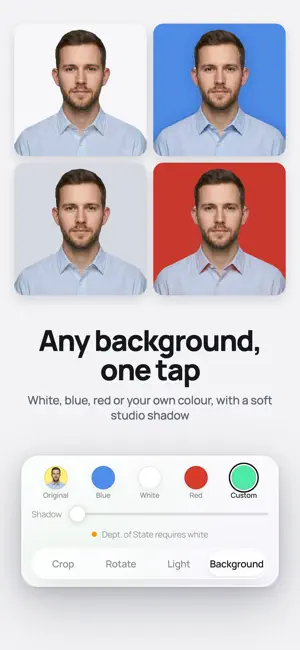
Passport Photo turns your phone into a passport photo studio. Take a photo or pick one from your gallery, choose your country and document, and the app does the rest: it removes the background, sizes your head to the official rules, checks every requirement and gives you a photo that is ready to submit or print. Made for the US 2×2 inch passport photo, and for passports, visas, ID cards and permits in 201 countries, each with its own official size and rules. IMPORTANT Passport Photo is an independent app. It is not affiliated with, endorsed by or acting on behalf of any government agency. Photo sizes and rules come from the official government sources listed below. Always check the official requirements before you apply. HOW IT WORKS 1. Pick your country and document 2. Take a photo, or choose one from your gallery 3. The background is removed and replaced with the right color for your document 4. Drag and pinch to line up your face, the guides show you where 5. The photo check tells you if anything needs fixing 6. Save the digital photo or print a 4×6 sheet at home or at any photo kiosk PHOTO CHECK Every photo is checked before you use it, so it doesn't get sent back: - Eyes open and visible - Face centered and straight - Head size inside the official range - Neutral expression - No glasses where they aren't allowed - Even lighting, no shadows - Sharp, not blurry If something is off, the app tells you exactly what to fix. US DOCUMENTS - US passport and passport renewal (2×2 inch) - US visa and DS-160 - Green Card, USCIS forms, naturalization and work permit (EAD) - DV Lottery (Green Card lottery) - Driver's license (DMV) AROUND THE WORLD UK, Canada, India (passport, OCI, visa), Schengen countries, 201 countries in all, each with the photo size set by its government. OFFICIAL SOURCES - US passport photos: https://travel.state.gov/content/travel/en/passports/how-apply/photos.html - US visa, DS-160 and DV Lottery photos: https://travel.state.gov/content/travel/en/us-visas/visa-information-resources/photos.html - Green Card, naturalization and work permit forms: https://www.uscis.gov/forms - Driver's license photos (by state): https://www.usa.gov/state-motor-vehicle-services - UK passport photos: https://www.gov.uk/photos-for-passports - Canada passport photos: https://www.canada.ca/en/immigration-refugees-citizenship/services/canadian-passports/photos.html - India passport: https://www.passportindia.gov.in - Schengen visas: https://home-affairs.ec.europa.eu/policies/schengen-borders-and-visa/visa-policy_en For every other country, the app follows the official requirements published by that country's government. PRINT OR UPLOAD Export the digital photo at the exact pixel size for online applications, or a 4×6 print sheet with several photos for a fraction of the price of a store photo. WHY PASSPORT PHOTO - No appointment, no queue, no trip to the store - Works offline, your photos stay on your phone - Available in English, Spanish, French, Arabic, Hindi, Italian and Chinese - Pro removes ads and unlocks HD exports and print layouts SUBSCRIPTION Pro is an optional auto-renewing yearly subscription. Payment is charged to your Apple ID at confirmation of purchase. It renews automatically unless cancelled at least 24 hours before the end of the current period, and your account is charged for renewal within 24 hours before the period ends. Manage or cancel it any time in Settings > Apple ID > Subscriptions. Terms of Use: https://uspassportphoto.app/terms Privacy Policy: https://uspassportphoto.app/privacy
What’s new
Version 1.2.0 · Updated October 13, 2026
A brand new Passport Photo: - Passport, visa and ID photos for 201 countries, not just the US - All new design, with light and dark mode - Sharper background removal, with white, light and colored backgrounds - Clearer photo check that tells you exactly what to fix - Easier editing: move, zoom and rotate your photo freely - Print sheets right from the Home screen
App privacy
The developer, Mohamed Shili, reported these privacy practices to Apple.
Data Used to Track You
The following data may be used to track you across apps and websites owned by other companies:
- Identifiers: Device ID
Data Linked to You
The following data, which may be collected and linked to your identity, may be used for the following purposes:
- Identifiers: Device ID
- Contact Info: Email Address, Name
- User Content: Photos or Videos
Used for: Third-Party Advertising, App Functionality
Data Not Linked to You
The following data, which may be collected but is not linked to your identity, may be used for the following purposes:
- Usage Data: Advertising Data, Product Interaction
- Identifiers: Device ID, User ID
- Diagnostics: Crash Data, Performance Data
Used for: Third-Party Advertising, Analytics, App Functionality
Alternatives to Passport Photo: ID Photo Booth
Looking for apps like Passport Photo: ID Photo Booth? Here are 6 similar apps on the App Store. The highest rated is Passport Photo Maker & Booth (4.9/5), and all 6 are free to download.
-
 PassportPic: ID Photo Maker
4.3
PassportPic: ID Photo Maker
4.3
-
 Green Card Visa Passport Photo
-
 Quick Passport Photo
4.8
Quick Passport Photo
4.8
-
 Passport Photo Maker & Booth
4.9
Passport Photo Maker & Booth
4.9
-
 Passport Photo Maker 2x2, Visa
4.7
Passport Photo Maker 2x2, Visa
4.7
-
 2x2pix
3.9
2x2pix
3.9
| App | Rating | Price | Last updated | Compare |
|---|---|---|---|---|
| Passport Photo: ID Photo Booth | – | Free | October 13, 2026 | |
| PassportPic: ID Photo Maker | 4.3 / 5 (6) | Free | Aug 30, 2026 | Compare |
| Green Card Visa Passport Photo | – | Free | Nov 25, 2025 | Compare |
| Quick Passport Photo | 4.8 / 5 (67) | Free | Jul 6, 2026 | Compare |
| Passport Photo Maker & Booth | 4.9 / 5 (86) | Free | Apr 9, 2026 | Compare |
| Passport Photo Maker 2x2, Visa | 4.7 / 5 (20) | Free | Sep 18, 2026 | Compare |
| 2x2pix | 3.9 / 5 (74) | Free | Oct 25, 2024 | Compare |