

Dev Notes++
Sylvain Lafrance Developer Tools iPhoneiPadiPod touch
Dev Notes++ is a free Developer Tools app for iPhone and iPad by Sylvain Lafrance. Requires iOS 26.0. Updated June 18, 2026.
- Price
- Free
- on the App Store
- Size
- 3 MB
- Age 4+
- Updated
- Jun 18
- 2026 · v1.7
Screenshots
About Dev Notes++
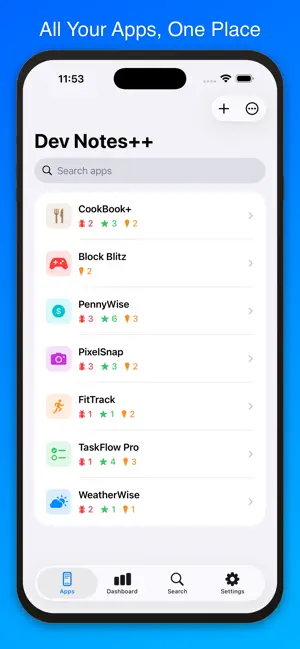
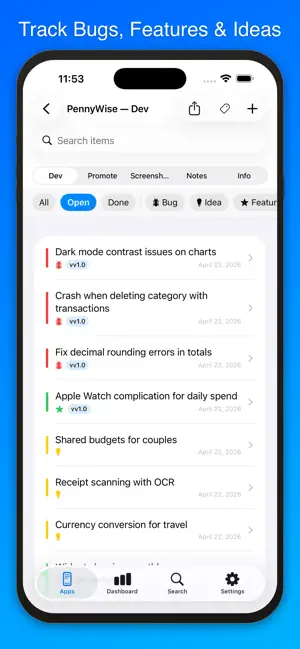
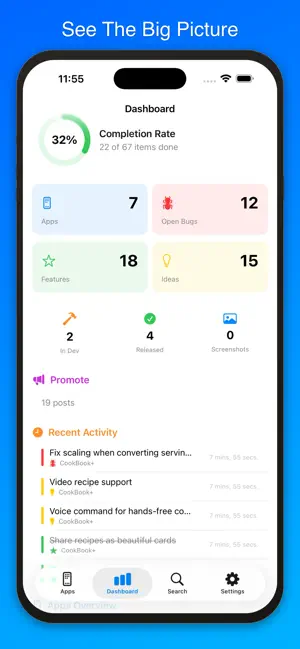
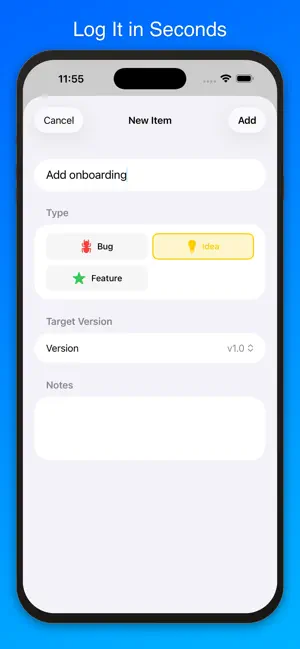
Dev Notes++ is your all-in-one companion for tracking app development. Log bugs, features, and ideas. Plan promotions. Manage App Store screenshots. Take rich text notes. See your progress on a Dashboard — all synced across your devices with iCloud. Track Everything Create apps and organize bugs, features, and ideas by version. Mark items as open, in progress, or done. Filter by status, type, and version — filters sync across devices. Quick-add by type with a long press on +. Share from Anywhere Use the system share sheet to send text, links, or images directly into Dev Notes++. Save as a Bug, Feature, Idea, Post, or Notes. URLs show a rich preview card. Share multiple images at once. Your last-used app is remembered. App Store Info Paste a Bundle ID or App Store URL to auto-import your app's icon, description, rating, in-app purchases, genres, and more from any App Store region. Dashboard See your completion rate, bug trends, 7-day activity, and stats at a glance. Filter by date range. Show or hide apps from your stats. Tap any stat card to drill down. Promote Draft social media posts with character counts for X, Threads, Bluesky, and more. Track post status from draft to published. Duplicate posts for quick variations. Screenshots Organize App Store screenshots across 65 locales. Drag to reorder. Tap to edit or view full screen. Rich Notes Write formatted notes with bold, italic, lists, and inline images. Backup & Restore Create full backups. Restore selectively — pick exactly which apps and items to import. Export Export to JSON & Markdown, PDF report, or CSV spreadsheet. Sync iCloud sync across all your devices. Settings, filters, and data stay in sync automatically. Free to Start Track up to 2 apps for free. Upgrade to Pro for unlimited apps, screenshots, export, global search, and more. Privacy Policy: https://myrcbox.com/privacy-policy-and-terms-dev-notes/ User Agreement: https://myrcbox.com/privacy-policy-and-terms-dev-notes/
What’s new
Version 1.7 · Updated June 18, 2026
Priorities, due dates, and reminders. • Set Low / Medium / High / Critical priority on any item — colored flags appear everywhere • Add a due date that turns red when overdue, with a calendar badge on the row • Get a local reminder at a time you pick — auto-cancels when you mark the item done • Pick a default priority in Settings, synced to iCloud and the Share Extension • Choose a priority right from the Share Extension before saving • Duplicating an item now keeps its priority and due date Dashboard gets smarter. • New Critical, High Priority, Overdue, and Due in 7 Days tiles surface what needs attention • Tap any tile — bugs, features, ideas, priorities, deadlines — to drill into a filtered list • Tap the 7-Day Activity chart for a bigger view with totals and a per-day breakdown Sort the Dev list. • New Sort menu: Newest, Oldest, Priority, Due Date, or Title • Your choice is remembered per app and synced via iCloud Thanks for the feedback — keep it coming.
App privacy
The developer, Sylvain Lafrance, reported these privacy practices to Apple.
Data Not Collected
The developer does not collect any data from this app.
Alternatives to Dev Notes++
Looking for apps like Dev Notes++? Here are 6 similar apps on the App Store. The highest rated is AppPreviewCut: Edit & Convert (5.0/5), and 5 of the 6 are free to download.
-
 OSCope - on-site OSC debugger
-
 AppPreviewCut: Edit & Convert
5.0
AppPreviewCut: Edit & Convert
5.0
-
 Community Week #WWDC24
-
 JSON View : Editor & Formatter
-
 Keyword Scout: ASO Research
4.5
Keyword Scout: ASO Research
4.5
-
 Ducky Model Editor
4.9
Ducky Model Editor
4.9
| App | Rating | Price | Last updated | Compare |
|---|---|---|---|---|
| Dev Notes++ | – | Free | June 18, 2026 | |
| OSCope - on-site OSC debugger | – | 1.99 USD | Jul 1, 2026 | Compare |
| AppPreviewCut: Edit & Convert | 5.0 / 5 (1) | Free | Aug 2, 2026 | Compare |
| Community Week #WWDC24 | – | Free | Jun 2, 2024 | Compare |
| JSON View : Editor & Formatter | – | Free | May 25, 2026 | Compare |
| Keyword Scout: ASO Research | 4.5 / 5 (8) | Free | Oct 23, 2026 | Compare |
| Ducky Model Editor | 4.9 / 5 (8) | Free | Feb 5, 2025 | Compare |
Compare Dev Notes++ with the top alternatives: ratings, updates, ASO score and keyword gaps →