

PhotoZip: Photo Video Compress
嘉乐 陈 Utilities iPhoneiPadiPod touch
PhotoZip: Photo Video Compress is a free Utilities app for iPhone and iPad by 嘉乐 陈. Requires iOS 16.0. Updated May 20, 2026.
- Price
- Free
- on the App Store
- Size
- 11 MB
- Age 9+
- Updated
- May 20
- 2026 · v1.0.2
Screenshots

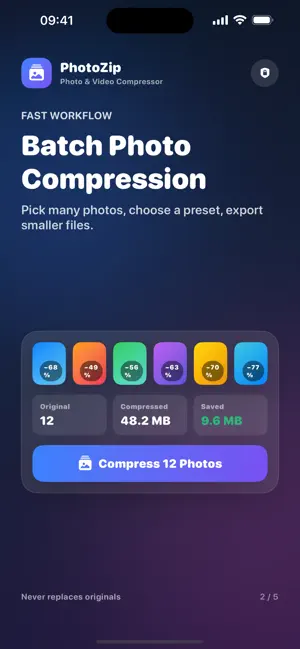


About PhotoZip: Photo Video Compress
Compress photos and MP4 videos fully on-device. Batch shrink JPEG, HEIC, and PNG images, or make videos small enough for sharing. No uploads, no account, no tracking — your media stays private. Shrink photos up to 90% smaller — without losing the quality you care about. PhotoZip is a fast, private photo compressor for iPhone and iPad. Drop in hundreds of images at once, pick a preset, and get perfectly optimized JPEG, HEIC, or PNG files in seconds. Everything happens on-device — your photos never leave your phone. WHY PHOTOZIP • Save gigabytes of iCloud and device storage • Send attachments that no longer get rejected for "file too large" • Upload faster to Instagram, WhatsApp, TikTok, email, and Shopify • Keep EXIF & orientation correct — compressed photos still look right CORE FEATURES • Batch compress — pick up to hundreds of photos, process in parallel • Smart presets — Web, Email, Message, Storage, or custom quality & size • Format control — JPEG, HEIC, PNG, plus Auto (preserve original format) • Resize + compress in one step — max dimension aware • Before / After slider — see exactly what you're keeping and losing • Save back to Photos or share straight to any app • History — browse every batch you've ever compressed, re-share any file 100% PRIVATE • Zero servers, zero uploads, zero tracking • No account, no sign-up • Works offline in airplane mode PHOTOZIP PRO Unlock unlimited compressions, no daily quota, every preset, and premium support with a single purchase. Choose: • Monthly subscription • Yearly subscription (best value) • Lifetime — one payment, yours forever Free version includes 5 compressions per day so you can try everything before you upgrade. DESIGNED FOR iOS Built with SwiftUI for iOS 16 and later. Runs natively on iPhone and iPad, with full support for Dynamic Type, Dark Mode, and Haptic feedback. — Terms of Use: https://www.apple.com/legal/internet-services/itunes/dev/stdeula/ Privacy Policy: https://photozip.j-chan.com/privacy.html Support: https:https://photozip.j-chan.com/
What’s new
Version 1.0.2 · Updated May 20, 2026
• Added on-device video compression with MP4 output • New target video sizes: under 25 MB, 10 MB, and 5 MB • Cleaner photo and video layouts with fixed compress buttons • Video history now supports playback and sharing • Improved save flow so originals are never replaced
App privacy
The developer, 嘉乐 陈, reported these privacy practices to Apple.
Data Not Collected
The developer does not collect any data from this app.
Alternatives to PhotoZip: Photo Video Compress
Looking for apps like PhotoZip: Photo Video Compress? Here are 6 similar apps on the App Store. The highest rated is Swipe Clean: Tidy Photos (5.0/5), and all 6 are free to download.
-
 SlimPic
-
 LiteZo: Compress & Convert
-
 Squeeze - Compress Videos
-
 Shrink PDF Audio Video Photo
-
 Periphery: Bluetooth Scanner
-
 Swipe Clean: Tidy Photos
5.0
Swipe Clean: Tidy Photos
5.0
| App | Rating | Price | Last updated | Compare |
|---|---|---|---|---|
| PhotoZip: Photo Video Compress | – | Free | May 20, 2026 | |
| SlimPic | – | Free | Jun 10, 2026 | Compare |
| LiteZo: Compress & Convert | – | Free | Jul 30, 2026 | Compare |
| Squeeze - Compress Videos | – | Free | May 27, 2026 | Compare |
| Shrink PDF Audio Video Photo | – | Free | Aug 31, 2026 | Compare |
| Periphery: Bluetooth Scanner | – | Free | Oct 13, 2026 | Compare |
| Swipe Clean: Tidy Photos | 5.0 / 5 (1) | Free | Aug 13, 2026 | Compare |