

Divly: Split Expenses
MEHMET FATIH KUTLAR Finance iPhoneiPadiPod touch
Divly: Split Expenses is a free Finance app for iPhone and iPad by MEHMET FATIH KUTLAR. Requires iOS 18.0. Updated June 5, 2026.
- Price
- Free
- on the App Store
- Size
- 25 MB
- Age 4+
- Updated
- Jun 5
- 2026 · v1.0.10
Screenshots

About Divly: Split Expenses
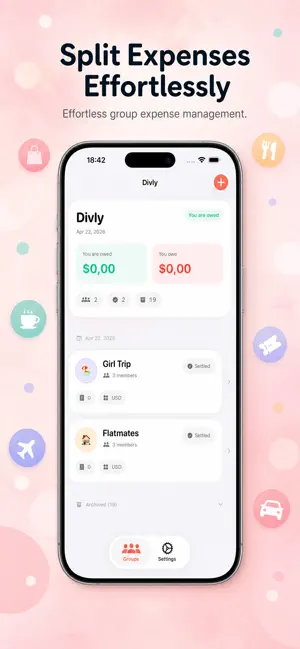
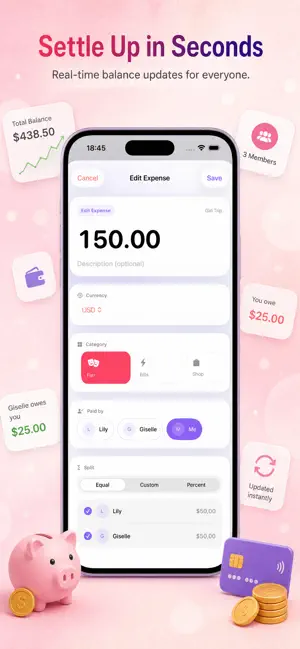
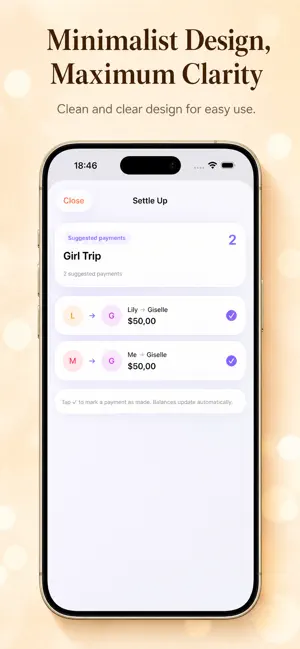
Divly is the easiest way to split bills and track shared expenses with friends, roommates, partners, and travel groups — without giving up your email, watching ads, or hitting a wall after one trip. WHY DIVLY IS DIFFERENT - No account required. Open the app and start splitting expenses in 10 seconds. - 1 active groups for free. Archive a finished trip and start a new one — no quota games. - No ads. Ever. Premium is optional, not pressured. - Native iOS, built with SwiftUI + SwiftData. Fast, offline-first, dark-mode polished. PERFECT FOR - Roommates: rent, groceries, utilities, and the small store runs that pile up. Track who owes what without group chats. - Couples: daily spending, weekly groceries, and one clean settle-up at month-end. Divide costs fairly, automatically. - Travel groups: hotels, taxis, tickets — log expenses on the go, settle before the airport. - Friends and dinners: nights out, weekend plans, the "I'll send it later" pile. THE CORE FLOW 1. Create a group with an emoji, color, and currency (30 supported). 2. Add an expense — pick who paid, choose equal or custom split. 3. Open the Balances tab. See the minimum number of payments to clear all debts. 4. Tap a payment to mark it settled. Confetti when the group is fully even. SMART DEBT SIMPLIFICATION Divly's algorithm finds the fewest possible transactions to settle the whole group. If three roommates owe each other in a circle, you'll see one transfer — not three. PRIVACY-FIRST DESIGN Your data lives on your device. Optional iCloud backup uses your Apple ID — no Divly servers in the loop. Receipt scanning runs on-device with Apple's Vision framework. We don't sell, share, or sniff your data. DIVLY PREMIUM Optional upgrade for power users: - Unlimited groups - Receipt scanning (OCR) — snap a photo, auto-fill the amount - iCloud backup with version history - Spending statistics by category and per person - Recurring expenses (monthly bills, rent, subscriptions) - Percentage splits (great for unequal incomes) - Home Screen widget showing your top group balances - CSV export for your records The yearly Premium plan is shown in your local currency on the App Store; a monthly plan is also available. If shared expenses come up every week, the yearly plan is easily the smartest choice. DESIGNED FOR REAL LIFE - 30 currencies with up-to-date conversion (premium) - Dark mode and Liquid Glass-ready visuals - Haptic feedback on every interaction that matters - Confetti when a group is fully settled - Onboarding that asks how you'll use the app (housemates, couple, trip, social) and shapes the first screen LANGUAGES Available in English, Turkish, German, Spanish, French, and Russian. NO HIDDEN GOTCHAS - No ads - No tracking SDKs - No daily transaction limit - No mandatory signup - No "create account to export your data" trick If shared expenses have felt slow or cluttered with other apps — give Divly a try. Have feedback? Tap Settings → About → Email Support. We read everything. --- Auto-renewable subscription. Payment is charged to your Apple Account at confirmation of purchase. Subscription auto-renews unless canceled at least 24 hours before the end of the current period. Manage or cancel anytime in Apple Account settings. Privacy Policy: https://divly.app/privacy Terms of Use: https://divly.app/terms
What’s new
Version 1.0.10 · Updated June 5, 2026
This update improves group management and sync reliability. Group creators can now edit the group name, currency, color, and emoji. Archived groups now stay archived across launches and sync per user. We also fixed an issue where some signed-in users could see an empty group list even though their groups were still active. Expense, split, member, group, and settlement sync is now faster and more reliable.
App privacy
The developer, MEHMET FATIH KUTLAR, reported these privacy practices to Apple.
Data Linked to You
The following data, which may be collected and linked to your identity, may be used for the following purposes:
- Contact Info: Email Address, Name
- Purchases: Purchase History
- User Content: Other User Content
- Identifiers: User ID, Device ID
Used for: Developer’s Advertising or Marketing, App Functionality
Data Not Linked to You
The following data, which may be collected but is not linked to your identity, may be used for the following purposes:
- Usage Data: Product Interaction, Advertising Data, Other Usage Data
- Diagnostics: Crash Data
Used for: Analytics, Other Purposes
Alternatives to Divly: Split Expenses
Looking for apps like Divly: Split Expenses? Here are 6 similar apps on the App Store. The highest rated is Divly (5.0/5), and all 6 are free to download.
-
 Hesap Paylaş
-
 Inali: Shared Expense Wallet
-
 WOW: Who Owes Whom Restaurants
-
 Splipay - Splitting Bill AI
-
 Divly
5.0
Divly
5.0
-
 IzyLife Split
| App | Rating | Price | Last updated | Compare |
|---|---|---|---|---|
| Divly: Split Expenses | – | Free | June 5, 2026 | |
| Hesap Paylaş | – | Free | Jan 12, 2026 | Compare |
| Inali: Shared Expense Wallet | – | Free | Jul 1, 2026 | Compare |
| WOW: Who Owes Whom Restaurants | – | Free | Sep 14, 2026 | Compare |
| Splipay - Splitting Bill AI | – | Free | Jan 7, 2026 | Compare |
| Divly | 5.0 / 5 (1) | Free | Oct 9, 2026 | Compare |
| IzyLife Split | – | Free | May 28, 2026 | Compare |