

AudioMultiCut: Audio Splitter
Lior Elgali Music iPhoneiPadiPod touch
AudioMultiCut: Audio Splitter is a free Music app for iPhone and iPad by Lior Elgali. Rated 5.0/5 from 3 ratings. Requires iOS 18.0.
- Rating
- 5.0
- 3 ratings
- Price
- Free
- on the App Store
- Size
- 67 MB
- Age 4+
- Updated
- Oct 11
- 2026 · v1.0.12
Screenshots



About AudioMultiCut: Audio Splitter
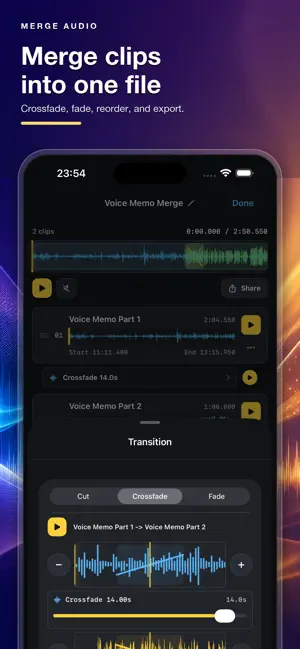
Record long audio, turn it into clean clips, or merge files into one export. AudioMultiCut is made for rehearsals, lectures, meetings, interviews, voice memos, podcasts, live recordings, sample chains, and audio from video. Record in the app or import an existing file, review every cut, fine-tune exact boundaries, and export only what you need. RECORD, SPLIT & MERGE • Record audio directly in the app • Turn a completed recording into a Split project • Split one long recording into multiple named clips • Merge multiple audio files into one export • Import from Files, Photos, Voice Memos, or any app that shares audio or video • Extract audio from video • Start with Auto-Cut, then review and refine every segment • Fine-trim clip starts and ends with automatic boundary preview • Save projects and return to them later EXPORT YOUR WAY Export to MP3, M4A, Apple Lossless, WAV, FLAC, or Opus. See an estimated file size for every segment before exporting. BUILT AROUND YOUR ORIGINAL RECORDING Recording, editing, and export happen on your device. Sharing the untouched original recording is free at any length. Editing and listening are free at any length. The app displays the current free export limit. For projects above that limit, choose a monthly subscription or lifetime export access. The App Store displays your local price and terms before purchase. Optional cloud AI features upload only the audio you select, and only after you start that feature. No studio learning curve. Record, split, review, merge, export, and share. Terms of Use (EULA): https://www.apple.com/legal/internet-services/itunes/dev/stdeula/ Privacy Policy: https://www.audiomulticut.com/privacy
What’s new
Version 1.0.12 · Updated October 11, 2026
Bug fixes and reliability improvements.
App privacy
The developer, Lior Elgali, reported these privacy practices to Apple.
Data Linked to You
The following data, which may be collected and linked to your identity, may be used for the following purposes:
- Identifiers: Device ID, User ID
- Usage Data: Product Interaction, Other Usage Data
- Purchases: Purchase History
- Diagnostics: Crash Data, Performance Data, Other Diagnostic Data
- User Content: Audio Data, Other User Content
Used for: Developer’s Advertising or Marketing, Analytics, Product Personalization, App Functionality
Data Not Linked to You
The following data, which may be collected but is not linked to your identity, may be used for the following purposes:
- Identifiers: User ID
- Purchases: Purchase History
Used for: Developer’s Advertising or Marketing, App Functionality
Alternatives to AudioMultiCut: Audio Splitter
Looking for apps like AudioMultiCut: Audio Splitter? Here are 6 similar apps on the App Store. The highest rated is MP3 Cutter: Audio Trimmer (5.0/5), and all 6 are free to download.
-
 Audio Splitter - MP3 Cutter
-
 Audio Cutter : MP3 Splitter
-
 MP3 Cutter: Audio Trimmer
5.0
MP3 Cutter: Audio Trimmer
5.0
-
 Audio Editor & MP3 Cutter
5.0
Audio Editor & MP3 Cutter
5.0
-
 MP3 Cutter - Trimmer
4.8
MP3 Cutter - Trimmer
4.8
-
 VU202
4.8
VU202
4.8
| App | Rating | Price | Last updated | Compare |
|---|---|---|---|---|
| AudioMultiCut: Audio Splitter | 5.0 / 5 (3 ratings) | Free | October 11, 2026 | |
| Audio Splitter - MP3 Cutter | – | Free | Apr 8, 2026 | Compare |
| Audio Cutter : MP3 Splitter | – | Free | Mar 18, 2026 | Compare |
| MP3 Cutter: Audio Trimmer | 5.0 / 5 (1) | Free | Sep 18, 2026 | Compare |
| Audio Editor & MP3 Cutter | 5.0 / 5 (1) | Free | Oct 13, 2026 | Compare |
| MP3 Cutter - Trimmer | 4.8 / 5 (49) | Free | Aug 21, 2024 | Compare |
| VU202 | 4.8 / 5 (34) | Free | Sep 17, 2026 | Compare |