

Driving Log - Trip Odometer
Soukaina Hassani Navigation iPhoneiPadiPod touch
Driving Log - Trip Odometer is a free Navigation app for iPhone and iPad by Soukaina Hassani. Rated 3.3/5 from 3 ratings. Requires iOS 18.0.
- Rating
- 3.3
- 3 ratings
- Price
- Free
- on the App Store
- Size
- 34 MB
- Age 4+
- Updated
- Sep 28
- 2026 · v1.1
Screenshots


About Driving Log - Trip Odometer
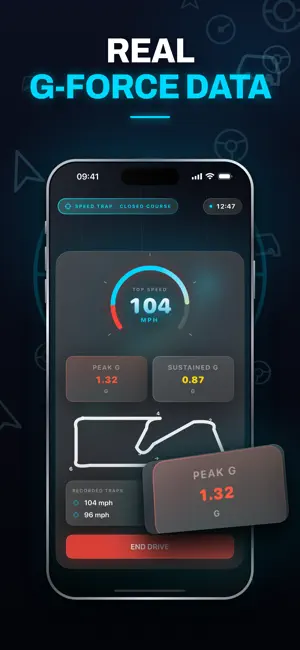
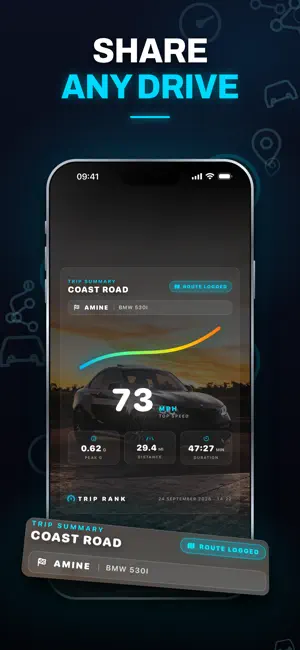
Every drive, recorded. Trip Rank turns your iPhone into a driving log, trip distance recorder and digital speedometer - no external hardware, no OBD dongle, no extra fees. Start a drive when you set off and Trip Rank tracks your route, distance, speed and cornering forces, then saves the whole run to your history. DRIVING LOG Every drive you record is saved with its date, distance, duration, average speed and top speed. Each trip carries its own distance reading, so you can see exactly how far a single journey went, and browse your full driving history at any time. DIGITAL SPEEDOMETER A large, readable GPS speedometer showing current speed, average speed and top speed. It reads your device's GPS, so it works in any vehicle - car, van, motorbike or bike. Choose MPH or KM/H and the whole app follows, from the live dashboard to your trip history and your share cards. ROUTE MAP Every recorded drive is drawn on an interactive map so you can see the exact route you took. Your GPS routes stay on your device. DUAL G-FORCE METERS Peak and sustained cornering and braking loads are sampled continuously through the drive and stored alongside the trip. Useful on a track, interesting everywhere else. MY GARAGE Set your driver name, add your vehicle's make and model, and choose the accent color your dashboard uses. GLOBAL LEADERBOARD Opt in to compare your best top speed and peak G against drivers worldwide. Your exact GPS routes are never uploaded - only the two numbers you choose to share. SHARE CARDS Generate a summary card for any drive and send it to Messages, Instagram or your camera roll. TRIP RANK PRO Trip Rank Pro unlocks the timing modes and the full share card studio: - Speed Zone: drop geofenced start and finish points for precise point-to-point timing. The timer stays at zero until you cross the start line, giving true rally-stage accuracy. - Speed Trap: capture your exact speed at a point you choose on the map. - Pro share cards: full-height cards built on your own background photo, with filters and your trip's route. SUBSCRIPTION TERMS Weekly and monthly auto-renewing subscriptions are available. Payment is charged to your Apple Account at confirmation of purchase. Subscriptions renew automatically unless auto-renew is turned off at least 24 hours before the end of the current period. Your account is charged for renewal within 24 hours prior to the end of the current period. Manage or cancel your subscription in your App Store account settings after purchase. Any unused portion of a free trial period is forfeited when a subscription is purchased. IMPORTANT Trip Rank is a recording and measurement tool. Speed Zone and Speed Trap timing are intended for closed courses and track days. Always obey local traffic laws and speed limits, and never operate your phone while driving. GPS readings depend on satellite signal quality and are not a substitute for your vehicle's own instruments. Continuous background GPS use can significantly reduce battery life. SUBSCRIPTION PRICING & TERMS: Unlock all premium features and remove ads with our subscription plans: Weekly: $5.99/week Monthly: $14.99/week Payment will be charged to your iTunes Account at confirmation of purchase. Subscriptions automatically renew unless auto-renew is turned off at least 24-hours before the end of the current period. Your account will be charged for renewal within 24-hours prior to the end of the current period. You can manage or cancel your subscriptions by going to your App Store Account Settings after purchase. Any unused portion of a free trial period will be forfeited when the user purchases a subscription. For support, contact: [email protected] Privacy Policy: https://sites.google.com/view/triprank/privacy-policy Terms of Use: https://www.apple.com/legal/internet-services/itunes/dev/stdeula
What’s new
Version 1.1 · Updated September 28, 2026
Improved trip logging accuracy and a refreshed driving history view. Bug fixes and performance improvements.
App privacy
The developer, Soukaina Hassani, reported these privacy practices to Apple.
Data Not Collected
The developer does not collect any data from this app.
Alternatives to Driving Log - Trip Odometer
Looking for apps like Driving Log - Trip Odometer? Here are 6 similar apps on the App Store. The highest rated is Enroad – Drive Tracker (4.8/5), and all 6 are free to download.
-
 Trip Rank - Speed Tracker₊
-
 DriveRank - Rank One
-
 SpeedRank - Trip Tracker
4.5
SpeedRank - Trip Tracker
4.5
-
 TripRank: GPS Speedometer
4.6
TripRank: GPS Speedometer
4.6
-
 Enroad – Drive Tracker
4.8
Enroad – Drive Tracker
4.8
-
 Wheelz - Social Drive Tracker
4.7
Wheelz - Social Drive Tracker
4.7
| App | Rating | Price | Last updated | Compare |
|---|---|---|---|---|
| Driving Log - Trip Odometer | 3.3 / 5 (3 ratings) | Free | September 28, 2026 | |
| Trip Rank - Speed Tracker₊ | – | Free | Jun 17, 2026 | Compare |
| DriveRank - Rank One | – | Free | May 12, 2026 | Compare |
| SpeedRank - Trip Tracker | 4.5 / 5 (8) | Free | Jul 25, 2026 | Compare |
| TripRank: GPS Speedometer | 4.6 / 5 (10) | Free | Oct 11, 2026 | Compare |
| Enroad – Drive Tracker | 4.8 / 5 (6,734) | Free | Oct 10, 2026 | Compare |
| Wheelz - Social Drive Tracker | 4.7 / 5 (4,253) | Free | Oct 17, 2026 | Compare |