

Screenshot: ExplainShot
Kenneth John Silvere Emmanuel Productivity iPhoneiPadiPod touch
Screenshot: ExplainShot is a free Productivity app for iPhone and iPad by Kenneth John Silvere Emmanuel. Requires iOS 18.0. Updated May 11, 2026.
- Price
- Free
- on the App Store
- Size
- 9 MB
- Age 4+
- Updated
- May 11
- 2026 · v1.0.2
Screenshots


About Screenshot: ExplainShot
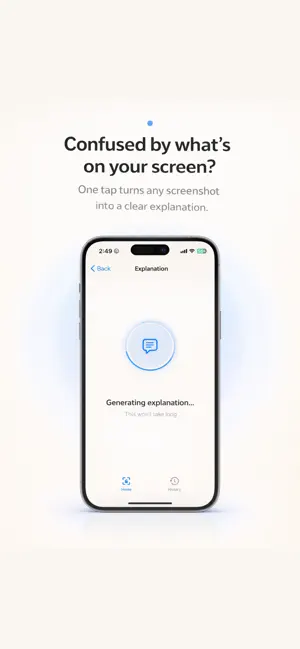
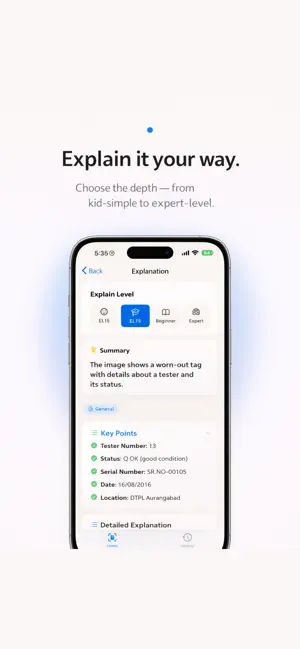
Every screenshot hides something you need to understand. ExplainShot uses AI to explain it in seconds. Paste or pick any screenshot and ExplainShot gets to work immediately. On-device OCR extracts every word from the image, then AI identifies what you are looking at — code, math, legal text, a chart, medical information, an error message, or general content — and explains it in plain language. You choose how deep to go. Pick ELI5 for a simple, jargon-free breakdown. Choose Normal for a balanced explanation that covers the essentials. Select Technical when you need the full picture. Switch levels anytime to match exactly what you need. The Share Extension makes ExplainShot part of every app you use. Send a screenshot straight from Safari, Messages, Photos, or any other app without copying, switching, or extra steps. Your explanation is ready in moments. Every explanation is saved on-device so you can revisit it whenever you need. No cloud uploads, no account required, no data leaving your phone. Whether you are a developer staring at a cryptic error, a student puzzling over a complex chart, a patient trying to make sense of medical results, or anyone who encounters confusing content on their screen — ExplainShot was built for you. Designed natively for iOS with clean light and dark themes that feel right at home. Premium unlocks unlimited daily explanations and priority processing, perfect for power users who rely on ExplainShot throughout their day. Download ExplainShot and stop wondering what you are looking at. Terms of Use (EULA): https://www.apple.com/legal/internet-services/itunes/dev/stdeula/ Privacy Policy: https://explain-shot-support-site.vercel.app/privacy
What’s new
Version 1.0.2 · Updated May 11, 2026
• New name: we're now "Screenshot: ExplainShot" — same app, clearer mission. • We'll occasionally ask for a quick App Store rating after you've had a few great explanations. Your feedback helps us improve. • Minor performance and stability improvements.
App privacy
The developer, Kenneth John Silvere Emmanuel, reported these privacy practices to Apple.
Data Linked to You
The following data, which may be collected and linked to your identity, may be used for the following purposes:
- Purchases: Purchase History
- Identifiers: User ID
- Usage Data: Product Interaction
Used for: Analytics, App Functionality
Alternatives to Screenshot: ExplainShot
Looking for apps like Screenshot: ExplainShot? Here are 6 similar apps on the App Store. The highest rated is ScribblePad: Notes & PDF (5.0/5), and all 6 are free to download.
-
 Smart Document Summary AI
-
 Story World Builder
-
 OpenTodoList
4.5
OpenTodoList
4.5
-
 Translay - Screen Translator
3.0
Translay - Screen Translator
3.0
-
 ScribblePad: Notes & PDF
5.0
ScribblePad: Notes & PDF
5.0
-
 Voice Record Pro 7
4.7
Voice Record Pro 7
4.7
| App | Rating | Price | Last updated | Compare |
|---|---|---|---|---|
| Screenshot: ExplainShot | – | Free | May 11, 2026 | |
| Smart Document Summary AI | – | Free | Sep 14, 2026 | Compare |
| Story World Builder | – | Free | Oct 27, 2026 | Compare |
| OpenTodoList | 4.5 / 5 (4) | Free | Jul 13, 2026 | Compare |
| Translay - Screen Translator | 3.0 / 5 (2) | Free | Jan 21, 2026 | Compare |
| ScribblePad: Notes & PDF | 5.0 / 5 (3) | Free | Sep 7, 2026 | Compare |
| Voice Record Pro 7 | 4.7 / 5 (1,157) | Free | May 26, 2026 | Compare |