

Beam: Powered by Arc
Ultimate Drill Book Education iPhoneiPadiPod touch
Beam: Powered by Arc is a free Education app for iPhone and iPad by Ultimate Drill Book. Rated 5.0/5 from 2 ratings. Requires iOS 18.0.
- Rating
- 5.0
- 2 ratings
- Price
- Free
- on the App Store
- Size
- 108 MB
- Age 4+
- Updated
- Oct 23
- 2026 · v1.3.10
Screenshots


About Beam: Powered by Arc
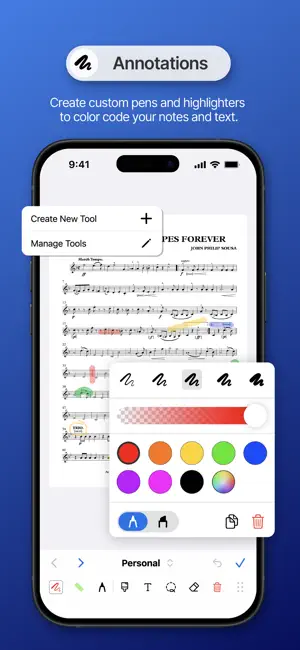
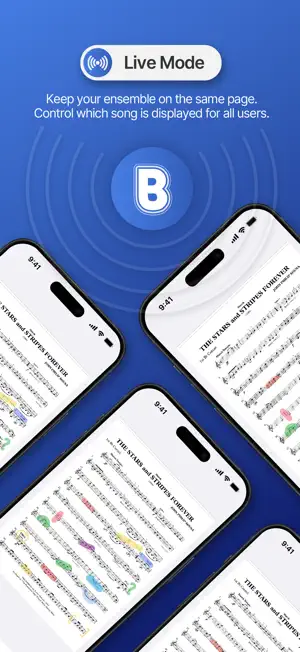
Beam transforms rehearsal into an interactive experience, giving ensembles powerful tools to organize, annotate, and perform music together. Built for bands, orchestras, choirs, drum corps, and performing ensembles of every kind, Beam makes it easy to keep every performer on the same page, whether you’re in rehearsal, on the field, or on stage. NEW * Completely redesigned interface now integrated with the full Arc ecosystem * Update licenses or access in Beam, and changes are reflected across all Arc products * Easily upload, re-order and crop scores in the re-designed upload center * Create and save customizable annotation tools Features for Members * One login grants you access to Beam, UDBapp, and Geo * Check-in with Geo without ever leaving Beam, no more interrupted rehearsals * Discover free sheet music in the Beam Public Library Features for Admins and Staff * Easily add, edit, or delete scores in your ensemble's account directly from the app * Assign collections, set lists and songs based on subject, group or subgroup * One tap access to UDB for drill, and Geo for attendance * Discover royalty free sheet music in the Beam Public Library ready to perform or record Integrated with the Arc Ecosystem As part of the Arc ecosystem, Beam integrates seamlessly with UDBapp and Geo, so your music, drill, attendance, and rehearsal tools all work together. With Arc, Beam now offers: * A single login for all your Arc apps: Directors, staff, and performers can access everything they need in one connected platform. * Seamless page management: Edit one or multiple pages at a time with the crop, cut, and delete tools. Reorder, or duplicate pages, and assign a single page to multiple parts all from the upload screens. * Custom Annotation Layers: Role-dependent layers offer directors, students and staff managed access to annotations and notes. * Calendar & Attendance Integration with Geo: See full rehearsal and performance schedules, check-in to events with multiple locations, and track attendance throughout the season. Use Live Attendance to get a real-time view of who is at rehearsal and who is not.
What’s new
Version 1.3.10 · Updated October 23, 2026
• Default Parts: Set a Default Part for each Group you’re in. Beam downloads that part automatically and selects it to open. Go to Settings > [Group] > Default Parts. • Auto-Download Parts: Choose which parts download automatically for every song in your Subject. The setting applies to all Groups in that Subject. Go to Settings > [Subject] > Auto Downloads. • Smart Access: Subject Admins can now give other users access to features like uploading and assigning music and making Global Annotations on layers. Go to Settings > Smart Access. • Smart Line Snapping: Draw a rough line and hold your finger or stylus at the end. It snaps into a straight line, and you can rotate it around its starting point as long as your finger or stylus stays on the screen. • Bluetooth Foot Pedal Support: Turn pages hands-free with a Bluetooth foot pedal. Apple Pencil (iPad) • Smoother Drawing: Apple Pencil drawing is now smoother, with lower latency. • Pencil-Only Drawing: Choose whether drawing works with Apple Pencil only or with Apple Pencil and fingers. Pencil-only lets you annotate with the Pencil and still swipe to turn pages with your fingers. Tap the Hand/Pencil icon in the edit bar, at the bottom right between Redo and the Save checkmark. • Annotate Immediately: Start annotating the moment your Apple Pencil touches the screen. To turn it on, tap the screen, tap the ⋯ menu at the top right, and toggle on Annotate Immediately.
App privacy
The developer, Ultimate Drill Book, reported these privacy practices to Apple.
Data Linked to You
The following data, which may be collected and linked to your identity, may be used for the following purposes:
- Location: Precise Location
- Contact Info: Email Address, Name, Phone Number
- User Content: Photos or Videos
Used for: App Functionality, Other Purposes
Data Not Linked to You
The following data, which may be collected but is not linked to your identity, may be used for the following purposes:
- Identifiers: User ID
- Usage Data: Product Interaction
- Diagnostics: Crash Data, Performance Data, Other Diagnostic Data
Used for: App Functionality
Alternatives to Beam: Powered by Arc
Looking for apps like Beam: Powered by Arc? Here are 6 similar apps on the App Store. The highest rated is Pitch Master - Ear Training (4.6/5), and all 6 are free to download.
-
 CompetitionSuite Commentary
3.1
CompetitionSuite Commentary
3.1
-
 illuminant app
-
 CompetitionSuite Judge
4.3
CompetitionSuite Judge
4.3
-
 Pitch Master - Ear Training
4.6
Pitch Master - Ear Training
4.6
-
 Drumr - Learn & Practice Drums
4.4
Drumr - Learn & Practice Drums
4.4
-
 FAMU Mobile
4.4
FAMU Mobile
4.4
| App | Rating | Price | Last updated | Compare |
|---|---|---|---|---|
| Beam: Powered by Arc | 5.0 / 5 (2 ratings) | Free | October 23, 2026 | |
| CompetitionSuite Commentary | 3.1 / 5 (30) | Free | Oct 11, 2026 | Compare |
| illuminant app | – | Free | Sep 22, 2026 | Compare |
| CompetitionSuite Judge | 4.3 / 5 (18) | Free | Oct 9, 2026 | Compare |
| Pitch Master - Ear Training | 4.6 / 5 (562) | Free | Oct 28, 2026 | Compare |
| Drumr - Learn & Practice Drums | 4.4 / 5 (95) | Free | Oct 28, 2026 | Compare |
| FAMU Mobile | 4.4 / 5 (47) | Free | Jul 25, 2024 | Compare |