

Openloop Connect
Haudi Crypto, Inc. Finance iPhoneiPadiPod touch
Openloop Connect is a free Finance app for iPhone and iPad by Haudi Crypto, Inc. Requires iOS 15.1. Updated October 15, 2026.
- Price
- Free
- on the App Store
- Size
- 25 MB
- Age 4+
- Updated
- Oct 15
- 2026 · v1.1.5
Screenshots


About Openloop Connect
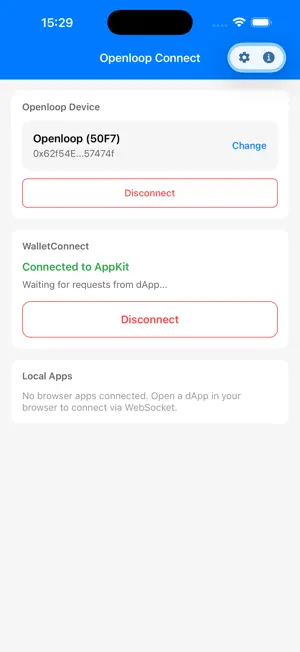
Openloop Connect is a companion application used with the Openloop hardware wallet. Openloop features three functions: crypto wallet (signer), security key (passkey), and PIV. It is used by connecting Openloop to a desktop or smartphone via USB or BLE. Openloop Connect supports the following six features. 1. Openloop Firmware Update Update the firmware on your Openloop device. Connect Openloop via USB or Bluetooth and update it to the latest version. 2. WalletConnect Relay WalletConnect is a globally standardized protocol for connecting various wallets to DApps (decentralized applications) and Web3 platforms. By launching Openloop Connect, you can use Openloop from numerous dApps that support WalletConnect. Access via DeepLink: openloop:// 3. Openloop API Server (not available on iOS) A local WebSocket server that allows web apps and native apps to use Openloop. Using the API, applications can access various Openloop features. Accessible at ws://127.0.0.1:21320. 4. Safari Web Extension Container (iOS only) A browser extension for using Openloop from Safari on iOS. Openloop Connect functions as a Containing App. By installing Openloop Connect, Safari web apps can use Openloop through the Openloop API. 5. PKCS#11 Dynamic Library for PIV (desktop only) PKCS#11 is a standard API interface for cryptographic tokens, defined as part of the Public-Key Cryptography Standards. Openloop Connect bundles a PKCS#11 dynamic library for using Openloop with PIV. The library is located in the pkcs11/ folder under the application install path: macOS: [app]/Contents/Resources/pkcs11/libopenloop-pkcs11.dylib Windows: [app]/resources/pkcs11/libopenloop-pkcs11.dll Linux: [app]/resources/pkcs11/libopenloop-pkcs11.so The actual app install location [app] depends on the install method: macOS (DMG): /Applications/Openloop Connect.app Windows (standard installer): C:\Program Files\Openloop Connect Windows (Microsoft Store): (Get-AppxPackage 7CA75049.OpenloopConnect).InstallLocation Linux (deb): /opt/Openloop Connect 6. BLE Passkey Provider (iOS / Android only) A feature that registers Openloop Connect as a credential provider in the mobile OS, forwarding passkey authentication requests from browsers and other apps to Openloop over BLE so that they can be signed inside the hardware. Passkeys over USB work with the OS's built-in support; additionally, to use passkeys over BLE as well, enable this feature. iOS: Settings - General - AutoFill & Passwords - enable Openloop Connect Android: Settings - Passwords & accounts - Additional services - enable Openloop Connect
What’s new
Version 1.1.5 · Updated October 15, 2026
- Improved the messages shown when a request is not approved on the device. - Improved stability when sending Bitcoin in quick succession. - Fixed bugs and improved stability.
App privacy
The developer, Haudi Crypto, Inc., reported these privacy practices to Apple.
Data Not Collected
The developer does not collect any data from this app.
Alternatives to Openloop Connect
Looking for apps like Openloop Connect? Here are 6 similar apps on the App Store. The highest rated is USV dApp (5.0/5), and all 6 are free to download.


| App | Rating | Price | Last updated | Compare |
|---|---|---|---|---|
| Openloop Connect | – | Free | October 15, 2026 | |
| USV dApp | 5.0 / 5 (3) | Free | Oct 30, 2026 | Compare |
| YieldHarvest | – | Free | Jul 31, 2026 | Compare |
| Via Salaria Business | – | Free | Jul 24, 2026 | Compare |
| enclayve wallet | – | Free | Sep 25, 2025 | Compare |
| Tibane | 5.0 / 5 (1) | Free | Jul 11, 2026 | Compare |
| TeleGiro | 5.0 / 5 (3) | Free | Aug 20, 2026 | Compare |
Compare Openloop Connect with the top alternatives: ratings, updates, ASO score and keyword gaps →