

ArcReader: Web Novel Offline
Thien Le Book iPhoneiPadiPod touchMac
ArcReader: Web Novel Offline is a free Book app for iPhone and iPad by Thien Le. Rated 4.9/5 from 69 ratings. Requires iOS 15.6. Updated October 25, 2026.
- Rating
- 4.9
- 69 ratings
- Price
- Free
- on the App Store
- Size
- 155 MB
- Age 17+
- Updated
- Oct 25
- 2026 · v1.2.10
Screenshots


About ArcReader: Web Novel Offline
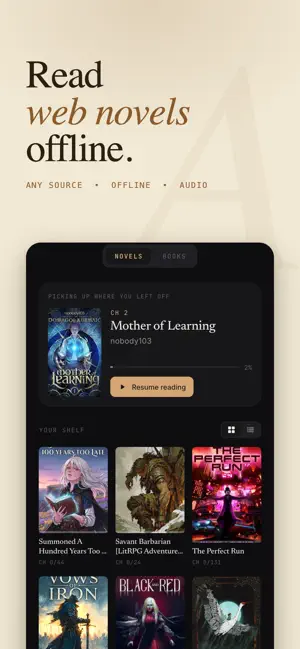
Paste any web novel link. Download every chapter. Read offline anywhere — no account, no subscription required to start. ArcReader is the offline-first reader for Royal Road, WTR-Lab, NovelFire, and dozens more sources. Bring your own link, we handle the rest — whether it's progression fantasy, xianxia, cultivation fiction, LitRPG, isekai, romance, or any English web novel and light novel. Loved by readers who wanted something quieter: no crowded feeds, no coin walls, just your books. Built for readers who want full control: pick your theme, your font, your scroll mode, and read offline whenever you want. POPULAR GENRES ON ARCREADER Progression Fantasy · Cultivation · Xianxia · Wuxia · Xuanhuan · LitRPG · GameLit · Isekai · Reincarnation · Fantasy · Romance · Sci-Fi · Fanfiction · Thriller · Horror · Slice of Life · Harem · Adventure WHY READERS LOVE ARCREADER A reader designed for long sessions Choose between four themes (Light, Dark, Sepia, Black AMOLED). Adjust font size, line spacing, font family, and margins to find your perfect setup. Switch between paginated mode with page-turn animation, or smooth continuous scroll. Listen with on-device narration Built-in neural text-to-speech turns any novel into an audiobook — runs entirely on your device. No internet required, no data costs, no monthly fees for the core feature. Adjustable speed from 0.75x to 2x, lock-screen controls, sleep timer, and auto-advance between chapters. Offline-first reading Downloaded content stays on your device in a local library — not a temporary cache. Read on airplanes, in tunnels, or anywhere connectivity is unreliable. Import your own EPUB files Already have books saved as EPUB? Import them straight into your library and read them with the same themes, fonts, and narration as everything else. Look up words and build vocabulary Tap any word for an instant dictionary definition, then save it as a flashcard. Review your flashcards later to lock in new vocabulary as you read. Highlights and notes Long-press to highlight passages in four colors with optional notes. Review all your highlights for any title in one place. Reading position sync Auto-saves your position every few seconds. Open a book on another device and continue exactly where you left off, after signing in. No sign-up wall Open the app and start reading. Account creation is optional — only needed if you want to sync between devices. EVERYTHING ARCREADER OFFERS - Customizable reader (themes, fonts, layout, scroll modes) - On-device neural text-to-speech with voice selection - Background audio with lock-screen controls and sleep timer - Highlights and notes with color coding - Import your own EPUB files into your library - Built-in dictionary with tap-to-define - Vocabulary flashcards to review and remember new words - Reading progress auto-save and cross-device sync - Daily reading goals and streaks - Reading statistics and history ARCREADER VIP (OPTIONAL SUBSCRIPTION) ArcReader VIP adds: - Premium cloud voices for high-quality narration - Unlimited chapter downloads - Ad-free reading experience ArcReader VIP is available as a monthly or yearly auto-renewing subscription, or a one-time lifetime purchase. The exact price in your local currency is shown in the app and on the App Store before you confirm. Payment is charged to your Apple ID account at purchase confirmation. Subscriptions auto-renew unless turned off in iOS Settings at least 24 hours before the current period ends; renewal is charged within 24 hours before the period ends. Manage or cancel anytime in Settings > Apple ID > Subscriptions. PRIVACY ArcReader stores your reading data on your device. Optional account sync uses encrypted cloud storage. We do not sell your data. Full privacy policy available below. Terms of Service: https://arcreaders.app/terms.html Privacy Policy: https://arcreaders.app/privacy.html
Ratings & reviews
4.9
69 ratings
What’s new
Version 1.2.10 · Updated October 25, 2026
- Achievements: 55 badges for how you read. - Reading stats: each period in a sentence, plus a reading goal. - Search inside a book, or pull down in Library to search them all. - Imported books keep their contents, footnotes and links. - AI translation: a glossary, faster chapters, Arc AI with Premium. - App icons, your own fonts, and name effects in Community. - Voices are easier to browse, filtered by female or male. - Give characters a picture that shows while they speak. - New widgets: pick up listening, your reading goal and streak, or one highlight a day.
App privacy
The developer, Thien Le, reported these privacy practices to Apple.
Data Used to Track You
The following data may be used to track you across apps and websites owned by other companies:
- Identifiers: Device ID
Data Linked to You
The following data, which may be collected and linked to your identity, may be used for the following purposes:
- Identifiers: Device ID, User ID
- Usage Data: Product Interaction
- Diagnostics: Crash Data, Performance Data
- Contact Info: Email Address
Used for: Third-Party Advertising, Analytics, App Functionality
Alternatives to ArcReader: Web Novel Offline
Looking for apps like ArcReader: Web Novel Offline? Here are 6 similar apps on the App Store. The highest rated is Cinder Reader (5.0/5), and all 6 are free to download.
-
 NovelFull: Novel Reader
2.7
NovelFull: Novel Reader
2.7
-
 LiteNovel: Light Novel World
-
 StoryCodex: WebNovel Reader
4.5
StoryCodex: WebNovel Reader
4.5
-
 Eclipse - Manga Reader
4.6
Eclipse - Manga Reader
4.6
-
 Ink&Echo
4.8
Ink&Echo
4.8
-
 Cinder Reader
5.0
Cinder Reader
5.0
| App | Rating | Price | Last updated | Compare |
|---|---|---|---|---|
| ArcReader: Web Novel Offline | 4.9 / 5 (69 ratings) | Free | October 25, 2026 | |
| NovelFull: Novel Reader | 2.7 / 5 (6) | Free | Jun 25, 2026 | Compare |
| LiteNovel: Light Novel World | – | Free | Sep 2, 2025 | Compare |
| StoryCodex: WebNovel Reader | 4.5 / 5 (8) | Free | Oct 21, 2026 | Compare |
| Eclipse - Manga Reader | 4.6 / 5 (14) | Free | Oct 20, 2026 | Compare |
| Ink&Echo | 4.8 / 5 (17) | Free | Oct 26, 2026 | Compare |
| Cinder Reader | 5.0 / 5 (8) | Free | Oct 19, 2026 | Compare |