

CloudSweep
Atchutarao Killamsetty Utilities iPhoneiPadiPod touchMac
CloudSweep is a free Utilities app for iPhone and iPad by Atchutarao Killamsetty. Requires iOS 18.0. Updated September 9, 2026.
- Price
- Free
- on the App Store
- Size
- 7 MB
- Age 4+
- Updated
- Sep 9
- 2026 · v1.0.1
Screenshots


About CloudSweep
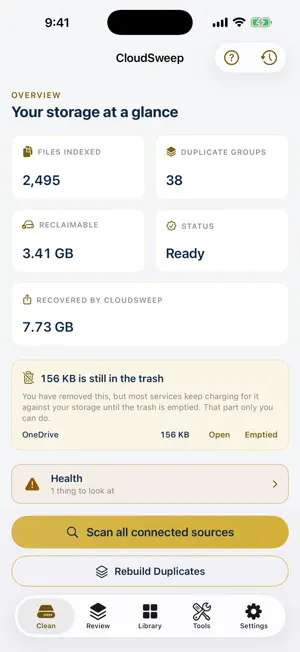
CloudSweep finds duplicate photos, videos and files on your device and across your clouds, then helps you clear the extra copies safely. CONNECT YOUR STORAGE • iPhone & iPad Photos library (works with iCloud Photos) • iCloud Drive • OneDrive • Google Photos: scan a Takeout export • Amazon Photos: scan your downloaded library FIND EVERY DUPLICATE • Exact matching by checksum: byte-identical copies within and across sources • Visually similar matching: re-encoded, edited or resized copies, matched entirely on your device • One shared index: scan each source once and CloudSweep finds duplicates inside every source AND across them CLEAN UP SAFELY • Every removal goes to a recoverable trash (about 30 days), never permanent • At least one copy of a file always survives • Copies are re-verified before deleting, so a file that changed since your scan is never touched • Imported libraries (Google Photos Takeout, Amazon Photos) are copies of your originals, so CloudSweep guides you to the original and verifies your cleanup instead of pretending MOVE BETWEEN CLOUDS • Bring photos and videos from OneDrive, a Google Photos export or an Amazon Photos folder into your Photos library, or back up your Photos library to your iCloud Drive folder • Every copy is written at original quality, read back and compared byte for byte before it counts • Nothing leaves the source until you confirm the cleanup afterwards, and originals then go to a recoverable trash PRIVATE BY DESIGN • All duplicate matching runs on your device • No accounts on our side, no analytics, no tracking • Sign-in tokens live only in your device Keychain • Your files never touch our servers FREE & PREMIUM Scanning and reviewing duplicates are free forever, with 10 removals included. CloudSweep Premium unlocks unlimited removals: $2.99/month or $19.99/year. Subscriptions are charged to your Apple Account and renew automatically unless cancelled at least 24 hours before the end of the period. Manage or cancel any time in your Apple Account settings. Terms of Use (EULA): https://www.apple.com/legal/internet-services/itunes/dev/stdeula/ Privacy Policy: https://marsstudio.app/cloudsweep/privacy Terms: https://marsstudio.app/cloudsweep/terms
What’s new
Version 1.0.1 · Updated September 9, 2026
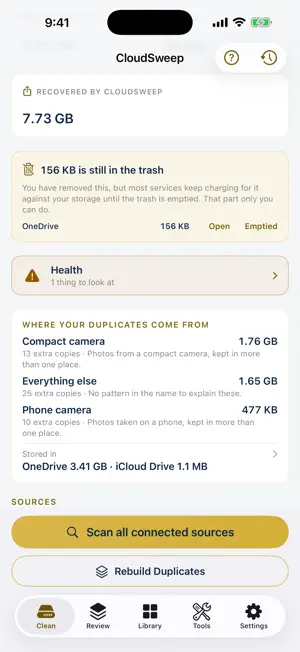
Finds the same photo across your sources A photo on your iPhone that also sits in OneDrive or iCloud Drive is now matched by its content, not its name, and without downloading anything. The Clean tab says how many matches were found across sources. Move between clouds A new Tools tab. Copy photos and videos from OneDrive, a Google Photos export or an Amazon Photos folder into your Photos library, or back up your Photos library to your iCloud Drive folder. Every copy is read back and compared byte for byte before it counts, and nothing leaves the source until you confirm the cleanup afterwards. Let your Mac do the heavy reading Most iPhone originals live in iCloud, so the phone cannot read them without downloading each one. Point CloudSweep on your Mac and iPhone at one shared folder, and the Mac reads the originals it already holds. Settings, "Share the work with your Mac". Where your duplicates come from, and where they sit The Clean tab names the cause of your duplicates, such as photos copied off a camera or an archive filed into two clouds. A tap shows which source holds the space, split into what CloudSweep can remove and what you would clear yourself. Recently removed Every sweep now records the files it removed. Open Sweep history to see what went, with sizes and dates, and the way to get each one back. Rebuild Duplicates, faster and lighter Rebuilding duplicate groups now rebuilds them first, uses about a third of the memory it used to, and no longer keeps the old groups on large libraries. Junk photos, and Pause Long press a copy in a group to mark it as junk, review the whole set, then clear it. Any scan can be paused and picks up where it stopped. Health One row shows anything that needs attention, each item with the action that fixes it. Also - Protected albums: Favorites and iCloud Shared Albums are left out of scans, on by default - Video duplicates must match on every frame checked, not just one, and video length is shown on group rows - Filters for screenshots, the least sharp copy, large files, and files not touched in a while - Keeper rules: keep the largest, the sharpest, the newest, or the copy on this device - Export the duplicates found as a CSV from Settings - The scan header now says which step is running - Settings shows how much of the free allowance is left. Scanning and reviewing duplicates stay free - Confirmations always show Cancel, and files that could not be found are no longer counted as removed
App privacy
The developer, Atchutarao Killamsetty, reported these privacy practices to Apple.
Data Not Collected
The developer does not collect any data from this app.
Alternatives to CloudSweep
Looking for apps like CloudSweep? Here are 6 similar apps on the App Store. The highest rated is Duplicate Storage Cleaner AI (5.0/5), and all 6 are free to download.
-
 Duplicate Storage Cleaner AI
5.0
Duplicate Storage Cleaner AI
5.0
-
 FlyArchive
-
 PicSweep – Photo Cleaner
-
 Trimbyte: Storage Cleaner
-
 Cleaner 360 - Clean Up Phone
-
 Highon BMS
| App | Rating | Price | Last updated | Compare |
|---|---|---|---|---|
| CloudSweep | – | Free | September 9, 2026 | |
| Duplicate Storage Cleaner AI | 5.0 / 5 (2) | Free | Sep 23, 2026 | Compare |
| FlyArchive | – | Free | Sep 22, 2026 | Compare |
| PicSweep – Photo Cleaner | – | Free | Jan 25, 2026 | Compare |
| Trimbyte: Storage Cleaner | – | Free | Jun 16, 2026 | Compare |
| Cleaner 360 - Clean Up Phone | – | Free | May 5, 2026 | Compare |
| Highon BMS | – | Free | Jul 14, 2025 | Compare |
Compare CloudSweep with the top alternatives: ratings, updates, ASO score and keyword gaps →