

Encode Keyboard
Dat Thanh Nguyen Utilities iPhoneiPadiPod touch
Encode Keyboard is a free Utilities app for iPhone and iPad by Dat Thanh Nguyen. Requires iOS 18.0. Updated September 18, 2026.
- Price
- Free
- on the App Store
- Size
- 10 MB
- Age 4+
- Updated
- Sep 18
- 2026 · v1.5.1
Screenshots


About Encode Keyboard
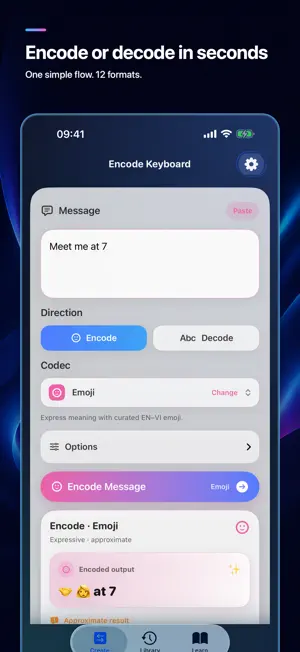
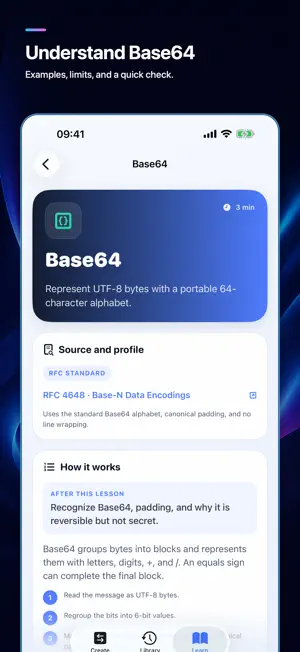
Encode Keyboard lets you encode and decode text in the app or directly from a custom iOS keyboard. TYPE, CONVERT, CONTINUE • Type in a supported text field, choose Encode or Decode, then select a codec • Tap Convert to replace the current line before the cursor • Undo the last conversion instantly • Switch between English and Vietnamese input TWELVE FORMATS, HONEST LABELS • RFC 4648 Base64, Base64URL, Base32, and Base16/Hex • RFC 3986 URL Percent and International Morse • UTF-8 Binary as an educational app profile; ROT13 as a classic convention • Emoji, Kaomoji, Leetspeak, and your own Personal Code for expression CREATE AND LEARN IN THE APP • Convert text with one clear direction-and-codec flow • Copy, share, or save a result; revisit favorites and recent history • Learn all 12 formats with specification sources, canonical examples, practice, and quick checks • Create, import, and export custom Emoji mappings and Personal Codebooks PRIVATE BY DESIGN All transformations run on device. No account or Full Access is required. There are no ads, analytics, or subscriptions. The keyboard has no network access and does not collect what you type. IMPORTANT Encoding is not encryption. Do not use these formats to protect passwords or sensitive information. Byte-based standard formats, Binary, and ROT13 can restore valid text exactly. Morse may normalize accents, case, and spacing. Emoji, Kaomoji, Leetspeak, and Personal Code are approximate or require the same codebook. Third-party keyboards are unavailable in secure text fields and some app-specific fields because of iOS restrictions.
What’s new
Version 1.5.1 · Updated September 18, 2026
Encode Keyboard 1.5.1 improves conversion reliability: • Convert results in the opposite direction with one tap for 8 formats. Morse normalization still applies. • Copy and Paste preserve spaces and line breaks; whitespace-only results now have a clear notice. • Fixed current-line keyboard conversion with Windows-style (CRLF) line breaks. • Added selection guards and safer Undo checks when the text or cursor context changes. • Clearer English/Vietnamese errors and optional Morse normalization details. • Convert remains one tap, offline, with no Full Access required.
App privacy
The developer, Dat Thanh Nguyen, reported these privacy practices to Apple.
Data Not Collected
The developer does not collect any data from this app.
Alternatives to Encode Keyboard
Looking for apps like Encode Keyboard? Here are 6 similar apps on the App Store. The highest rated is Scrombler (5.0/5), and all 6 are free to download.
-
 Scrombler
5.0
Scrombler
5.0
-
 输入法增强 - 拼音词库
-
 Grapheme — Unicode Catalog
-
 UKeyboard - Character keyboard
-
 SVXPortal
-
 SMARTA Audio
| App | Rating | Price | Last updated | Compare |
|---|---|---|---|---|
| Encode Keyboard | – | Free | September 18, 2026 | |
| Scrombler | 5.0 / 5 (2) | Free | Apr 7, 2026 | Compare |
| 输入法增强 - 拼音词库 | – | Free | Sep 19, 2026 | Compare |
| Grapheme — Unicode Catalog | – | Free | Aug 2, 2026 | Compare |
| UKeyboard - Character keyboard | – | Free | Sep 23, 2026 | Compare |
| SVXPortal | – | Free | Jun 5, 2026 | Compare |
| SMARTA Audio | – | Free | Apr 30, 2026 | Compare |
Compare Encode Keyboard with the top alternatives: ratings, updates, ASO score and keyword gaps →