

Lexa Reader
培培 王 Productivity iPhoneiPadiPod touch
Lexa Reader is a free Productivity app for iPhone and iPad by 培培 王. Requires iOS 15.0. Updated October 19, 2026.
- Price
- Free
- on the App Store
- Size
- 9 MB
- Age 4+
- Updated
- Oct 19
- 2026 · v2.0.0
Screenshots
About Lexa Reader
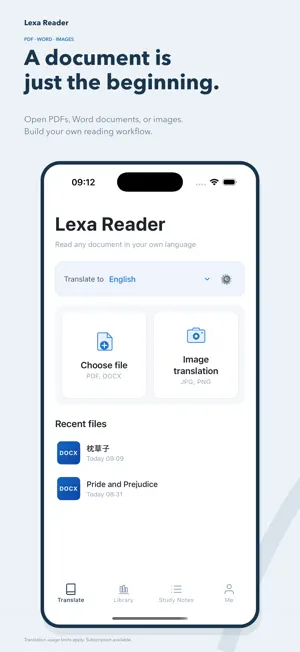
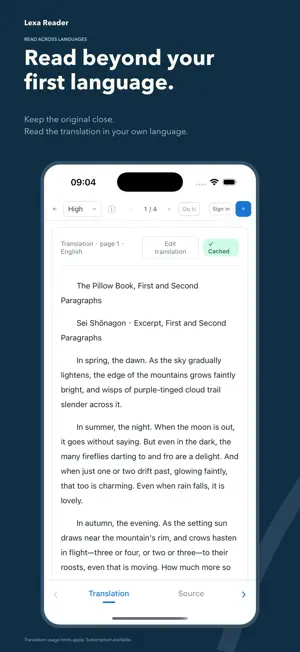
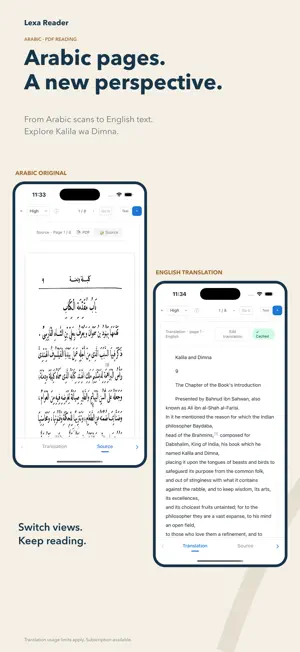
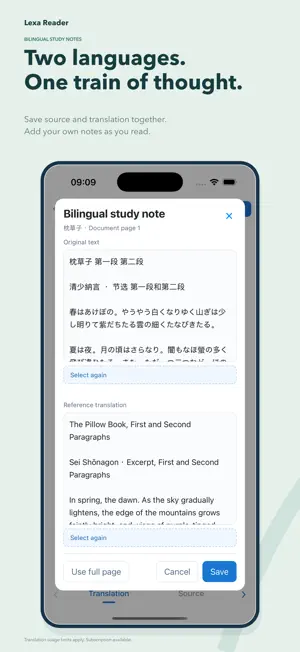
Lexa Reader — Read beyond your first language. Open PDFs, Word documents, or images and read with the original close at hand. Move from translation to editing, bilingual notes, and Word export in one reading workflow. SUPPORTED TRANSLATION LANGUAGES Choose from Chinese, English, Arabic, Japanese, Korean, Thai, French, Spanish, German, Russian, Indonesian, and more. READ WITH THE ORIGINAL • Import PDFs, Word documents, and images. • Recognize and translate text from scanned pages. • Read side by side or switch between source and translation, depending on your device and document. • Choose Smart, Advanced, or Visual translation modes. • Use cross-page context for continuity, with the next translation prepared after the current page. REFINE AS YOU READ • Edit translated text and footnotes directly in the reader. • Save your changes or restore the original translation. • Pair source and translation excerpts in bilingual study notes. • Add your own comments for later reference. KEEP YOUR READING ORGANIZED • Add documents to your device’s bookshelf and continue reading. • Build a personal glossary to help maintain consistent terminology. • Listen to source text or translations with read-aloud tools. EXPORT TO WORD Export source text, translations, or bilingual content, including saved translation edits. Supported headings, paragraphs, and footnotes can be carried into the export. Continue refining the layout in Word or another compatible editor. INTERFACE AND USAGE The interface is available in English and Simplified Chinese. New users confirm their translation language on first launch and can change it later. Translation and OCR require an internet connection and send relevant page text or images for processing. Automatically preparing upcoming translations may use the allowance for the selected tier. Translation and recognition results may contain errors. Check important passages against the original. SUBSCRIPTIONS Three monthly subscription plans provide different usage allowances. Plan names, prices, and allowances are displayed in the app before purchase. Payment is charged to your Apple Account. Subscriptions renew automatically unless cancelled at least 24 hours before the current subscription period ends. Manage or cancel your subscription in your Apple Account settings. Cancelling renewal does not end access during the current paid period. Privacy Policy: https://aybeidanci.com/privacy.html Terms of Use: https://aybeidanci.com/terms.html
What’s new
Version 2.0.0 · Updated October 19, 2026
Welcome to Lexa Reader 2.0. • Organize documents on your device’s bookshelf and continue reading. • Save paired source and translation excerpts with your own study notes. • Edit translations and footnote text directly in the reader, then export your changes. • Enjoy improved cross-page continuity and automatic preparation of the next translation. • Confirm your preferred translation language on first launch. • Explore refined bookshelf, document details, and English interfaces.
App privacy
The developer, 培培 王, reported these privacy practices to Apple.
Data Linked to You
The following data, which may be collected and linked to your identity, may be used for the following purposes:
- Contact Info: Email Address
- Identifiers: User ID
- Usage Data: Product Interaction
Used for: App Functionality
Alternatives to Lexa Reader
Looking for apps like Lexa Reader? Here are 6 similar apps on the App Store. The highest rated is Pomodoro Clock-Focus Timer (5.0/5), and 5 of the 6 are free to download.
-
 微记忆 • 便签笔记本与记账打卡日历
4.8
微记忆 • 便签笔记本与记账打卡日历
4.8
-
 Muharram Karbala Message Image
-
 MarsChat
-
 小北云盘
小北云盘
-
 Pomodoro Clock-Focus Timer
5.0
Pomodoro Clock-Focus Timer
5.0
-
 Doco Translate: PDF Translator
| App | Rating | Price | Last updated | Compare |
|---|---|---|---|---|
| Lexa Reader | – | Free | October 19, 2026 | |
| 微记忆 • 便签笔记本与记账打卡日历 | 4.8 / 5 (8) | 2.99 USD | Aug 18, 2025 | Compare |
| Muharram Karbala Message Image | – | Free | Jun 23, 2026 | Compare |
| MarsChat | – | Free | Dec 15, 2023 | Compare |
| 小北云盘 | – | Free | Jan 3, 2024 | Compare |
| Pomodoro Clock-Focus Timer | 5.0 / 5 (1) | Free | Jun 6, 2026 | Compare |
| Doco Translate: PDF Translator | – | Free | Oct 19, 2026 | Compare |
Compare Lexa Reader with the top alternatives: ratings, updates, ASO score and keyword gaps →