

Minus 5
Victor Florian Productivity iPhoneiPadiPod touchMacApple Watch
Minus 5 is a free Productivity app for iPhone and iPad by Victor Florian. Rated 5.0/5 from 1 ratings. Requires iOS 17.0. Updated October 25, 2026.
- Rating
- 5.0
- 1 ratings
- Price
- Free
- on the App Store
- Size
- 8 MB
- Age 4+
- Updated
- Oct 25
- 2026 · v1.11
Screenshots
About Minus 5
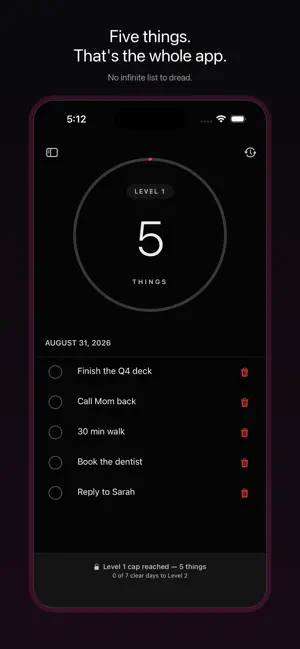
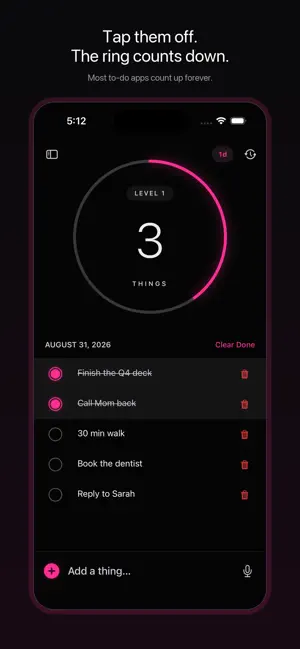
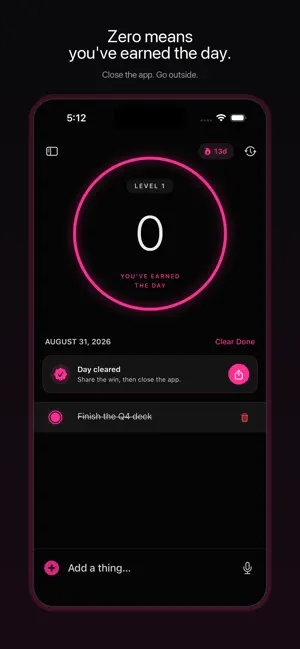
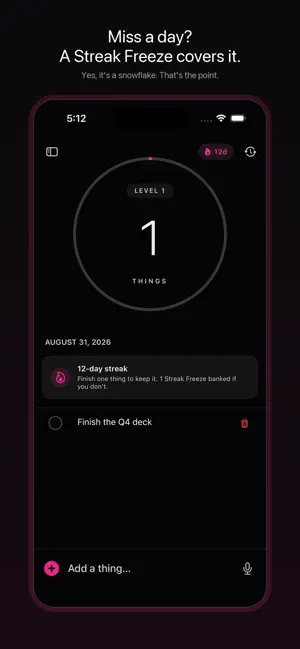
Minus 5 is a daily to-do list with one rule: five things. That's it. Every other task app gives you infinite room, and infinite room is how you end up with a 40-item list you're too tired to look at. Minus 5 gives you five slots. Most to-do lists count up forever. This one counts down to zero. If you open your task manager, feel your stomach drop, and close it again — this is built for you. — THE RING — One neon progress ring is the entire interface. The big number in the middle is what's LEFT, not what you've done. When it hits zero: "you've earned the day." Close the app. Go outside. — FIVE SLOTS, ON PURPOSE — The cap isn't a limitation, it's the product. Five is roughly what a person actually finishes in a day. Everything beyond five is a wish list pretending to be a plan. — STREAKS THAT DON'T PUNISH YOU — Finish at least one thing a day and your streak grows. Miss a day and a Streak Freeze covers you automatically — you earn one every 10 days and can bank two. No shattered-streak animation, no guilt trip, nothing to buy back. A day off isn't a character flaw, it's a Tuesday. An optional evening nudge (off by default, at a time you pick) tells you what's still open before midnight. — AGE BADGES — Anything you don't finish carries into tomorrow with a small 1d / 4d / 2w tag, warming from grey to red the longer it sits. A nudge, not a punishment — delete what's not going to happen. You'll feel better. — LEVELS — Consistency unlocks capacity. Start at 5 slots. Clear your whole list seven days in a row and the next level opens: 7 slots at Level 2, 11 at Level 3, and up. The app rewards follow-through, not list-making. — RECURRING THINGS — Daily, weekly, monthly, or custom-day things that appear on schedule, with reminders that say exactly what — no generic "tackle your things." Stretch every morning. Pay rent on the 1st. Gym Mon/Wed/Fri. — PROGRESS — A 30-day curve, your weekly rhythm, and a consistency grid where each square is one week of the year. Best streak, active days, and how many days you cleared all five. Honest numbers, no dashboards. — RANKINGS — See how your streak stands against everyone else's, worldwide and in your own country. Free, anonymous, and you can leave any time. You get a made-up name like "Bright Otter" plus a few digits of your own — no real names, no accounts, no email. — WIDGETS & LOCK SCREEN — Home Screen (small and medium), and all three Lock Screen styles — circular, rectangular, and inline. Your ring, glanceable, without opening anything. — SIRI & SHORTCUTS — "Hey Siri, add a thing to Minus 5." Works from the Lock Screen, AirPods, CarPlay, anywhere Siri lives. — APPLE WATCH — A real Watch app and complication. Check things off from your wrist. — EXPORT — Copy your list as Markdown, share it, or send things straight to Things 3 or Reminders. Your data is portable. — CALENDAR MIRROR (optional) — Pull today's events in as read-only one-liners ("Meeting · 6–8pm"). They don't count toward your five and don't carry over — just context. — iCLOUD SYNC — Your things sync privately across your devices through your own iCloud account. No accounts, no tracking, no telemetry, no analytics. The only thing that ever leaves your iCloud is a streak number for Rankings, under a made-up name — and you can leave them any time. — THEME & ACCESSIBILITY — Light, Dark, or System. Nine neon accent colors with automatic contrast. Text size override (Default / Large / Larger / Huge). Full VoiceOver support. — MINUS 5 PRO — The five things stay free, forever. Pro is a one-time unlock — bought once, not rented — adding progress stats and streak history, the Apple Watch app and complication, the calendar mirror, unlimited recurring templates, and custom reminder times. Widgets, Siri, export, Rankings and iCloud sync stay free for everyone. No ads. No subscription. No analytics. No tags. No projects. Just five things.
What’s new
Version 1.11 · Updated October 25, 2026
Minus 5 v1.11 — everyone on the board, and Pro for 99¢. • Rankings, with everyone on them. You're on the board from today, under a made-up name like "Bright Otter" — no Apple ID, no email, nothing that points back to you. Only your streak, your country and that name are shared. If you'd rather not be on it, tap the pencil on the Rankings screen and leave; your row is deleted, not hidden, and the app remembers. • Nobody falls off. A quiet week no longer drops you from the boards. Everyone keeps their place and is ranked on their streak. • The top ten, and you. Each board shows the ten longest streaks. If you're further down, your own row sits underneath with your number — #37 worldwide, say — so you always know where you stand. • Share your day. Clear your five and, now and then, Minus 5 offers your day as a card to send to a friend or post. One tap, or "Not now". • A Sunday recap. If you've allowed notifications, Sunday evening brings your week in one line: how many days you got things done, your streak, and where you rank. • Minus 5 Pro is now $0.99, once. Progress, the full Logbook, the Apple Watch app, the calendar mirror, unlimited recurring and custom reminder times. The daily five stay free, as always.
App privacy
The developer, Victor Florian, reported these privacy practices to Apple.
Data Not Linked to You
The following data, which may be collected but is not linked to your identity, may be used for the following purposes:
- Diagnostics: Crash Data, Performance Data, Other Diagnostic Data
- Identifiers: User ID
- Other Data: Other Data Types
Used for: Analytics, App Functionality
Alternatives to Minus 5
Looking for apps like Minus 5? Here are 6 similar apps on the App Store. The highest rated is The BitBinder (5.0/5), and 4 of the 6 are free to download.
-
 The BitBinder
5.0
The BitBinder
5.0
-
 TypeFlow Chinese
2.9
TypeFlow Chinese
2.9
-
 Tracker Note
-
 Handwritten Quick Notes: Jot
-
 Just a Simple Video Converter
5.0
Just a Simple Video Converter
5.0
-
 Hexa Timer: Focus & Pomodoro
5.0
Hexa Timer: Focus & Pomodoro
5.0
| App | Rating | Price | Last updated | Compare |
|---|---|---|---|---|
| Minus 5 | 5.0 / 5 (1 rating) | Free | October 25, 2026 | |
| The BitBinder | 5.0 / 5 (5) | Free | Oct 10, 2026 | Compare |
| TypeFlow Chinese | 2.9 / 5 (8) | Free | Aug 2, 2026 | Compare |
| Tracker Note | – | 0.99 USD | Aug 16, 2026 | Compare |
| Handwritten Quick Notes: Jot | – | Free | Sep 22, 2026 | Compare |
| Just a Simple Video Converter | 5.0 / 5 (1) | 0.99 USD | Jul 18, 2026 | Compare |
| Hexa Timer: Focus & Pomodoro | 5.0 / 5 (2) | Free | Oct 14, 2026 | Compare |
Compare Minus 5 with the top alternatives: ratings, updates, ASO score and keyword gaps →