

QR Pocket Wallet
Hyunwoo Lee Utilities iPhoneiPadiPod touch
QR Pocket Wallet is a free Utilities app for iPhone and iPad by Hyunwoo Lee. Requires iOS 17.0. Updated October 29, 2026.
- Price
- Free
- on the App Store
- Size
- 7 MB
- Age 4+
- Updated
- Oct 29
- 2026 · v1.1.1
Screenshots


About QR Pocket Wallet
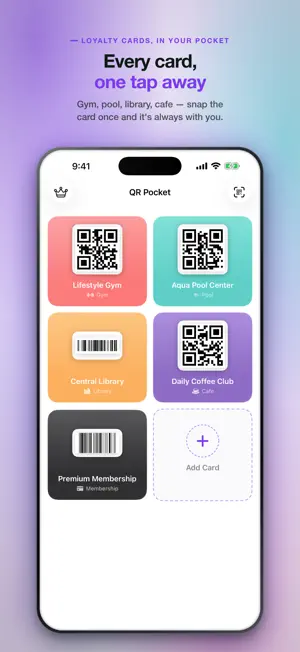
FEATURES - Auto-detect from photos: pick a card photo, we extract the QR or barcode on-device using Apple's Vision framework. - Full-screen display: tap a card to see the QR full-screen with max brightness for fast scanning. - Home & lock screen widgets: iOS 17+ widgets in small, medium, and large sizes. Pick your favorite card to show. - Widget tap goes straight to that card — no hunting through a list. With App Lock on, it opens after Face ID. - Category labels: gym, pool, library, cafe, membership, study cafe, PC cafe, or custom. Quick to find when you're in line. - Works offline: QR rendering is 100% on-device. No server, no account, no internet required. SUPPORTED FORMATS QR Code, Code 128, Code 39, EAN-13, EAN-8, PDF417, Aztec, UPC-E, ITF-14 Data Matrix can be read from a photo, but cannot be shown on screen yet. PRIVACY FIRST - Your card data stays on-device. No server, no account, no ad SDK. - Photos selected from your library are processed in-memory and never copied to app storage. - Widget sharing uses iOS App Groups (on-device only). - No ads and no tracking. The app makes no advertising network calls and never asks for tracking permission. - iCloud sync uses your own iCloud storage. We cannot read it. SUPPORTER PACK (OPTIONAL ONE-TIME PURCHASE) - iCloud Sync and App Lock are free for everyone: the same cards on your other devices through your own iCloud (sync, not a backup — a card you delete is deleted everywhere), and your codes behind Face ID in the app and the widget. - The Supporter Pack is a one-time purchase that supports development and unlocks three alternate app icons (Sunny, Mint, Mono) plus future Supporter extras. - Everything above stays free, forever. Not a subscription. HOW TO USE 1. Tap + and pick a card photo from your library 2. We auto-detect the QR or barcode 3. Name it, pick a category, save 4. At the counter: tap card, see full-screen, scan 5. Add a widget to home or lock screen for one-tap access
What’s new
Version 1.1.1 · Updated October 29, 2026
Purchase restore and refund handling are now more reliable.
App privacy
The developer, Hyunwoo Lee, reported these privacy practices to Apple.
Data Not Collected
The developer does not collect any data from this app.
Alternatives to QR Pocket Wallet
Looking for apps like QR Pocket Wallet? Here are 6 similar apps on the App Store. The highest rated is AirDash File Sharing (4.8/5), and all 6 are free to download.
-
 QR Pocket
-
 TVSync: TV Remote Control
-
 Beam Universal Smart TV Remote
-
 AirDash File Sharing
4.8
-
 Colorix.com Pro
4.0
-
 Photo Holder
| App | Rating | Price | Last updated | Compare |
|---|---|---|---|---|
| QR Pocket Wallet | – | Free | October 29, 2026 | |
| QR Pocket | – | Free | Apr 21, 2024 | Compare |
| TVSync: TV Remote Control | – | Free | Sep 24, 2026 | Compare |
| Beam Universal Smart TV Remote | – | Free | Oct 27, 2026 | Compare |
| AirDash File Sharing | 4.8 / 5 (22) | Free | Sep 2, 2024 | Compare |
| Colorix.com Pro | 4.0 / 5 (1) | Free | Jul 23, 2025 | Compare |
| Photo Holder | – | Free | Jun 26, 2026 | Compare |
Compare QR Pocket Wallet with the top alternatives: ratings, updates, ASO score and keyword gaps →