

SoundMess Lab: SPL Meter
Chih Han Lin Music iPhoneiPadiPod touch
SoundMess Lab: SPL Meter is a free Music app for iPhone and iPad by Chih Han Lin. Requires iOS 17.0. Updated October 20, 2026.
- Price
- Free
- on the App Store
- Size
- 7 MB
- Age 4+
- Updated
- Oct 20
- 2026 · v1.1.0
Screenshots


About SoundMess Lab: SPL Meter
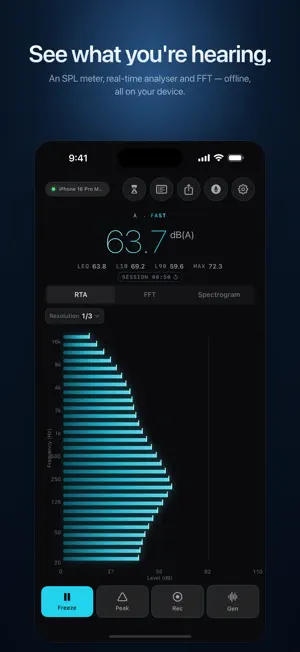
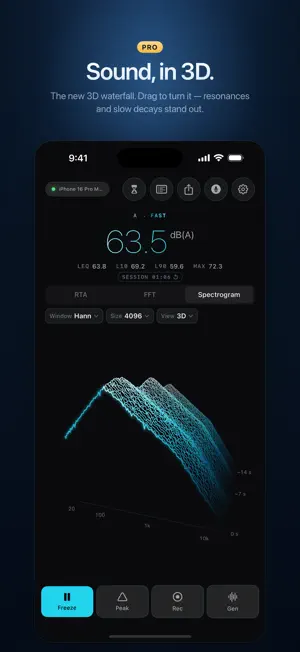
SoundMess Lab is a careful, offline sound measurement tool for iPhone and iPad. Built for musicians, producers, podcasters, acoustic enthusiasts, and anyone who wants to understand what they're hearing. WHAT IT MEASURES • SPL meter — A/C/Z weighting, Fast/Slow/Impulse time weighting, Leq, L10, L90, Lmax, Lmin, Lpeak, with one-tap session reset • Real-time analyser — 1/3 to 1/24 octave bands with peak hold • FFT — Hann, Hamming, Blackman, Blackman-Harris windows, sizes up to 65,536, exponential averaging • Spectrogram — a 3D waterfall you can turn with a drag, or the classic 2D live and rolling view, with six tuned colour palettes (Pro) • RT60 — per-octave-band reverberation time, ISO 3382-2 T20 method with interrupted pink noise (Pro) • Signal generator — sine, pink, white, swept sine (Pro) • Reference-tone calibration — trim every reading against a known 94 dB source (Pro) SOUND IN 3D The 3D waterfall turns each moment of sound into a ridge line, with frequency across and time stepping back, so room resonances and slow decays stand out at a glance. Drag to change the viewing angle. Free users see an animated preview on the Spectrogram tab; Pro unlocks the full, live view. SIX THEMES, TWO LAYOUTS Five themes are free: Studio Cyan, Aurora, Solar Flare, Graphite Safety and Arctic Cobalt, three dark and two light. Pro adds Tactical Violet, a dark console theme with its own layout for every screen, Japanese labels and small English captions. Preview it for 15 seconds from Settings → Appearance. Turn your iPhone sideways for a landscape layout that gives the chart room. On iPad it works in any orientation and in multiple windows. BUILT CAREFULLY SoundMess Lab implements the IEC 61672 A/C/Z weighting curves with published coefficients to 10 decimals, Paul Kellett pink noise, and ISO 3382-2 T20 linear regression for RT60 fitting. Every reading shows a confidence indicator so you know which frequencies you can trust — built-in iPhone microphones have known hardware limits below 500 Hz and above 8 kHz, and we don't pretend otherwise. HONEST ABOUT LIMITS Every phone microphone has physical constraints. SoundMess Lab shows you where it can be trusted and where it can't. It's a serious listening tool for creative work — not a replacement for a calibrated measurement microphone in professional field acoustics or compliance settings. PRIVACY BY DESIGN Nothing you measure ever leaves your device. No account, no analytics, no ads, no cloud. Audio is only written to disk when you start a recording, and those files stay in your app sandbox until you choose to share them. FREE INCLUDES SPL meter (with L10 / L90 / session reset), 1/3-octave RTA, FFT (4096 · Hann), peak hold, Freeze, five themes, a preview of the 3D waterfall, and a short try of Tactical Violet. PRO UNLOCKS Spectrogram (3D waterfall, plus 2D live + rolling), RT60 room-acoustics measurement, fractional RTA (1/6, 1/12, 1/24), advanced FFT (sizes up to 65,536, Hamming / Blackman / Blackman-Harris windows, exponential averaging), signal generator (sine / pink / white / sweep), recording history with notes / tags / baselines and RTA / FFT A/B comparison, PNG / CSV / PDF export and WAV sharing, automatic device compensation, reference-tone calibration, external mic calibration-curve import (.txt / .frd), and the Tactical Violet theme with its own console layout. PRICING • One-time Lifetime purchase · Family Sharing supported No subscription, no auto-renew. BUILT FOR THE WORK Most sound apps optimise for the spike — big colourful needles and "how loud is a rock concert" trivia. SoundMess Lab is built for the work: reading a room, shaping a mix, checking a speaker, measuring a decay, teaching acoustics. Careful DSP, calm UI, no noise.
What’s new
Version 1.1.0 · Updated October 20, 2026
See sound in 3D. Version 1.1.0 adds a 3D waterfall spectrogram: each moment becomes a ridge line, so resonances and decays stand out at a glance. Drag to change the angle, or switch back to the 2D view. The waterfall is part of Pro; free users get an animated preview on the Spectrogram tab. Meet Tactical Violet, a new Pro theme with its own console layout for every screen, Japanese labels and small English captions. You can preview it for 15 seconds from Settings → Appearance. Also in this update: • Landscape layouts on iPhone, so the chart gets room when you turn the phone sideways • Dropdown menus stay steady and easy to pick from while the meters update • Larger tap targets, plus Dynamic Type and VoiceOver fixes • On iPad, the theme preview and Pro screen now stay in the window you opened them from
App privacy
The developer, Chih Han Lin, reported these privacy practices to Apple.
Data Not Collected
The developer does not collect any data from this app.
Alternatives to SoundMess Lab: SPL Meter
Looking for apps like SoundMess Lab: SPL Meter? Here are 6 similar apps on the App Store. The highest rated is Ernie Radio (5.0/5), and 5 of the 6 are free to download.
-
 Reverb Room RT60 Calculator
-
 Audio Spectrum Pro: Analyzer
-
 DFTM Audio Tools
-
 Ernie Radio
5.0
Ernie Radio
5.0
-
 RIP DJ
-
 Visual Reverb AUv3 Plugin
5.0
Visual Reverb AUv3 Plugin
5.0
| App | Rating | Price | Last updated | Compare |
|---|---|---|---|---|
| SoundMess Lab: SPL Meter | – | Free | October 20, 2026 | |
| Reverb Room RT60 Calculator | – | Free | Jun 11, 2026 | Compare |
| Audio Spectrum Pro: Analyzer | – | Free | Jul 7, 2026 | Compare |
| DFTM Audio Tools | – | Free | Jun 16, 2026 | Compare |
| Ernie Radio | 5.0 / 5 (2) | Free | Feb 1, 2026 | Compare |
| RIP DJ | – | Free | Apr 21, 2026 | Compare |
| Visual Reverb AUv3 Plugin | 5.0 / 5 (1) | 7.99 USD | Sep 3, 2025 | Compare |