
Semora: AI Study Planner
Rajesh Panta Education iPhoneiPadiPod touchApple Watch
Semora: AI Study Planner is a free Education app for iPhone and iPad by Rajesh Panta. Rated 4.9/5 from 10 ratings. Requires iOS 15.1.
- Rating
- 4.9
- 10 ratings
- Price
- Free
- on the App Store
- Size
- 45 MB
- Age 4+
- Updated
- Oct 5
- 2026 · v1.16
Screenshots

About Semora: AI Study Planner
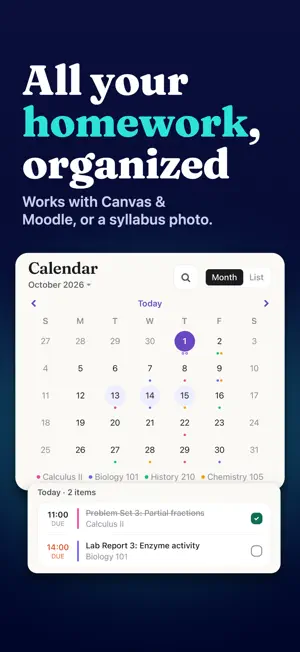
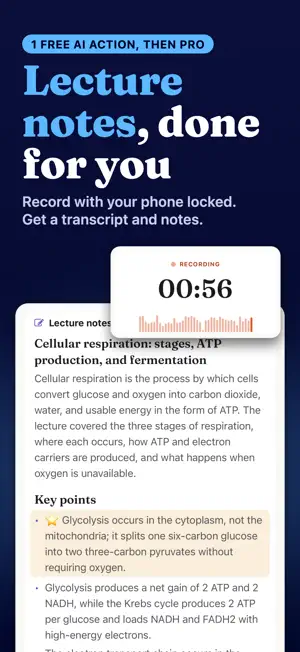
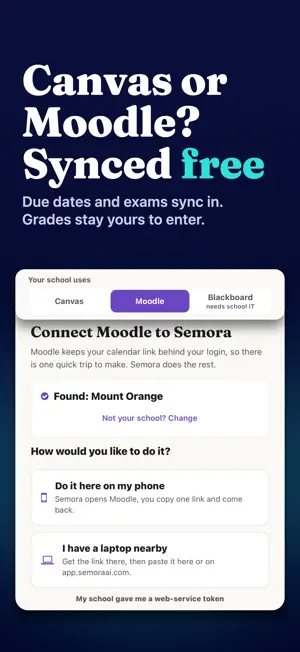
Semora is an AI student planner, syllabus scanner, Canvas assignment tracker, lecture recorder, and study-notes app for college students. Scan a syllabus from a photo or PDF, connect Canvas, Blackboard or Moodle, record lectures, create transcripts and notes, track homework, exams and grades, and organize every deadline in one place. You review everything before it is saved. Turn your syllabus into an organized semester. Semora is an AI student planner for assignments, exams, grades, deadlines, classes, and study planning — all in one place. Take a photo of your syllabus, upload a PDF, or paste the text. Semora identifies assignments, exams, quizzes, projects, readings, due dates, class meetings, office hours, and grade weights. You review everything before it's saved. SEE YOUR SEMESTER CLEARLY Open Semora and know what matters next. Next Up shows your upcoming work. Overdue assignments are flagged clearly, and you can see what's due today, this week, and later without scrolling through a long task list. Enter a score and Semora automatically updates your weighted course grade, including your current percentage and letter grade based only on work that has actually been graded. Your academic calendar organizes deadlines, class meetings, and office hours by course. CONNECT YOUR CLASSES Connect Canvas, Blackboard, or Moodle to automatically bring your classes and assignments into Semora. All three are included on the free plan, with no limit on how many classes you sync. Join Course Spaces shared by classmates to keep course deadlines and assignments in sync. Pro members can create and host Course Spaces. STUDY, DON'T JUST PLAN Semora Pro includes: • Smart Plan built around your real deadlines • AI Tutor grounded in your syllabus and course materials • Lecture recording and AI study notes • Flashcards with spaced repetition • Practice quizzes • Grade forecasting and custom grade scales • Academic Risk alerts • Workload planning • Progress Insights • Focus timer • Customizable reminders • Calendar sync • Unlimited courses and semesters • Course Space hosting ON ALL YOUR DEVICES Your semester stays synced across iPhone, iPad, Apple Watch, and the web with one account. Add the Next Up widget to your Home Screen to see your next deadline without opening Semora. THE FREE PLAN DOESN'T EXPIRE Free includes: • Unlimited classes synced from Canvas, Blackboard, or Moodle • One manually added course within one semester • One lifetime AI action — use it for a syllabus scan, lecture recording, or turning a document into notes • Assignment and deadline tracking • Weighted grade tracking • Academic calendar • Same-day reminders • Joining shared Course Spaces Upgrade to Semora Pro for unlimited manually added courses and semesters, more AI actions, and advanced study tools. Scan your syllabus. Organize your semester. Know what to do next. SEMORA PRO • Monthly: $4.99/month • Annual: $29.99/year Semora Pro is an auto-renewable subscription. Payment is charged to your Apple ID and renews automatically unless auto-renew is turned off at least 24 hours before the end of the current subscription period. You can manage or cancel your subscription in your Apple ID subscription settings. Privacy Policy: https://semoraai.com/privacy Terms of Use (EULA): https://www.apple.com/legal/internet-services/itunes/dev/stdeula/ Questions or feedback? [email protected]
Ratings & reviews
4.9
10 ratings
What’s new
Version 1.16 · Updated October 5, 2026
The Back button works every time again on iOS 26 and later. Buttons respond on the first tap: sheets have Cancel or Close, the keyboard no longer swallows a tap or hides the Add button, and a quick double tap saves once. Opening a shared course link works again. Plus small fixes and improvements.
App privacy
The developer, Rajesh Panta, reported these privacy practices to Apple.
Data Linked to You
The following data, which may be collected and linked to your identity, may be used for the following purposes:
- Contact Info: Email Address
- Identifiers: User ID
Used for: App Functionality
Data Not Linked to You
The following data, which may be collected but is not linked to your identity, may be used for the following purposes:
- Identifiers: Device ID
- Usage Data: Product Interaction
Used for: Analytics, App Functionality
Alternatives to Semora: AI Study Planner
Looking for apps like Semora: AI Study Planner? Here are 6 similar apps on the App Store. The highest rated is CourseLink: AI Study Planner (5.0/5), and all 6 are free to download.
-
 Smart Syllabus
-
 Sylly - AI Syllabus Scanner
4.9
Sylly - AI Syllabus Scanner
4.9
-
 Ahead - AI Student Planner
4.8
Ahead - AI Student Planner
4.8
-
 CourseLink: AI Study Planner
5.0
CourseLink: AI Study Planner
5.0
-
 CourseDeck: AI Study Planner
5.0
CourseDeck: AI Study Planner
5.0
-
 Quad: AI Syllabus Planner
5.0
Quad: AI Syllabus Planner
5.0
| App | Rating | Price | Last updated | Compare |
|---|---|---|---|---|
| Semora: AI Study Planner | 4.9 / 5 (10 ratings) | Free | October 5, 2026 | |
| Smart Syllabus | – | Free | Jul 18, 2026 | Compare |
| Sylly - AI Syllabus Scanner | 4.9 / 5 (50) | Free | Sep 18, 2026 | Compare |
| Ahead - AI Student Planner | 4.8 / 5 (25) | Free | Aug 31, 2026 | Compare |
| CourseLink: AI Study Planner | 5.0 / 5 (10) | Free | Aug 24, 2026 | Compare |
| CourseDeck: AI Study Planner | 5.0 / 5 (2) | Free | Sep 16, 2026 | Compare |
| Quad: AI Syllabus Planner | 5.0 / 5 (2) | Free | Aug 12, 2026 | Compare |