

Arlo: AI Task Manager
Leon Crassus Productivity iPhoneiPadiPod touch
Arlo: AI Task Manager is a free Productivity app for iPhone and iPad by Leon Crassus. Requires iOS 17.0. Updated May 6, 2026.
- Price
- Free
- on the App Store
- Size
- 10 MB
- Age 4+
- Updated
- May 6
- 2026 · v1.0
Screenshots
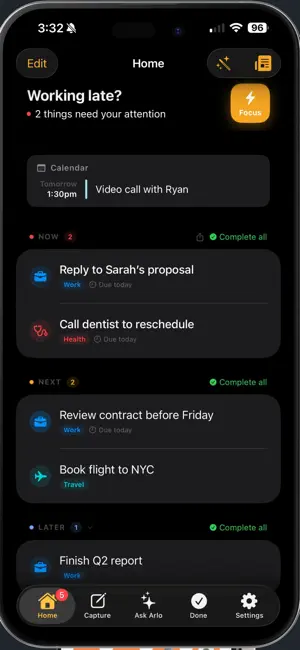
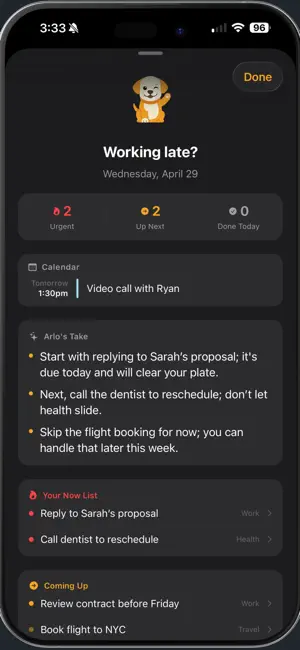

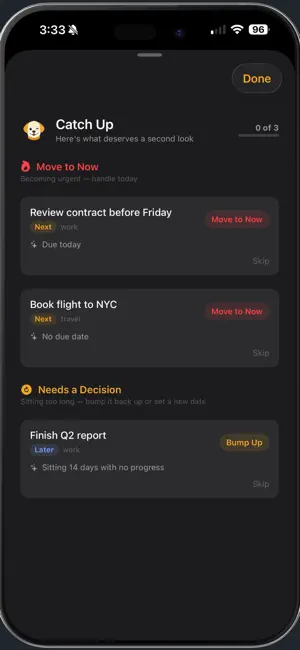
About Arlo: AI Task Manager
Focus on what actually matters. Arlo is your AI task manager. It captures everything you need to do — typed notes, voice memos, shared links, forwarded emails, Slack DMs, things you mention to it in chat — and sorts every one into three simple lists: Now (today), Next (this week), Later (everything else). No labels. No projects. No folders. The AI does the sorting. You just show up and do the work. CAPTURE ANYTHING, ANYWHERE Type it, speak it, share it, forward it. Tap the mic and Arlo turns voice memos into clean action items. Use the share sheet to send links and screenshots from any app. Forward emails to your personal @in.sendarlo.com address — anything sent there lands sorted. Connect Gmail and real emails become tasks while marketing and noise get filtered out automatically. AI THAT THINKS WITH YOU Arlo doesn't just store tasks — it has opinions. A morning briefing tells you what's urgent, what slipped, and what you can safely skip. Ask Arlo lets you chat with your tasks in plain English ("what needs a reply today?", "what's overdue?", "what can I push to next week?"). Catch Up reviews everything you've been avoiding and tells you what's become urgent, what to revive, and what to drop. The AI learns your patterns over time. FOCUS MODE Work through your Now list one task at a time. A Live Activity keeps the current task on your lock screen. Pair with iOS Focus modes — Arlo can silence everything except urgent items during a Focus session. PULSE — A SHELF FOR USEFUL NOISE Shipping updates, payment receipts, security alerts, bank notifications — Arlo files these in Pulse instead of cluttering your task list. Useful when you need them, invisible when you don't. YOUR ARLO ADDRESS Every account comes with a personal @in.sendarlo.com address. Forward an email, share a link, drop it in your email signature — anything sent there lands in Arlo, already sorted into the right bucket. CONNECT WHAT YOU USE Gmail (filtered for real emails only), Slack DMs, your calendar (read-only context — events stay in your calendar). Arlo pulls what's actionable, ignores what isn't. HOME SCREEN WIDGET Your Now list, one glance away. ARLO PREMIUM Unlimited AI, morning briefings, Catch Up, smart retriage, and Pulse. Try free for 14 days, then monthly or annual. Subscription auto-renews. Cancel anytime in Settings → Apple ID → Subscriptions. Terms of Use (EULA): https://www.apple.com/legal/internet-services/itunes/dev/stdeula/ Privacy Policy: https://privacy.sendarlo.com
App privacy
The developer, Leon Crassus, reported these privacy practices to Apple.
Data Linked to You
The following data, which may be collected and linked to your identity, may be used for the following purposes:
- Contact Info: Email Address
- User Content: Emails or Text Messages, Other User Content
- Identifiers: User ID
- Usage Data: Product Interaction
Used for: App Functionality
Alternatives to Arlo: AI Task Manager
Looking for apps like Arlo: AI Task Manager? Here are 6 similar apps on the App Store. The highest rated is Cue - Simple Task Manager (5.0/5), and all 6 are free to download.
-
 Cue - Simple Task Manager
5.0
Cue - Simple Task Manager
5.0
-
 Contask AI: Task Manager
-
 LocalPlan: AI Calendar
-
 Now: ADHD Focus & Routines
5.0
Now: ADHD Focus & Routines
5.0
-
 Drift: ADHD Task Manager
-
 LogDT • Log Monitoring
| App | Rating | Price | Last updated | Compare |
|---|---|---|---|---|
| Arlo: AI Task Manager | – | Free | May 6, 2026 | |
| Cue - Simple Task Manager | 5.0 / 5 (1) | Free | May 16, 2026 | Compare |
| Contask AI: Task Manager | – | Free | Mar 9, 2026 | Compare |
| LocalPlan: AI Calendar | – | Free | Apr 11, 2026 | Compare |
| Now: ADHD Focus & Routines | 5.0 / 5 (2) | Free | Sep 15, 2026 | Compare |
| Drift: ADHD Task Manager | – | Free | Jun 19, 2026 | Compare |
| LogDT • Log Monitoring | – | Free | Feb 5, 2026 | Compare |