

Koi AI - AI Video Studio
POLYVERSE ENTERTAINMENT INC. Photo & Video iPhoneiPadiPod touch
Koi AI - AI Video Studio is a free Photo & Video app for iPhone and iPad by POLYVERSE ENTERTAINMENT INC. Rated 4.0/5 from 95 ratings. Requires iOS 15.0.
- Rating
- 4.0
- 95 ratings
- Price
- Free
- on the App Store
- Size
- 94 MB
- Age 12+
- Updated
- Aug 27
- 2026 · v1.0.7
Screenshots


About Koi AI - AI Video Studio
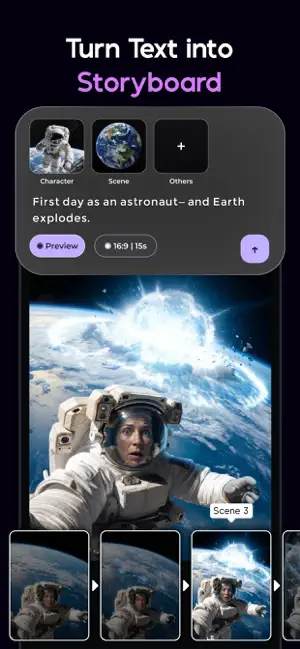
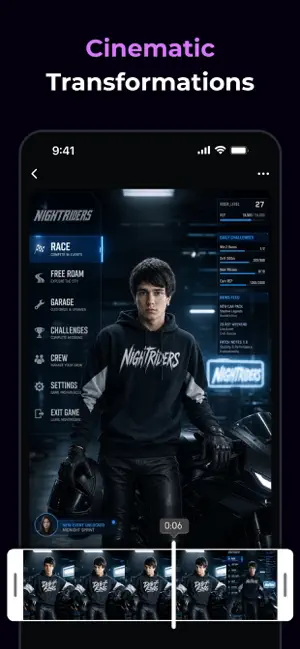
Koi is an AI video studio that fits in your pocket — and unlike most, it doesn't stop at a single clip. Its signature move: describe a scene and Koi turns it into a storyboard of connected shots, then renders them into one continuous short film with a beginning, middle, and end. That's where Koi starts — here's everything else it does. Direct your own short film Type a scene in plain words. Koi breaks it into multiple shots — each with its own characters and beat — as an editable storyboard. Rewrite any shot, see the full cost up front, then generate the whole sequence and watch it stitch into one continuous video, longer than any single AI clip. Tap a trend, get a look A constantly refreshed wall of viral presets — dance loops, transformations, stylized portraits. Pick one, drop in a photo, and your clip is ready to post. Photo or prompt to video Bring a still to life or start from a blank line. Animate any photo with natural motion, or describe a shot and let Koi build it — sketch-style or fully cinematic, no camera needed. Smart Ref locks the look to a reference image; Frames pins keyframes for precise motion. Restyle footage you already have Already shot something? Recolor it, restage it, repaint the world inside it — anime, oil, neon-noir, stop-motion. Koi remixes existing clips into looks you couldn't film. Fast, flexible, yours Renders land in the time it takes to write a caption. Tune aspect ratio, length, and reference strength so every clip stays yours, not the model's. A whole crew in your pocket: you bring the idea, Koi handles the shoot — from a single shot to a full short film. Stay Connected: We always welcome your feedback. Reach us at [email protected] Privacy policy: https://www.polyversestudio.com/koi_policy Terms of use: https://www.polyversestudio.com/koi_terms
Ratings & reviews
4.0
95 ratings
What’s new
Version 1.0.7 · Updated August 27, 2026
Bug Fixes & Interface Optimizations.
App privacy
The developer, POLYVERSE ENTERTAINMENT INC., reported these privacy practices to Apple.
Data Used to Track You
The following data may be used to track you across apps and websites owned by other companies:
- Identifiers: Device ID
Data Linked to You
The following data, which may be collected and linked to your identity, may be used for the following purposes:
- Identifiers: User ID, Device ID
- Usage Data: Product Interaction
- Diagnostics: Crash Data
- User Content: Photos or Videos
Used for: Analytics, Product Personalization, App Functionality
Alternatives to Koi AI - AI Video Studio
Looking for apps like Koi AI - AI Video Studio? Here are 6 similar apps on the App Store. The highest rated is Lenz AI: Video & Image Maker (4.8/5), and all 6 are free to download.
-
 AI Cartoon ・ Toon Me-Pixera
4.5
AI Cartoon ・ Toon Me-Pixera
4.5
-
 Lenz AI: Video & Image Maker
4.8
Lenz AI: Video & Image Maker
4.8
-
 Face Magic - AI Photo Editor
4.1
Face Magic - AI Photo Editor
4.1
-
 AIYAI - AI Photo & Video Maker
4.8
AIYAI - AI Photo & Video Maker
4.8
-
 Gen AI: AI Video Generator
3.7
Gen AI: AI Video Generator
3.7
-
 FaceAlly: AI Baby & Age Editor
3.1
FaceAlly: AI Baby & Age Editor
3.1
| App | Rating | Price | Last updated | Compare |
|---|---|---|---|---|
| Koi AI - AI Video Studio | 4.0 / 5 (95 ratings) | Free | August 27, 2026 | |
| AI Cartoon ・ Toon Me-Pixera | 4.5 / 5 (360) | Free | Aug 22, 2026 | Compare |
| Lenz AI: Video & Image Maker | 4.8 / 5 (8) | Free | Oct 3, 2026 | Compare |
| Face Magic - AI Photo Editor | 4.1 / 5 (291) | Free | Aug 20, 2026 | Compare |
| AIYAI - AI Photo & Video Maker | 4.8 / 5 (293) | Free | Sep 17, 2026 | Compare |
| Gen AI: AI Video Generator | 3.7 / 5 (7) | Free | Sep 9, 2026 | Compare |
| FaceAlly: AI Baby & Age Editor | 3.1 / 5 (58) | Free | Sep 8, 2026 | Compare |