

Dual Recorder: Duo Shot Video
POCKETECH LIMITED Photo & Video iPhoneiPadiPod touch
Dual Recorder: Duo Shot Video is a free Photo & Video app for iPhone and iPad by POCKETECH LIMITED. Rated 5.0/5 from 3 ratings. Requires iOS 17.
- Rating
- 5.0
- 3 ratings
- Price
- Free
- on the App Store
- Size
- 25 MB
- Age 4+
- Updated
- Jun 18
- 2026 · v1.1.6
Screenshots

About Dual Recorder: Duo Shot Video
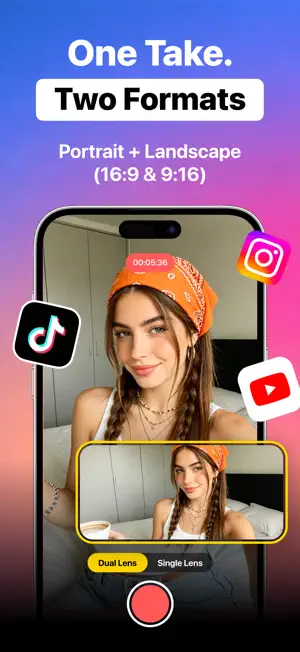
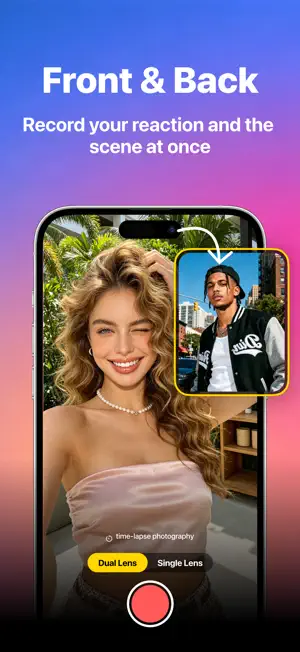
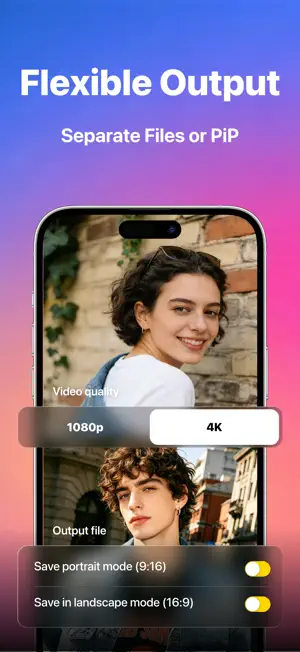
Dual Recorder: Duo Shot Video Record once. Get two videos. Ready for every platform. DuoCap lets you record landscape and portrait together in one take. Tap record to get synced 16:9 horizontal for YouTube and 9:16 vertical for TikTok, Reels & YouTube Shorts. It also records front and back cameras at once to capture scenes plus your reactions. One take outputs two synced videos ready to post. ONE TAKE. TWO SYNCHRONIZED VIDEOS Both landscape and portrait streams are natively recorded with frame-level timestamp synchronization. Export independent files optimized for immediate publishing directly to YouTube, TikTok, Reels, and Shorts. FRONT & BACK MULTI-CAM MODES (SPLIT & PIP) Split Mode: Simultaneously record rear-camera scenery and front-camera facial reactions in a stacked, split-screen layout. Pip Mode: Monitor both lenses simultaneously via an adjustable, draggable floating preview window overlay to keep yourself or the subject framed correctly. ANTI-SHARPENING PHOTO CAPTURE MODE The interface includes a dedicated photo mode that captures the native camera feed. Bypass Default Over-Sharpening:Turns off iPhone’s built-in over-sharpening to remove fake pixel edges and excess contrast, producing smooth, film-quality photos directly. PROFESSIONAL GRADE VIDEO QUALITY Resolution & Frame Rate:Configure recording up to 4K Ultra HD at stable 24, 30, or 60 FPS options.Full Apple Log supported Dual Export Formats: Save output as native MOV files or MP4 files ALL-IN-ONE CREATOR TOOLKIT Integrated manual controls and shooting utilities built directly into the native-style camera interface: Manual Camera Controls: Directly adjust hardware exposure parameters including ISO, and white balance. Built-in Teleprompter: Scroll scripts near lens for natural eye contact. PRIVACY-FIRST LOCAL PROCESSING All video capturing, encoding, and asset processing operations execute entirely locally on your device.Local Storage Only:All raw videos save locally to avoid data leaks. SUBSCRIPTION TERMS Unlock all premium features with flexible, affordable pricing: - Weekly Subscription: $3.99 | 3-Day Free Trial for new users - Lifetime Purchase: $9.99 one-time payment, permanent full access with no recurring fees - Subscription may be canceled at any time within the iTunes and App Store Apple ID Settings. All prices include applicable local sales taxes. - Payment will be charged to iTunes Account at confirmation of purchase. - Subscription automatically renews unless auto-renew is turned off at least 24-hours before the end of the current period. - The account will be charged for renewal within 24-hours prior to the end of the current period, and identify the cost of the renewal. - Subscriptions may be managed by the user and auto-renewal may be turned off by going to the user's Account Settings after purchase. - No cancellation of the current subscription is allowed during active subscription period. - Any unused portion of a free trial period, if offered, will be forfeited when the user purchases a subscription to that publication, where applicable Privacy Policy: https://pocketech-apps.notion.site/Privacy-Policy-DuoCap-348e63a30e858015830fd065a0282841 Terms of Use: https://www.apple.com/legal/internet-services/itunes/dev/stdeula/ Support Email: [email protected]
What’s new
Version 1.1.6 · Updated June 18, 2026
Fixed bugs, enriching the user experience.
App privacy
The developer, POCKETECH LIMITED, reported these privacy practices to Apple.
Data Used to Track You
The following data may be used to track you across apps and websites owned by other companies:
- Identifiers: User ID, Device ID
- Diagnostics: Crash Data, Other Diagnostic Data
- Other Data: Other Data Types
Data Linked to You
The following data, which may be collected and linked to your identity, may be used for the following purposes:
- Identifiers: User ID, Device ID
- Diagnostics: Crash Data, Other Diagnostic Data
- Other Data: Other Data Types
Used for: Analytics, App Functionality, Other Purposes
Alternatives to Dual Recorder: Duo Shot Video
Looking for apps like Dual Recorder: Duo Shot Video? Here are 6 similar apps on the App Store. The highest rated is Dual Shot Recorder - Bicamo (5.0/5), and all 6 are free to download.
-
 Dual-Shot Recorder: 2 Cameras
4.5
Dual-Shot Recorder: 2 Cameras
4.5
-
 Dual Recorder - Double Camera
3.4
Dual Recorder - Double Camera
3.4
-
 ContentCam: Dual Camera Video
4.8
ContentCam: Dual Camera Video
4.8
-
 DualCamera Recorder - Dualcam
4.4
DualCamera Recorder - Dualcam
4.4
-
 Dual Shot Recorder - Bicamo
5.0
Dual Shot Recorder - Bicamo
5.0
-
 Dual Recorder: DuoShot Camera
4.7
Dual Recorder: DuoShot Camera
4.7
| App | Rating | Price | Last updated | Compare |
|---|---|---|---|---|
| Dual Recorder: Duo Shot Video | 5.0 / 5 (3 ratings) | Free | June 18, 2026 | |
| Dual-Shot Recorder: 2 Cameras | 4.5 / 5 (15) | Free | Aug 20, 2026 | Compare |
| Dual Recorder - Double Camera | 3.4 / 5 (8) | Free | May 12, 2026 | Compare |
| ContentCam: Dual Camera Video | 4.8 / 5 (41) | Free | Oct 22, 2026 | Compare |
| DualCamera Recorder - Dualcam | 4.4 / 5 (18) | Free | Oct 6, 2026 | Compare |
| Dual Shot Recorder - Bicamo | 5.0 / 5 (34) | Free | Sep 1, 2026 | Compare |
| Dual Recorder: DuoShot Camera | 4.7 / 5 (223) | Free | Oct 22, 2026 | Compare |