

Syntien 2
Modulii Music iPhoneiPadiPod touch
Syntien 2 is a free Music app for iPhone and iPad by Modulii. Requires iOS 15.0. Updated August 31, 2026.
- Price
- Free
- on the App Store
- Size
- 35 MB
- Age 4+
- Updated
- Aug 31
- 2026 · v2.2.0
Screenshots

About Syntien 2
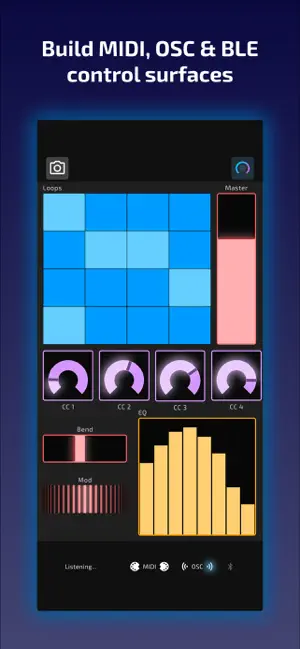
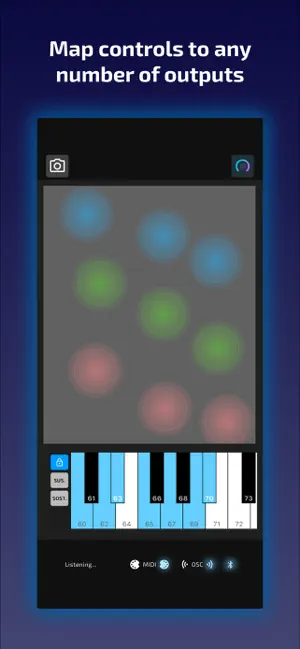
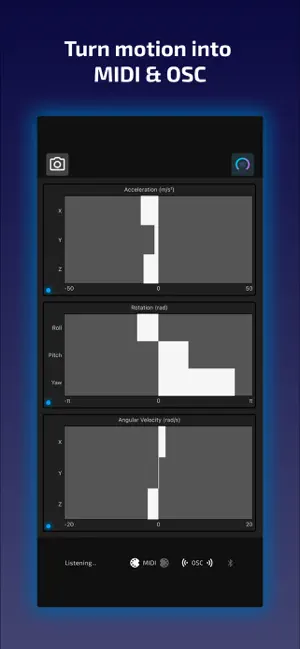
Syntien 2 recognizes a variety of input sources, including touch, movement, and sound, and converts them into data for your creative work. Syntien 2 can connect to other devices and software via MIDI, OSC, and BLE. It comes with all the standard controls you'd expect -- buttons, labels, sliders, knobs, etc. -- plus a unique set of tools that go far beyond the basics. • Use an adjustable, resizable Keyboard control to send MIDI note and velocity data, in addition to pitch bend, expression, and more. • The Touch Pad control takes full advantage of your device's multi-touch capabilities. Track multiple touches independently. Use a stylus like an Apple Pencil to send highly-expressive data with pressure and tilt sensitivity. • The IMU control uses data from your device's accelerometer, gyroscope, and magnetometer to transmit your device's acceleration, rotation, or nearby magnetic field strength. • Use the Level Meter to track audio input levels, and use the Pitch Detector control to detect pitch. • Transform and scale outputs directly in Syntien 2 without any complex scripting! • Connect controls to each other using Macros. Use buttons to toggle a Keyboard's sustain pedal, set up a Slider to modulate the frequency of an LFO, and more! • Create your own interfaces and modify the behavior of controls in-app, on any iPhone or iPad, without the need for a separate desktop editor! Place and resize controls exactly how you want them using intuitive drag-and-drop gestures. • Modify controls mid-performance by sending data from your computer to Syntien. Incoming OSC messages are displayed on the screen and color-coded, so you'll know exactly what messages Syntien is receiving and whether or not they're being interpreted. Works with Ableton, Max/MSP, SuperCollider, TouchDesigner, and any MIDI- or OSC-compatible software.
What’s new
Version 2.2.0 · Updated August 31, 2026
- Added support for MIDI inputs. Controls can now respond to incoming MIDI messages, with MIDI Learn for quick setup. Works over USB, BLE, Network Session, and Virtual MIDI. - Added two new controls: Ribbon and Ribbon Pad - Added haptic feedback, configurable globally or per-control - Added support for control labels, which can be static text, dynamic values, or a combination - Improved macros: you can now trigger a follow-up action, such as sending an output, after setting a value - Various bug fixes and performance improvements.
App privacy
The developer, Modulii, reported these privacy practices to Apple.
Data Not Linked to You
The following data, which may be collected but is not linked to your identity, may be used for the following purposes:
- Identifiers: Device ID
- Diagnostics: Crash Data, Performance Data, Other Diagnostic Data
Used for: App Functionality
Alternatives to Syntien 2
Looking for apps like Syntien 2? Here are 6 similar apps on the App Store. The highest rated is AudiBro (5.0/5), and all 6 are free to download.





| App | Rating | Price | Last updated | Compare |
|---|---|---|---|---|
| Syntien 2 | – | Free | August 31, 2026 | |
| AudiBro | 5.0 / 5 (1) | Free | Apr 5, 2026 | Compare |
| ARPJAM | 5.0 / 5 (1) | Free | Sep 10, 2026 | Compare |
| MIDI MACHINE | – | Free | Aug 20, 2026 | Compare |
| Hexapad - Beat Maker | 3.7 / 5 (3) | Free | Sep 24, 2026 | Compare |
| Wavepocket | 4.5 / 5 (2) | Free | Aug 18, 2026 | Compare |
| BeatGlow | 5.0 / 5 (1) | Free | Sep 25, 2026 | Compare |
Compare Syntien 2 with the top alternatives: ratings, updates, ASO score and keyword gaps →