

AfterNotification
Ryusuke Uchida Productivity iPhoneiPadiPod touch
AfterNotification is a free Productivity app for iPhone and iPad by Ryusuke Uchida. Requires iOS 18.0. Updated August 4, 2026.
- Price
- Free
- on the App Store
- Size
- 5 MB
- Age 4+
- Updated
- Aug 4
- 2026 · v1.0.1
Screenshots



About AfterNotification
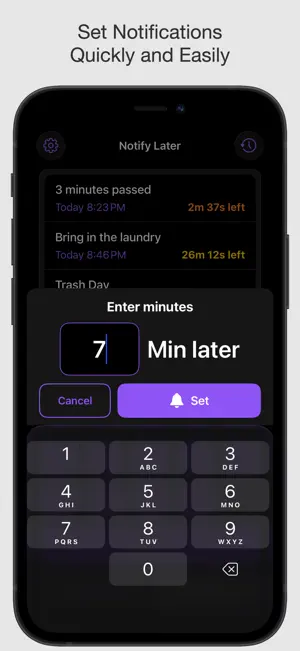
Alarms feel like too much. Reminder apps feel complicated and hard to figure out. If that sounds like you, this simple notification app is just what you need. It also works great as a timer. Perfect for you if: - You want to set notifications quickly and easily - You don't want your music or audio content interrupted when a timer goes off - You'd rather avoid loud alarms in public places like trains or anywhere outside home +++ Core Features +++ [Notify After X Minutes] Set a notification in a single tap using preset buttons, or enter your own number of minutes. [Notify at a Specific Time] Pick a date and time, and you'll get notified right when it arrives. [Check Remaining Time on the Lock Screen] See how much time is left directly from the lock screen via Live Activities. * This feature can be turned off in Settings. +++ More Features +++ - Change the notification sound (13 options) - Notification history - Customizable preset minutes - View all scheduled notifications and more +++ Even More Useful Features +++ These features give you even more flexibility. [Control Center Support] Launch the app or set a 1, 3, 5, or 10-minute timer right from Control Center. [Widget Support] Launch the app or set a 1, 3, 5, or 10-minute timer from a widget. [Shortcuts App Support] Launch the app or set a 1, 3, 5, or 10-minute timer via the Shortcuts app. Assigning these to the iPhone Action Button or Back Tap can be especially handy. +++ You Might Also Find This Useful When... +++ - Laundry & household timers - Light workout timers - Timing tasks on the train - Fridge expiration reminders - Astronomy event notifications - Bank transfer to-do - Sale end date alerts - Package delivery time reminders And much more We hope you enjoy using it! - Sound Credits - Sound effects: Otologic (https://otologic.jp)
What’s new
Version 1.0.1 · Updated August 4, 2026
* Made minor improvements and fixes. Thank you for using the App!
App privacy
The developer, Ryusuke Uchida, reported these privacy practices to Apple.
Data Not Linked to You
The following data, which may be collected but is not linked to your identity, may be used for the following purposes:
- Location: Coarse Location
- Identifiers: User ID, Device ID
- Usage Data: Product Interaction, Other Usage Data
- Diagnostics: Crash Data, Performance Data, Other Diagnostic Data
Used for: Analytics
Alternatives to AfterNotification
Looking for apps like AfterNotification? Here are 6 similar apps on the App Store. The highest rated is ID期限リマインダー (3.0/5), and 5 of the 6 are free to download.
-
 Arcora: Visual Day Planner
-
 ID期限リマインダー
3.0
ID期限リマインダー
3.0
-
 Start. Work earns your rest
-
 Doit - ひとつのタスクに集中するためのアプリ
-
 NotiMy - Reminder and Routine
-
 Mind Prompt
| App | Rating | Price | Last updated | Compare |
|---|---|---|---|---|
| AfterNotification | – | Free | August 4, 2026 | |
| Arcora: Visual Day Planner | – | Free | Sep 29, 2026 | Compare |
| ID期限リマインダー | 3.0 / 5 (1) | Free | Sep 17, 2026 | Compare |
| Start. Work earns your rest | – | Free | Jul 14, 2026 | Compare |
| Doit - ひとつのタスクに集中するためのアプリ | – | 0.49 USD | Jun 26, 2025 | Compare |
| NotiMy - Reminder and Routine | – | Free | Oct 3, 2026 | Compare |
| Mind Prompt | – | Free | Jul 14, 2026 | Compare |
Compare AfterNotification with the top alternatives: ratings, updates, ASO score and keyword gaps →