

SpendView - Expense Tracker
Albertazzi Labs LLC Finance iPhoneiPadiPod touch
SpendView - Expense Tracker is a free Finance app for iPhone and iPad by Albertazzi Labs LLC. Rated 5.0/5 from 1 ratings. Requires iOS 15.6.
- Rating
- 5.0
- 1 ratings
- Price
- Free
- on the App Store
- Size
- 96 MB
- Age 4+
- Updated
- Aug 21
- 2026 · v3.6
Screenshots

About SpendView - Expense Tracker
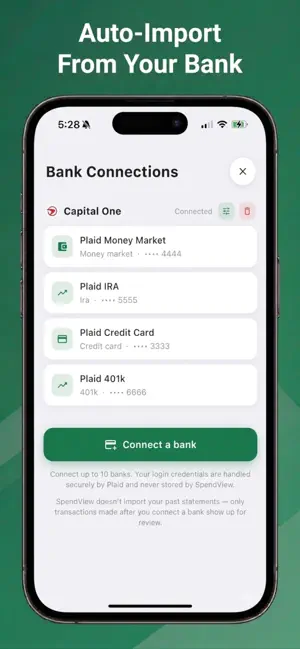
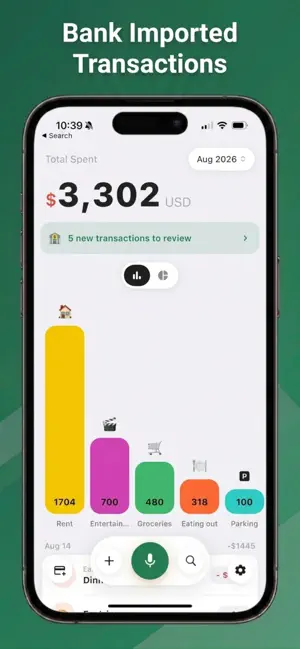
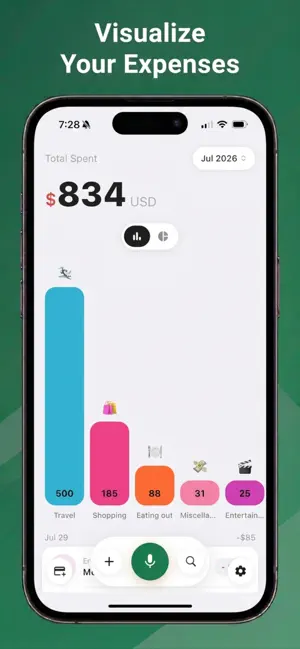
Your money, finally clear. SpendView connects to your bank and turns your spending into something you can actually see without receipts, spreadsheets, or typing in every purchase. CONNECT YOUR BANK Link an account from thousands of US banks and credit unions. From that moment on, every new purchase is imported for you, with the merchant name cleaned up and a category already suggested. You stay in control. Imported transactions land in a review inbox and are never silently added to your budget. Swipe away what isn't worth tracking, tap a chip to change a category, or hit Confirm All and be done in seconds. Connect up to 10 accounts, so checking, savings, and credit cards all flow into one picture. BUILT TO SHOW ONLY WHAT MATTERS SpendView doesn't dump years of history on you. It starts from the day you connect and moves forward, so your first week is your actual spending, not a wall of old statements you'll never review. Transfers between your own accounts and credit card payments are filtered out automatically, so moving money doesn't get counted as spending. Transactions appear once they've posted at your bank, which means the amount you approve is the final one. No pending charges that change later. OR JUST SAY IT Not everything comes from a linked account. Like cash purchases for example. Say "coffee at Starbucks, five dollars" and SpendView works out the amount, the merchant, and the category. Cash, splitting with a friend, the farmers market, logged in the time it takes to say it. SEE WHERE IT ACTUALLY GOES • Categories that match how you really spend • Monthly budgets with progress at a glance • Charts that make the pattern obvious • Everything in one place, always current PRIVACY AND SECURITY Bank connections are handled by Plaid, the service trusted by thousands of financial apps. SpendView never sees or stores your bank login, account numbers or routing numbers. You can disconnect any account at any time, and doing so removes SpendView’s connection to it completely. SpendView requires a subscription. Bank connection and auto-import are included. Terms of Use (EULA): https://www.apple.com/legal/internet-services/itunes/dev/stdeula/ Privacy Policy: https://getspendview.app/privacy-policy
What’s new
Version 3.6 · Updated August 21, 2026
UX bug fixes and enhancements
App privacy
The developer, Albertazzi Labs LLC, reported these privacy practices to Apple.
Data Not Collected
The developer does not collect any data from this app.
Alternatives to SpendView - Expense Tracker
Looking for apps like SpendView - Expense Tracker? Here are 6 similar apps on the App Store. The highest rated is Taur.us Budget & Money Tracker (5.0/5), and all 6 are free to download.
-
 Taur.us Budget & Money Tracker
5.0
Taur.us Budget & Money Tracker
5.0
-
 Avery - Finance App
-
 Penny: Halal Portfolio Tracker
5.0
Penny: Halal Portfolio Tracker
5.0
-
 Turf: Landscape Invoice Quotes
-
 Finly: Finance & Budgeting
-
 Basis Budget: Money Tracker
5.0
Basis Budget: Money Tracker
5.0
| App | Rating | Price | Last updated | Compare |
|---|---|---|---|---|
| SpendView - Expense Tracker | 5.0 / 5 (1 rating) | Free | August 21, 2026 | |
| Taur.us Budget & Money Tracker | 5.0 / 5 (2) | Free | Apr 27, 2026 | Compare |
| Avery - Finance App | – | Free | Sep 7, 2026 | Compare |
| Penny: Halal Portfolio Tracker | 5.0 / 5 (1) | Free | Oct 10, 2026 | Compare |
| Turf: Landscape Invoice Quotes | – | Free | Sep 18, 2026 | Compare |
| Finly: Finance & Budgeting | – | Free | Jan 31, 2026 | Compare |
| Basis Budget: Money Tracker | 5.0 / 5 (6) | Free | Oct 24, 2026 | Compare |