

KaView
Anthony VON BIELER Developer Tools iPhoneiPadiPod touch
KaView is a free Developer Tools app for iPhone and iPad by Anthony VON BIELER. Rated 5.0/5 from 1 ratings. Requires iOS 18.0. Updated August 10, 2026.
- Rating
- 5.0
- 1 ratings
- Price
- Free
- on the App Store
- Size
- 31 MB
- Age 4+
- Updated
- Aug 10
- 2026 · v1.2.6
Screenshots

About KaView
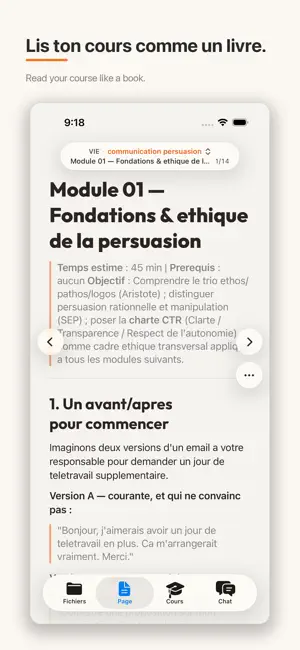
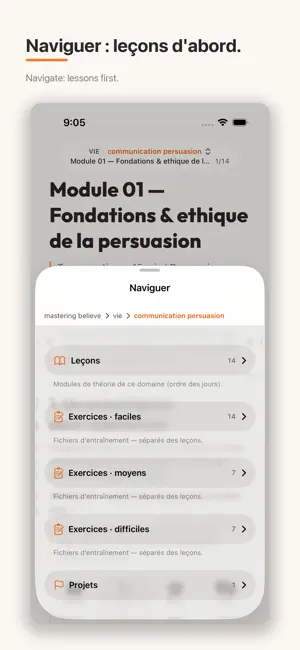
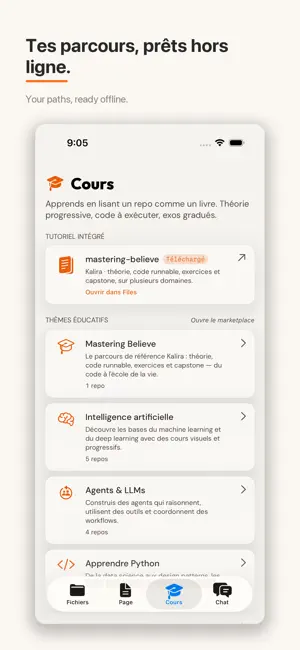
Learn anything, offline — on your iPad or iPhone. Starting with code. KaView's vision is a universal library you learn from offline. Today it teaches you to program from real projects: structured courses, hands-on practice in a real codebase, and an AI tutor that explains any line. It opens with Mastering Believe — Kalira's free reference curriculum (MIT-licensed): markdown lessons paired with runnable code, on agents, neural networks, algorithms, system design, and the craft of learning. Or open any GitHub project and study it like a book. No autoplay. No ads. No algorithm pulling you elsewhere. Just a real codebase and the quiet tools to understand it. LEARN, YOUR WAY, OFFLINE • Mastering Believe ships with the app, and five curated collections are ready on first launch — gentle starter paths, fully yours to edit: - First steps in Python - Understanding AI agents - Build an LLM from scratch - A tour of Swift - Essential algorithms • A dedicated Cours tab: one tap downloads a course to read • Go further: a marketplace of public repos by theme — AI, Python, Swift, web, books AN AI TUTOR THAT READS THE PAGE • Ask in plain words — "explain this like I'm new," "what does this term mean," "why is it written this way" • Tap any snippet for Explain, Complete, or Refactor • On-device when Apple Intelligence is on (iOS 26+): private, no connection needed • Or bring your own OpenAI or Anthropic key READ CODE LIKE A BOOK • Markdown and source side by side, syntax-highlighted • Progress is local to the module or folder you are in — n of total for that chapter, not hundreds of pages across a whole repo • Book-style chrome: aligned prev/next arrows, ⋯ menu beside next, large tap targets • Navigate sheet puts lessons first; exercises are listed separately • Changing chapter scrolls you back to the top • Dozens of languages, rendered cleanly PRACTICE IN A REAL EDITOR • Fix a typo, jot a note, save a TODO as you learn • Sign in with GitHub, clone, edit, commit, push — without leaving the app • Token stays in the iOS Keychain BUILT FOR iPHONE AND iPAD • Native iOS 26 design: Files, Page, Cours, Chat • iPad: three-column layout, Split View, Stage Manager • Dynamic Type, VoiceOver, hardware keyboards, VS Code–style shortcuts PRIVACY BY DESIGN • No analytics, no trackers, no ads, no telemetry, no account • Data Not Collected KaView is a place to learn — a reader, a light editor, and an AI tutor, not an IDE. It doesn't run code. iOS 18 minimum; the on-device tutor needs iOS 26+ with Apple Intelligence. Open a course. Ask a question. Understand the code.
What’s new
Version 1.2.6 · Updated August 10, 2026
KaView 1.2.6 — Read like a book. • Local progress: n of total for the module or folder you are in — no more huge page counts across a whole repo • Book chrome: aligned ← → arrows, ⋯ menu by next, larger tap targets • Navigate sheet: lessons first, exercises apart • New chapter always opens at the top
App privacy
The developer, Anthony VON BIELER, reported these privacy practices to Apple.
Data Not Collected
The developer does not collect any data from this app.
Alternatives to KaView
Looking for apps like KaView? Here are 6 similar apps on the App Store. The highest rated is OpenCone (5.0/5), and all 6 are free to download.


| App | Rating | Price | Last updated | Compare |
|---|---|---|---|---|
| KaView | 5.0 / 5 (1 rating) | Free | August 10, 2026 | |
| TeleCollect | – | Free | Jun 17, 2026 | Compare |
| Banana Code | – | Free | Apr 11, 2026 | Compare |
| DNP Remote | – | Free | Mar 23, 2026 | Compare |
| LingCode | – | Free | Oct 21, 2026 | Compare |
| Sessix -Mobile Vibe coding App | – | Free | May 27, 2026 | Compare |
| OpenCone | 5.0 / 5 (1) | Free | Oct 2, 2026 | Compare |
Compare KaView with the top alternatives: ratings, updates, ASO score and keyword gaps →