

PhotoSpots: Map Your Shots
Dominic Chomchai Photo & Video iPhoneiPadiPod touch
PhotoSpots: Map Your Shots is a free Photo & Video app for iPhone and iPad by Dominic Chomchai. Requires iOS 26.0. Updated October 22, 2026.
- Price
- Free
- on the App Store
- Size
- 191 MB
- Age 4+
- Updated
- Oct 22
- 2026 · v1.3.0
Screenshots



About PhotoSpots: Map Your Shots
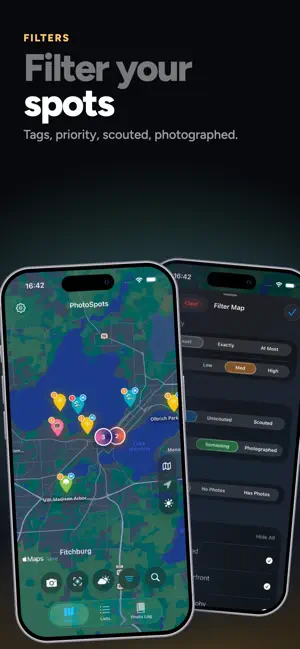
Never lose a great location. PhotoSpots lets you save spots, attach notes and photos, organize shoot lists, plan around light and weather, preview framing, and keep a photo log of what you shot. → Drop a pin to remember the spot Save any location in seconds. Add notes, reference photos, tags, and a priority, paste coordinates, or search places near you. → Track your progress Mark spots as scouted or photographed, log visit dates, archive what you want to keep, and restore deleted spots for 30 days. → Organize into lists Group spots into color- and icon-coded collections: golden hour rooftops, waterfalls, a vacation. Share a list as a link, download it as GPX, or sort by upcoming solar bookmarks. → Interactive map with clustered pins Color-coded, clustered pins, search, satellite view, smart filters, and one-tap Show All Spots keep large libraries fast and easy to scan. → Plan around the light, not the calendar Every location shows precise golden hour, blue hour, and sunrise/sunset times. Visualize the sun's path on an interactive solar compass, preview the sun in AR through the camera, and bookmark your favorite moments. → Check weather where it matters Forecasts focused on what affects a shoot: light, cloud cover, visibility, fog, and wind, in sections you can customize. → Frame the shot Preview real-world framing with your gear in the Framelines camera. Simulate focal lengths and aspect ratios, meter the light, use built-in or custom camera profiles, and capture reference photos with full metadata. → Keep a real photo log Track exposure notes, camera metadata, projects, rolls, and processing status after the shoot. Swipe through a roll frame by frame, or open a camera to see every photo it took. → Built for film shooters Give each roll its exposure count and watch frames number themselves in shooting order. Every roll gets a box-end tab styled after its film stock, a timeline of when it was loaded, shot, processed, and scanned, a contact sheet you can share as an image, and an exposure log you can export as CSV. → See your year in numbers The Stats page charts your spots and frames month by month, maps out a calendar of shooting days, and surfaces highlights like your favorite lens, most-used camera body, most-shot film stock, and typical lab turnaround. → Save without opening the app See a great location? Use widgets, Shortcuts, or Siri to save your current location, add spots, search lists, or open nearby spots quickly. On iOS 27, Siri knows your spots by name: find them in Spotlight, add several to a list at once, open a spot or list on the map, or jump straight into Framelines with a chosen camera and focal length. → Made for iPhone Duo Unfold iPhone Duo and PhotoSpots spreads out: the map stays up top while lists, spots, the Photo Log, weather, and the solar planner fill the lower half. On the full inner display, spots and photos open beside their lists, and controls move to the side bar where your thumbs already are. → Plan ahead with offline maps Download a map in Apple Maps and keep creating and navigating to spots without a connection. → Share hidden gems and get back there fast Send one spot, several, or a full list. Links open privately in the app, and navigation is one tap away. → Premium: Customize your workspace Unlock alternate app icons and background themes, from accent-color gradients to per-list custom backgrounds. → Also included: Automatic iCloud sync across all your devices CSV and GPX import and export for your full location library Home screen widgets for saving, nearby spots, stats, lists, and solar times Batch editing for tags, lists, priority, archive/delete, and photographed/scouted status
What’s new
Version 1.3.0 · Updated October 22, 2026
PhotoSpots 1.3 is made for iPhone Duo, and the Photo Log grows into a full film log. MADE FOR IPHONE DUO • Half-fold the inner display and the map stays on top while Lists, the Photo Log, spots, weather and the solar planner open below. Open it flat for the whole map, or pick either layout in Settings • On the full inner display, spots and photos open beside their lists, and Done, Close and Customize move to the side bar • Framelines, Sun Preview, the photo viewer and Settings are all laid out for the bigger screen • Fold, unfold or rotate and you stay right where you were FILM ROLLS • Set how many exposures a roll holds; frames number themselves in shooting order • Every roll records when it was loaded, shot, processed and scanned, shown on a timeline • Box-end tabs styled after each film stock, with presets and stickers, worn across the Photo Log and the camera toolbar • Share a roll as a contact sheet, or export its exposure log as CSV • Swipe through a roll frame by frame • Open a camera to see every photo it took • Log a photo to a spot straight from the map • Hide the Recently Deleted tray when you don't need it STATS • A new Stats page in Settings: spots and frames by month, a calendar of shooting days, your top tags, lists and film stocks, and highlights like your favorite lens, aperture and body, and your typical lab turnaround SIRI & SHORTCUTS (iOS 27) • Siri knows your spots by name, and Spotlight finds them • Add several spots to a list at once • Open any spot or list, optionally on the map • Open Framelines with a chosen camera profile and focal length
App privacy
The developer, Dominic Chomchai, reported these privacy practices to Apple.
Data Not Collected
The developer does not collect any data from this app.
Alternatives to PhotoSpots: Map Your Shots
Looking for apps like PhotoSpots: Map Your Shots? Here are 6 similar apps on the App Store.
-
 PhotographyFieldGuide
-
 Magic of Photography
-
 Photowalks: Photo Walk Map
-
 BonCadre: AI Photo Coach
-
 Apertio - Learn photography
-
 Photo Advisor
| App | Rating | Price | Last updated | Compare |
|---|---|---|---|---|
| PhotoSpots: Map Your Shots | – | Free | October 22, 2026 | |
| PhotographyFieldGuide | – | Free | Jun 2, 2026 | Compare |
| Magic of Photography | – | Free | Sep 10, 2026 | Compare |
| Photowalks: Photo Walk Map | – | Free | Oct 20, 2026 | Compare |
| BonCadre: AI Photo Coach | – | Free | Sep 15, 2026 | Compare |
| Apertio - Learn photography | – | Free | May 20, 2026 | Compare |
| Photo Advisor | – | Free | Dec 26, 2024 | Compare |