

LastTap: Chore & Reset Counter
Ankit Aglawe Productivity iPhoneiPadiPod touch
LastTap: Chore & Reset Counter is a free Productivity app for iPhone and iPad by Ankit Aglawe. Rated 5.0/5 from 1 ratings. Requires iOS 17.0.
- Rating
- 5.0
- 1 ratings
- Price
- Free
- on the App Store
- Size
- 6 MB
- Age 4+
- Updated
- Oct 28
- 2026 · v1.5.2
Screenshots



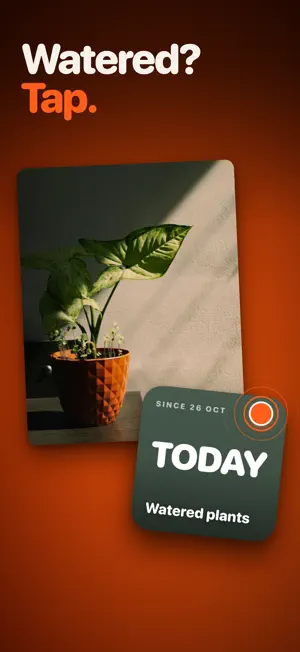
About LastTap: Chore & Reset Counter
The last time you did anything. How long since you watered the plants, changed the filter, fed the cat, changed the oil, took the meds, cleaned the litter box. Tap the widget on your Home Screen. The counter resets to zero. That's the app. HOW IT WORKS Add an event. Put the widget on your Home Screen. When you do the thing, tap the widget. The counter goes back to zero and starts again. No app to open. No menus. Nothing to type. A haptic confirms it and you're done. WHAT PEOPLE TRACK • Plants watered, filters changed, oil changed • Meds taken, contact lenses swapped, supplements • The litter box, the dog's flea treatment • Bins out, sheets washed, the gutters cleared • Since you last called your mum WIDGETS FIRST Small, medium and Lock Screen. Each widget can follow a different event: touch and hold → Edit Widget → pick one. WHAT IT COSTS Three events are free. Forever, not a trial. Need more? One payment and that's it. No subscription. No account. No ads. No tracking. Your data stays on your phone and, if you want, syncs through iCloud across your devices. No servers of ours, because we don't have any. Now in English, Italian, Simplified Chinese, German, French, Spanish, Brazilian Portuguese and Japanese. Every language is free. LastTap · For people who forget.
What’s new
Version 1.5.2 · Updated October 28, 2026
New in 1.5.2: • Redesigned widgets in three styles: Classic (the familiar look, refined), Odometer (rolling number wheels) and Postcard (your photo in an arch). Pick a style and colour in Settings > Widget style, with a live preview, or set it per widget. • Safer widget taps: choose Tap twice to reset, Tap once, Reset button only, or Open LastTap. After a reset from a widget, you can Undo for 10 minutes. • Reminders that actually arrive, with a Reset action right in the notification. • Custom intervals, and a clear Due and overdue state. • Lock Screen widgets now show when something is overdue, plus a new inline widget. • Widgets look right on tinted Home Screens and in StandBy. • Reset items with Siri and Shortcuts. • Clearer times: smart hours, weeks, months and years. • Ready-made packs: add common jobs for plants, car and home, or pets in a couple of taps. Seasonal packs show up ahead of their season. • Two new app icons, Ember and Ink. • A Rate LastTap row in Settings. • Small fixes and polish.
App privacy
The developer, Ankit Aglawe, reported these privacy practices to Apple.
Data Not Collected
The developer does not collect any data from this app.
Alternatives to LastTap: Chore & Reset Counter
Looking for apps like LastTap: Chore & Reset Counter? Here are 6 similar apps on the App Store. The highest rated is LastTap: Last Done Reminders (5.0/5), and all 6 are free to download.
-
 Lapsed: Days Since Tracker
-
 LastTap: Last Done Reminders
5.0
-
 DailyDoer - Simple Tasks
5.0
-
 NeuroA
-
 Focus, Streaks, Planner - Doer
-
 Habit Mind: AI Habit Tracker
| App | Rating | Price | Last updated | Compare |
|---|---|---|---|---|
| LastTap: Chore & Reset Counter | 5.0 / 5 (1 rating) | Free | October 28, 2026 | |
| Lapsed: Days Since Tracker | – | Free | Mar 28, 2026 | Compare |
| LastTap: Last Done Reminders | 5.0 / 5 (3) | Free | Oct 28, 2026 | Compare |
| DailyDoer - Simple Tasks | 5.0 / 5 (2) | Free | Apr 2, 2026 | Compare |
| NeuroA | – | Free | Oct 18, 2026 | Compare |
| Focus, Streaks, Planner - Doer | – | Free | Aug 12, 2026 | Compare |
| Habit Mind: AI Habit Tracker | – | Free | Sep 7, 2026 | Compare |