

img2pdf: Image to PDF Scanner
Quan Dang Productivity iPhoneiPadiPod touch
img2pdf: Image to PDF Scanner is a free Productivity app for iPhone and iPad by Quan Dang. Rated 5.0/5 from 1 ratings. Requires iOS 18.0.
- Rating
- 5.0
- 1 ratings
- Price
- Free
- on the App Store
- Size
- 5 MB
- Age 4+
- Updated
- Oct 22
- 2026 · v1.5
Screenshots


About img2pdf: Image to PDF Scanner
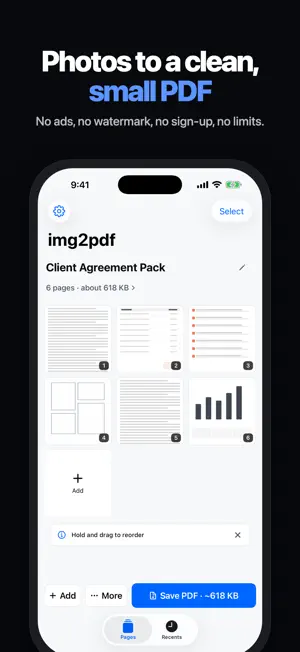
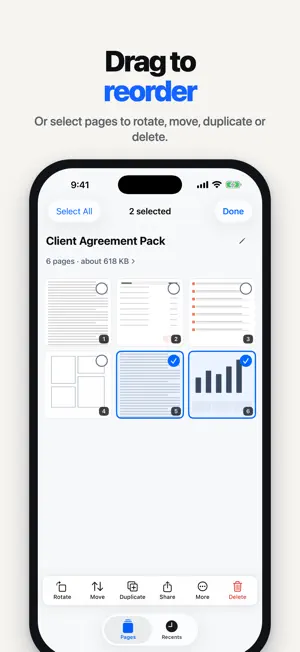
Photos to a clean, small PDF in seconds. Free: no ads, no watermark, no sign-up, no limits. Pick your photos in order, drag pages where you want them, see the file size, and share. That is the whole flow. When you need more, you can sign, password-protect, redact and search your PDFs too. PICK, ORDER, SHARE • Pick photos in the order you want the pages; the picker numbers each one as you tap • Scan pages with the document scanner, take a photo, or import PDFs from Files, including password-protected ones • Hold and drag to reorder, or select pages to rotate, move, duplicate, share or delete them • Reverse the order or sort by the date the photos were taken • Tap a page to see it full size, then swipe through the rest • Combine both sides of an ID card on one page, or split a two-page book spread SEE THE SIZE BEFORE YOU SHARE • Small, Standard and Best, each with a size estimate before you share • Colour stays on unless you turn it off; black and white makes the file smaller • Your country's page size (A4 or US Letter) with automatic orientation, plus Legal and original size • Compress any saved PDF again before you share it CLEAN UP EVERY PAGE • Crop with four-corner perspective correction and automatic edge detection • Rotate, and adjust brightness and contrast • Document, Enhance, Whiteboard and Crisp looks that lift shadows off paper • Erase marks, or black out private details: redactions are burned into the page and cannot be undone SIGN AND FILL • Draw a signature in black, blue or red and place it on any page • Add initials, text boxes and ticks to forms • Everything is flattened into the PDF on your iPhone FIND IT AGAIN • Searchable PDFs: text on your pages is recognised on-device and added as an invisible layer • Recents searches the text inside those PDFs, not just file names, and shows where the match is • Find a word inside an open PDF • Tag, pin, sort and merge PDFs in Recents • Copy, edit or share a page's text, turn a table into CSV, or save a business card as a contact PROTECT IT • Password-protect a PDF with 128-bit AES encryption when you export • Lock the app with Face ID or your passcode SHARE YOUR WAY • Share as PDF, or as JPG, PNG or HEIC images • Print directly with AirPrint • Name files automatically from the document's title and date, or use your own template • Start a scan from Siri, Shortcuts or a Home Screen quick action PRIVACY, PLAINLY • No account required • No tracking: the app's privacy manifest declares no tracking and no collected data • Scanning, text recognition, signing, redaction and compression all happen on your iPhone • Page images, recognised text and signatures stay on your iPhone. Exported PDFs in Recents use your own iCloud when it is available • No watermark unless you add one Free, with nothing to unlock.
What’s new
Version 1.5 · Updated October 22, 2026
A simpler way to make a PDF: pick photos in order, drag to reorder, see the size, share. SIMPLER • One welcome page whose button opens the photo picker, and the picker numbers photos in the order you tap them. • The Pages screen is down to a title, the page grid and three buttons: Add, More and Share PDF. • Hold and drag to reorder. Select pages to rotate, move, duplicate, share or delete them. Reverse or sort by date from More. • Tap a page to see it full size and swipe through the rest, with Crop, Rotate, Look and Delete at hand. • Export is now Size (Small, Standard or Best, each with an estimate), a Colour switch, and Page setup & extras for everything else. • New installs export in colour at Standard quality, on your country's page size. ALSO NEW • Password-protect a PDF when you export it (128-bit AES), and open password-protected PDFs from Files. • Lock the app with Face ID or your passcode. • Black out private details. Redactions are burned into the page and cannot be undone. • Crop with four-corner perspective correction and automatic edge detection. • Whiteboard and Crisp looks, shadow removal, and an eraser for stray marks. • Search the text inside searchable PDFs in Recents, with a snippet of each match. Find a word inside an open PDF. • Tag, pin, sort and merge PDFs in Recents. • Sign with initials, text boxes and ticks, in black, blue or red ink. • Combine both sides of an ID card on one page, split book spreads, and duplicate, insert or extract pages. • Share pages as JPG, PNG or HEIC images, or print straight to AirPrint. • Turn a table into CSV, and save a business card as a contact. • Smart file names from the document's title and date. • Start a scan from Siri, Shortcuts or a Home Screen quick action. • A new app icon, and a refreshed design for iOS 26. No ads, no watermark, no sign-up, no limits. Your pages are processed on your iPhone.
App privacy
The developer, Quan Dang, reported these privacy practices to Apple.
Data Not Collected
The developer does not collect any data from this app.
Alternatives to img2pdf: Image to PDF Scanner
Looking for apps like img2pdf: Image to PDF Scanner? Here are 6 similar apps on the App Store. The highest rated is photo to pdf - PhotoPDF (5.0/5), and all 6 are free to download.
-
 photo to pdf - PhotoPDF
5.0
photo to pdf - PhotoPDF
5.0
-
 Convert Image to PDF by PDFee
-
 Merge all PDFs
-
 PDF Creator : Read,Scan & Sign
5.0
PDF Creator : Read,Scan & Sign
5.0
-
 FilePro - Image to PDF Tool
-
 Image to PDF AI Converter
| App | Rating | Price | Last updated | Compare |
|---|---|---|---|---|
| img2pdf: Image to PDF Scanner | 5.0 / 5 (1 rating) | Free | October 22, 2026 | |
| photo to pdf - PhotoPDF | 5.0 / 5 (1) | Free | Sep 12, 2026 | Compare |
| Convert Image to PDF by PDFee | – | Free | Oct 14, 2026 | Compare |
| Merge all PDFs | – | Free | May 11, 2025 | Compare |
| PDF Creator : Read,Scan & Sign | 5.0 / 5 (4) | Free | Oct 3, 2026 | Compare |
| FilePro - Image to PDF Tool | – | Free | Jan 19, 2026 | Compare |
| Image to PDF AI Converter | – | Free | Mar 9, 2026 | Compare |