

LabKey AI Reply Keyboard
登宇 郁 Utilities iPhoneiPadiPod touch
LabKey AI Reply Keyboard is a free Utilities app for iPhone and iPad by 登宇 郁. Requires iOS 16.0. Updated September 22, 2026.
- Price
- Free
- on the App Store
- Size
- 4 MB
- Age 9+
- Updated
- Sep 22
- 2026 · v1.4.2
Screenshots
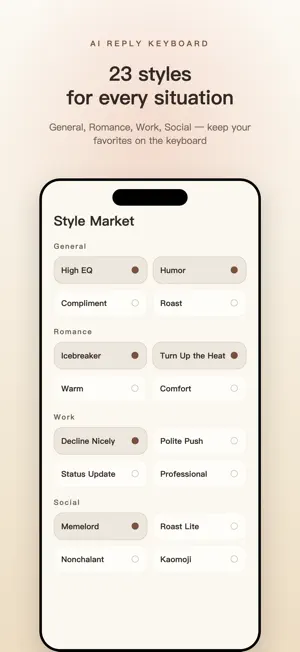


About LabKey AI Reply Keyboard
A message lands. You stare at the field for five minutes, type something, delete it. LabKey is an iOS keyboard. Copy their message, switch to LabKey, tap Generate. Three ready-to-send replies appear. Pick one, it lands in the field, done. IT READS THE MESSAGE FIRST This is what separates LabKey from tools that only make your words prettier. They say "it's fine, whatever you want." Most people answer "what's wrong?" That question makes them withdraw further. LabKey tells you first: they're pulling back, this is not really your call. Then it offers: "Alright, your call. Did you eat yet?" Accept the line, move to something ordinary. That is the move here. ROMANCE MODE Off by default. Turn it on and most styles switch judgment: meet the feeling before offering a fix, do not close the topic, do not stack questions, do not defend yourself. Roast, Philosophy, Business and Translate are left alone. Their character genuinely conflicts with dating judgment, so we did not force it. The screen shows before and after examples. 24 STYLES, GROUPED BY SITUATION General: High EQ, Humour, Aloof, Sweet Talk, Wordsmith, Kaomoji, Emoji Romance: Flirt (hers), Flirt (his), Icebreaker, Warm Up, Gentle, Comfort, Confess Work: Chase, Decline, Report, Business Social: Unbothered, Memelord, Banter Write your own prompt if none of them fit. CONVERSATION PLAYBOOK The same message answered three ways, scored 2, 5 and 10, with the reason each one lands where it does. Not platitudes: rules you can act on. Take their side while the feeling is hot. Small talk continues, it does not conclude. One question per reply, at most. PASTE A SCREENSHOT Paste the image and the text is read out of it, with each line attributed to the right person. Text baked into avatars, timestamps and other furniture is filtered out. IT LEARNS HOW YOU WRITE Every reply you pick teaches it your phrasing. Samples stay on the device; the text itself is never uploaded. FOUR LANGUAGES, EACH LOCALISED PROPERLY English, Japanese, Simplified and Traditional Chinese. Japanese and Traditional are not translations. The Japanese set is rewritten for Japanese norms; the Traditional set follows Taiwan usage and pacing. HOW IT WORKS 1. Copy their message, or just copy a screenshot of the chat 2. In any text field, switch to the LabKey keyboard and tap Paste 3. Pick a style, tap Generate, tap a reply to insert it MORE THAN REPLIES · Polish: rewrite what you already typed so it lands better · Natural English: turn a line into how a native speaker would say it · Custom styles: describe the tone you want in one sentence and it is yours KEYBOARD SKINS Full colour sets such as Cream Mail Cat, applied to the app and the keyboard at once. Switch in Settings, or go back to the stock iOS look anytime. PRIVACY FIRST · Keystrokes are never logged · Only what you copy and explicitly send by tapping Generate is processed · Screenshot recognition happens on-device, images never leave your phone · Custom styles and learning samples stay on your device by default · Sign in with Apple, no email or password, or use it with no account at all SIMPLE PRICING · 10 free generations every day, no account needed · Need more: one-time packs (100 or 500) or LabKey Pro Monthly (200 per day) · Invite a friend and you both get 50 free generations Download LabKey and never stare at an empty text box again. —————————— Monthly Pro is an auto-renewing subscription (1-month term). It renews automatically unless auto-renewal is turned off at least 24 hours before the end of the current period. Manage or cancel anytime in Settings > Apple ID > Subscriptions. Terms of Use (EULA): https://www.apple.com/legal/internet-services/itunes/dev/stdeula/ Privacy Policy: https://labkey.w4xiaoyao.space/labkey/v1/privacy
What’s new
Version 1.4.2 · Updated September 22, 2026
TRADITIONAL CHINESE INTERFACE Not just the store listing. The app itself is now fully available in Traditional Chinese, bringing it to four languages. ROMANCE MODE A new switch. With it on, most styles adopt dating-context judgment: meet the feeling first, keep the topic open, stop chasing, stop defending. Roast, Philosophy, Business and Translate are unaffected, and the screen shows side-by-side examples of what changes. IT READS BEFORE IT REPLIES Above the suggestions you now see what they actually want from that message, and how to meet it. CONVERSATION PLAYBOOK A library of situations. One message, three replies scored 2, 5 and 10, and what separates them. Each style also has a page showing when to use it. SCREENSHOT READING, FIXED Replies are no longer attributed to the wrong person. Text inside avatars, timestamps and other screen furniture is filtered out instead of being fed to the model. HISTORY YOU CAN COPY Tap to expand the full reply, swipe to copy, long-press for more. CLEANER AND FASTER The standing quota line is gone; it appears only when it matters. Insert is an icon now, leaving room for the reply itself. The keyboard warms its connection as it opens, cutting about half a second from every generation. ALSO Sweet Talk was renamed. The first-run guide now explains how to get straight back to your own keyboard.
App privacy
The developer, 登宇 郁, reported these privacy practices to Apple.
Data Linked to You
The following data, which may be collected and linked to your identity, may be used for the following purposes:
- Contact Info: Email Address
- User Content: Other User Content
Used for: App Functionality
Data Not Linked to You
The following data, which may be collected but is not linked to your identity, may be used for the following purposes:
- Identifiers: Device ID
Used for: Other Purposes
Alternatives to LabKey AI Reply Keyboard
Looking for apps like LabKey AI Reply Keyboard? Here are 6 similar apps on the App Store. The highest rated is Proxy Switchboard (5.0/5), and all 6 are free to download.
-
 Proxy Switchboard
5.0
Proxy Switchboard
5.0
-
 Daily Check: Routine Tracker
-
 M3U8管理助手 - M3U8在线播放器
5.0
M3U8管理助手 - M3U8在线播放器
5.0
-
 iGoHotspot—Travel WiFi Finder
2.8
iGoHotspot—Travel WiFi Finder
2.8
-
 轻阅-简简单单的电子书阅读器
4.5
轻阅-简简单单的电子书阅读器
4.5
-
 ZenReader - Read ebooks easily
4.7
ZenReader - Read ebooks easily
4.7
| App | Rating | Price | Last updated | Compare |
|---|---|---|---|---|
| LabKey AI Reply Keyboard | – | Free | September 22, 2026 | |
| Proxy Switchboard | 5.0 / 5 (1) | Free | Oct 19, 2026 | Compare |
| Daily Check: Routine Tracker | – | Free | May 26, 2026 | Compare |
| M3U8管理助手 - M3U8在线播放器 | 5.0 / 5 (21) | Free | Apr 16, 2026 | Compare |
| iGoHotspot—Travel WiFi Finder | 2.8 / 5 (17) | Free | Jan 14, 2025 | Compare |
| 轻阅-简简单单的电子书阅读器 | 4.5 / 5 (45) | Free | Oct 19, 2026 | Compare |
| ZenReader - Read ebooks easily | 4.7 / 5 (374) | Free | Oct 24, 2026 | Compare |