

Pomo - Pomodoro
Alex Immerkaer Kristensen Productivity iPhoneiPadiPod touchMac
Pomo - Pomodoro is a free Productivity app for iPhone and iPad by Alex Immerkaer Kristensen. Rated 5.0/5 from 1 ratings. Requires iOS 26.0.
- Rating
- 5.0
- 1 ratings
- Price
- Free
- on the App Store
- Size
- 3 MB
- Age 4+
- Updated
- Aug 29
- 2026 · v1.1
Screenshots



About Pomo - Pomodoro
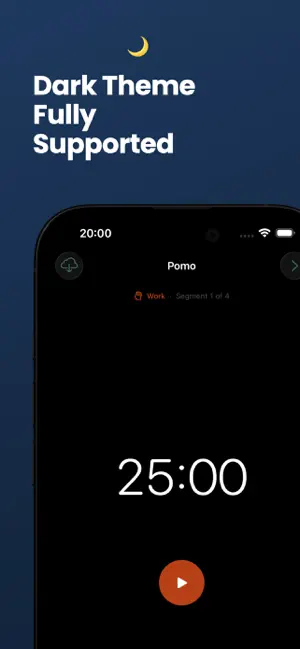
Pomo is a native Pomodoro timer for iPhone and Mac. Start a session. Focus. When the timer ends, take a break. Repeat. The countdown lives in your Mac menu bar and on your iPhone Lock Screen — always visible, never in the way. No Dock icon. No dashboard. Just the timer. WHAT'S FREE • Full Pomodoro timer with custom work and break lengths • Custom cycle configuration • Sound selection and notifications • iCloud sync — timer state and cycle config sync across all your devices, free • No account required • /- buttons to quickly add/subtract minutes from the current timer PRO • Live Activities on your Lock Screen and Dynamic Island (iPhone) • Segment goal — set a focus intention for each session (iPhone) A 2-week free trial is available for monthly and annual plans. Cancel any time before the trial ends and you won't be charged. Lifetime access is available as a one-time purchase. One purchase covers both Mac and iPhone. HOW IT WORKS Pomo follows the Pomodoro Technique: work in focused intervals, separated by short breaks. Set your session length, set your breaks, and let the timer run. The menu bar countdown on Mac and the Lock Screen timer on iPhone mean you never have to open the app to know where you are in your cycle. Simply tap the iOS Live Activity or right click the Mac menu bar timer to pause/unpause. NO DISTRACTIONS No analytics. No third-party code. No account. Pomo does not track you, report on you, or ask anything of you beyond the time you want to spend focused. Your data is yours alone, stored securely in your private iCloud via CloudKit. It does one thing well: keeps you focused, one session at a time. SYSTEM REQUIREMENTS • iPhone: iOS 26 or later • iCloud sync requires iCloud Drive to be enabled LEGAL Privacy Policy: https://aleximmerkaer.com/projects/pomo/privacy Terms of Use: https://www.apple.com/legal/internet-services/itunes/dev/stdeula/
What’s new
Version 1.1 · Updated August 29, 2026
This version introduces +/- buttons to quickly add/subtract minutes from the current timer.
App privacy
The developer, Alex Immerkaer Kristensen, reported these privacy practices to Apple.
Data Not Collected
The developer does not collect any data from this app.
Alternatives to Pomo - Pomodoro
Looking for apps like Pomo - Pomodoro? Here are 6 similar apps on the App Store. The highest rated is Focus To-Do - Pomodoro Tasks (3.0/5), and 5 of the 6 are free to download.
-
 Quartz: Focus & Flow
-
 Pomodoro Timer - Block & Focus
-
 Focus To-Do - Pomodoro Tasks
3.0
-
 PTimer: Pomodoro Focus Timer
-
 Tomatoro: Focus Timer
-
 Pomodoro Focus Timer: PomoJoy
| App | Rating | Price | Last updated | Compare |
|---|---|---|---|---|
| Pomo - Pomodoro | 5.0 / 5 (1 rating) | Free | August 29, 2026 | |
| Quartz: Focus & Flow | – | Free | Aug 12, 2026 | Compare |
| Pomodoro Timer - Block & Focus | – | Free | May 28, 2026 | Compare |
| Focus To-Do - Pomodoro Tasks | 3.0 / 5 (2) | Free | Aug 31, 2026 | Compare |
| PTimer: Pomodoro Focus Timer | – | 0.99 USD | Sep 21, 2026 | Compare |
| Tomatoro: Focus Timer | – | Free | Oct 18, 2026 | Compare |
| Pomodoro Focus Timer: PomoJoy | – | Free | Oct 8, 2026 | Compare |
Compare Pomo - Pomodoro with the top alternatives: ratings, updates, ASO score and keyword gaps →