

CallNinja - Spam Call Blocker
sunguk park Utilities iPhoneiPadiPod touch
CallNinja - Spam Call Blocker is a free Utilities app for iPhone and iPad by sunguk park. Requires iOS 16.0. Updated October 11, 2026.
- Price
- Free
- on the App Store
- Size
- 4 MB
- Age 4+
- Updated
- Oct 11
- 2026 · v1.2
Screenshots
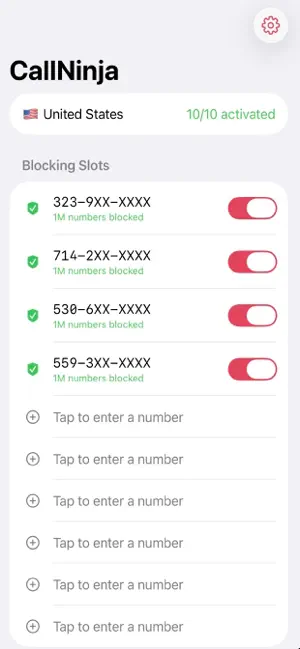
About CallNinja - Spam Call Blocker
Stop repeated spam calls that keep the same local or area-code prefix while changing the remaining digits. CallNinja blocks user-selected number patterns through the iOS CallKit system. Enter a number from a call you personally confirmed as spam. The app shows the resulting pattern and count, and blocks it only after you review and activate it. [How to use] 1. Select your country. 2. Enable the needed extensions from Slot 1 through Slot 10 in Settings. 3. Enter the number from the confirmed spam call. 4. Review the displayed pattern and count, then activate blocking. Example: Enter 323-773-4540 → Blocks up to 1,000,000 numbers in the 323-77XX-XXXX pattern [Blocking criteria] CallNinja has no pre-populated or remote spam database and does not automatically classify calls. The user enters only a number from a call they personally confirmed as spam. The final six digits become wildcards, so the selected range may block up to 1,000,000 numbers. Legitimate numbers may exist in that range, so the user must review and choose the range. Any active range can be disabled or deleted at any time. CallNinja blocks phone calls only and does not filter SMS or MMS. [Key features] • Range blocking for repeated spam calls that change their trailing digits • Up to 10 ranges and 10 million numbers total • A contact can be blocked if it matches a range you activate, so review each pattern first • No background data collection by the developer; optional sync uses your private iCloud account [iCloud Sync] You can sync your selected country and saved phone-number patterns for every country across devices using the same Apple Account. The data stays in your private iCloud database, which the developer cannot access. Turning sync off keeps your numbers on this device. Enable the 10 CallNinja extensions separately in call blocking settings on each device. iCloud sign-in and iCloud Drive are required.
What’s new
Version 1.2 · Updated October 11, 2026
- Sync your selected country and saved phone numbers across devices with your private iCloud account. - See sync progress and error details in the app. - Enable all 10 CallNinja extensions separately in each device’s call blocking settings. - Improved onboarding and Korean localization, and added diagnostics for user-initiated problem reports.
App privacy
The developer, sunguk park, reported these privacy practices to Apple.
Data Not Collected
The developer does not collect any data from this app.
Alternatives to CallNinja - Spam Call Blocker
Looking for apps like CallNinja - Spam Call Blocker? Here are 6 similar apps on the App Store. The highest rated is Telosafe: AI Spam Call Blocker (5.0/5), and all 6 are free to download.
-
 Telosafe: AI Spam Call Blocker
5.0
Telosafe: AI Spam Call Blocker
5.0
-
 Block phone numbers - Blockr
5.0
Block phone numbers - Blockr
5.0
-
 SpamGuard: SMS Filter
-
 TikSave - 미디어 아카이브 및 북마크
-
 Screenshot2Text
-
 Scammer Guardian
| App | Rating | Price | Last updated | Compare |
|---|---|---|---|---|
| CallNinja - Spam Call Blocker | – | Free | October 11, 2026 | |
| Telosafe: AI Spam Call Blocker | 5.0 / 5 (1) | Free | Feb 9, 2026 | Compare |
| Block phone numbers - Blockr | 5.0 / 5 (1) | Free | Sep 11, 2026 | Compare |
| SpamGuard: SMS Filter | – | Free | Sep 7, 2026 | Compare |
| TikSave - 미디어 아카이브 및 북마크 | – | Free | Mar 31, 2026 | Compare |
| Screenshot2Text | – | Free | Jan 22, 2026 | Compare |
| Scammer Guardian | – | Free | May 6, 2026 | Compare |