

GrayCat Markdown
泳涛 茅 Productivity iPhoneiPadiPod touchMac
GrayCat Markdown is a free Productivity app for iPhone and iPad by 泳涛 茅. Requires iOS 17.0. Updated July 27, 2026.
- Price
- Free
- on the App Store
- Size
- 5 MB
- Age 4+
- Updated
- Jul 27
- 2026 · v1.3.0
Screenshots


About GrayCat Markdown
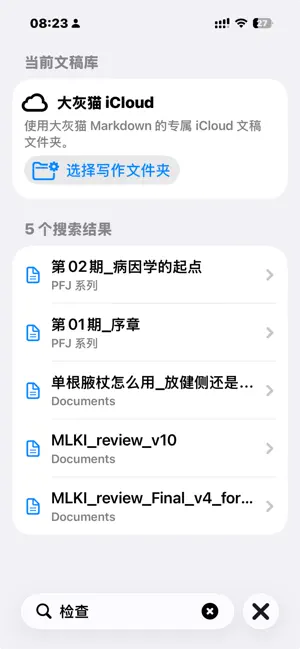
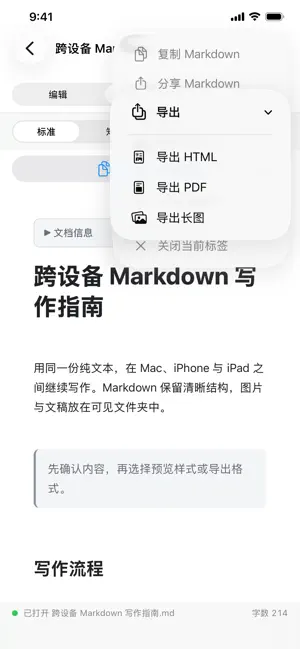
GrayCat Markdown is now available on iPhone and iPad. Bring the Markdown files you saved from the Mac app into iCloud, then open, edit, preview, and prepare them for publishing on the go. Core features • Open iCloud documents: shares the same iCloud.com.graycat.stickymd Documents container with the Mac app. • Choose a writing folder: authorize your own iCloud Drive folder in Files, such as a personal writing folder. • Mobile Markdown toolbar: headings, bold, italic, quotes, lists, links, and images are easy to insert. • Preview four output forms directly: Standard, Zhihu, Toutiao, and WeChat Official Account styles live inside Preview. • Keep image assets beside the document: inserted photos or image files are saved into the matching .assets folder and referenced with relative Markdown paths. • Search titles, paths, and document body text. • Publish readiness checks: review word count, headings, images, links, and code fences before copying. • Recent documents for quick return. Sync model GrayCat Markdown uses iCloud Documents and local Markdown files. It does not use a third-party cloud service or upload your content to the developer. After saving from the Mac app to iCloud, refresh the iOS document list or reload the active document to read the latest content. For a custom folder, select and authorize that folder on iOS first. Privacy • No app account required • No analytics collection • No ads or tracking SDKs • Documents stay in the local or iCloud location you choose
What’s new
Version 1.3.0 · Updated July 27, 2026
Version 1.3 focuses on document management and keeping the writing experience in step with the Mac app. Document management: swipe or long-press in the list to rename or delete documents. Undo / redo buttons on the keyboard toolbar. YAML front matter support: metadata at the top of a document shows as a collapsible "Document info" card instead of leaking into the body. Word counting upgraded to mixed CJK + Latin counting, matching the Mac app's publish checks. On non-Chinese devices the Chinese platform preview styles are hidden by default, with a toggle right below the platform picker. The iCloud conflict banner shows the cloud-side modification date; the preview refreshes immediately after a document is updated by another device; plus rendering and stability fixes (# inside code blocks no longer appears in the outline, Windows line-ending compatibility, and more).
App privacy
The developer, 泳涛 茅, reported these privacy practices to Apple.
Data Linked to You
The following data, which may be collected and linked to your identity, may be used for the following purposes:
- User Content: Other User Content
Used for: App Functionality
Alternatives to GrayCat Markdown
Looking for apps like GrayCat Markdown? Here are 6 similar apps on the App Store.
-
 Letterform: Markdown Editor
-
 NoteList: Todo and Markdown
-
 Habitually - Habit Tracker
-
 The Quantified Self
-
 Recto MD
-
 Notex: Easy Noting
| App | Rating | Price | Last updated | Compare |
|---|---|---|---|---|
| GrayCat Markdown | – | Free | July 27, 2026 | |
| Letterform: Markdown Editor | – | Free | Jul 6, 2026 | Compare |
| NoteList: Todo and Markdown | – | Free | Jul 15, 2026 | Compare |
| Habitually - Habit Tracker | – | Free | Oct 16, 2026 | Compare |
| The Quantified Self | – | Free | Nov 27, 2023 | Compare |
| Recto MD | – | Free | Oct 9, 2026 | Compare |
| Notex: Easy Noting | – | Free | Jul 30, 2024 | Compare |
Compare GrayCat Markdown with the top alternatives: ratings, updates, ASO score and keyword gaps →