

SaveSound
Ronald Fella Music iPhoneiPadiPod touch
SaveSound is a free Music app for iPhone and iPad by Ronald Fella. Rated 5.0/5 from 2 ratings. Requires iOS 18.6. Updated October 23, 2026.
- Rating
- 5.0
- 2 ratings
- Price
- Free
- on the App Store
- Size
- 9 MB
- Age 4+
- Updated
- Oct 23
- 2026 · v5.3
Screenshots


About SaveSound
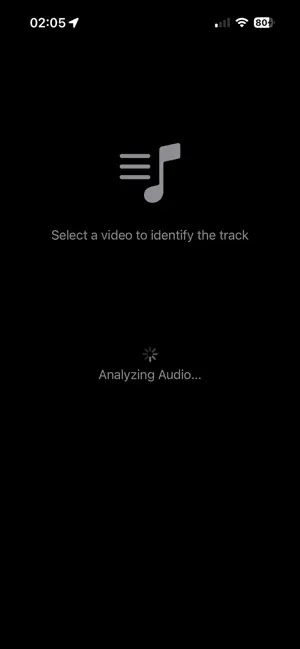
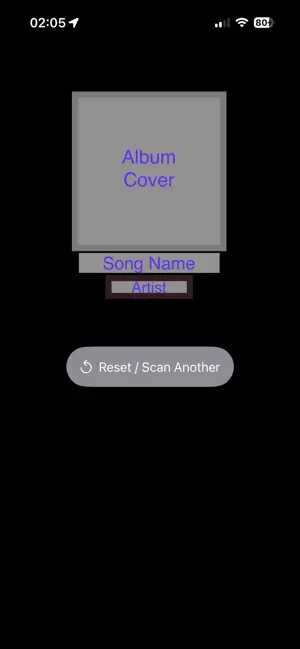
Identify music and sounds hidden within your videos, audio files, and live environment. SaveSound lets you discover track titles, artists, and artwork in seconds using fast, privacy-focused audio recognition. Voice Announcements: Choose whether SaveSound announces identified songs aloud. Customize song identification and no-match announcements independently in Settings. No Match Announcements: When Voice Announcements are enabled, SaveSound announces when no song is identified, so you know the scan is complete without looking at your screen. Scan History: Automatically save identified tracks and revisit your discoveries anytime. Open tracks directly from your history using your preferred streaming service. Share Extension: Scan videos and voice memos directly from the Share Sheet in apps like Photos and Voice Memos without manually opening SaveSound. Home Screen Quick Actions: Quickly start Live Scan, Video Upload, or Files & Voice Memo Scan by long-pressing the SaveSound icon. Siri Live Scan: Say “Hey Siri, Live Scan with SaveSound” and SaveSound will open and immediately begin listening for music. Control Center Live Scan: Start Live Scan directly from iOS Control Center, even when SaveSound isn't already open. Multi-Platform Integration: Open identified tracks in Apple Music, Spotify, SoundCloud, YouTube Music, Amazon Music, Pandora, Deezer, TIDAL, or YouTube. Key Features: Video Identification: Identify music from videos in your Photos library. Audio & Voice Memo Support: Import audio files from Files or Voice Memos. Live Scanning: Identify music playing around you with a 15-second listening session. Powered by ShazamKit: Fast and accurate music recognition. Privacy-First Design: Audio signatures are processed securely, with permissions requested only when necessary. Clean & Simple UI: Pick a file or start a Live Scan with minimal setup. Ad-Supported Experience: SaveSound remains free with a non-intrusive advertising experience. How it Works: Select Media: Choose a video, audio file, voice memo, or Live Scan. Analyze: SaveSound generates a digital audio signature from your media or microphone. Discover & Stream: View the matched track, artist, and artwork, then open it in your preferred music service. Note: An active internet connection is required for music recognition. Microphone access is required for Live Scan.
What’s new
Version 5.3 · Updated October 23, 2026
•Added SoundCloud support so you can search for recognized songs on SoundCloud. •Expanded music service options while keeping your existing music platforms available.
App privacy
The developer, Ronald Fella, reported these privacy practices to Apple.
Data Used to Track You
The following data may be used to track you across apps and websites owned by other companies:
- Identifiers: Device ID
- Usage Data: Product Interaction, Advertising Data
Data Not Linked to You
The following data, which may be collected but is not linked to your identity, may be used for the following purposes:
- Identifiers: Device ID
- Usage Data: Product Interaction, Advertising Data
- Diagnostics: Crash Data
- Other Data: Other Data Types
Used for: Third-Party Advertising, Analytics, App Functionality
Alternatives to SaveSound
Looking for apps like SaveSound? Here are 6 similar apps on the App Store. The highest rated is Reczt (5.0/5), and all 6 are free to download.
-
 Reczt
5.0
Reczt
5.0
-
 TuneTrace
4.3
TuneTrace
4.3
-
 Pindisco: Social Music Map
5.0
Pindisco: Social Music Map
5.0
-
 TuneTrace Offline Music Player
-
 Video2MP3 AI
-
 Retro-Amp
5.0
Retro-Amp
5.0
| App | Rating | Price | Last updated | Compare |
|---|---|---|---|---|
| SaveSound | 5.0 / 5 (2 ratings) | Free | October 23, 2026 | |
| Reczt | 5.0 / 5 (5) | Free | Sep 24, 2026 | Compare |
| TuneTrace | 4.3 / 5 (6) | Free | May 12, 2025 | Compare |
| Pindisco: Social Music Map | 5.0 / 5 (2) | Free | Oct 29, 2026 | Compare |
| TuneTrace Offline Music Player | – | Free | Oct 23, 2026 | Compare |
| Video2MP3 AI | – | Free | Feb 19, 2026 | Compare |
| Retro-Amp | 5.0 / 5 (1) | Free | May 12, 2026 | Compare |
Compare SaveSound with the top alternatives: ratings, updates, ASO score and keyword gaps →