

Scratchcam
Junghyun Yoo Graphics & Design iPhoneiPadiPod touch
Scratchcam is a free Graphics & Design app for iPhone and iPad by Junghyun Yoo. Rated 5.0/5 from 1 ratings. Requires iOS 17.6. Updated August 13, 2026.
- Rating
- 5.0
- 1 ratings
- Price
- Free
- on the App Store
- Size
- 3 MB
- Age 4+
- Updated
- Aug 13
- 2026 · v1.8
Screenshots

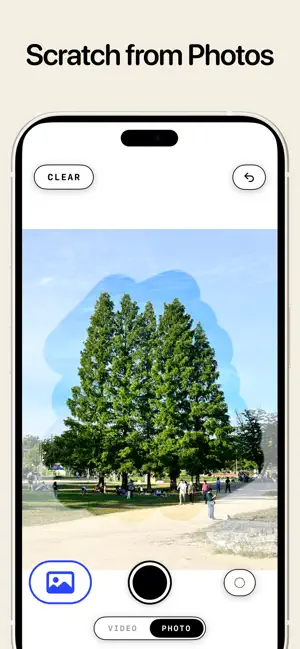


About Scratchcam
Scratch the screen to reveal the moment your camera sees! How to use Scratchcam - Scratch the white canvas, and the moment the camera was seeing appears right there. - Each new stroke stacks a new moment over the last. - Tap once to fade the canvas and see the full camera view. Video mode - Every moment you scratch is kept as a video. - The camera never stops: it keeps filming the whole time. Scratch from your photos - Pull a photo from your library and scratch into it instead. - Old pictures, opened one stroke at a time. Saving - Your work is saved as transparent PNGs and videos. - Turn them into stickers for iMessage and Instagram Stories. Photo import, video mode, and unlimited saves come with a single one-time unlock. No subscription.
What’s new
Version 1.8 · Updated August 13, 2026
Zoom into your photos: Pinch to zoom and drag with two fingers while you scratch a photo. Every screen now follows your text size setting.
App privacy
The developer, Junghyun Yoo, reported these privacy practices to Apple.
Data Not Collected
The developer does not collect any data from this app.
Alternatives to Scratchcam
Looking for apps like Scratchcam? Here are 6 similar apps on the App Store. The highest rated is MagicM: Object Remover AI (4.1/5), and 4 of the 6 are free to download.
-
 Tell Me What: Draw and Create
-
 The Hue vault: Color Palette
-
 MagicM: Object Remover AI
4.1
MagicM: Object Remover AI
4.1
-
 Fridge magnet: photos stickers
-
 Ebru: Water & Paper Marbling
3.7
Ebru: Water & Paper Marbling
3.7
-
 Sketudio: Animated Comic Maker
4.0
Sketudio: Animated Comic Maker
4.0
| App | Rating | Price | Last updated | Compare |
|---|---|---|---|---|
| Scratchcam | 5.0 / 5 (1 rating) | Free | August 13, 2026 | |
| Tell Me What: Draw and Create | – | Free | Jul 12, 2026 | Compare |
| The Hue vault: Color Palette | – | 2.99 USD | Oct 2, 2026 | Compare |
| MagicM: Object Remover AI | 4.1 / 5 (8) | Free | Aug 26, 2026 | Compare |
| Fridge magnet: photos stickers | – | Free | Jun 5, 2026 | Compare |
| Ebru: Water & Paper Marbling | 3.7 / 5 (3) | 9.99 USD | Oct 22, 2026 | Compare |
| Sketudio: Animated Comic Maker | 4.0 / 5 (1) | Free | Aug 31, 2026 | Compare |
Compare Scratchcam with the top alternatives: ratings, updates, ASO score and keyword gaps →