

Sign on pdf - Sign Documents
Prince Boateng Productivity iPhoneiPadiPod touch
Sign on pdf - Sign Documents is a free Productivity app for iPhone and iPad by Prince Boateng. Requires iOS 17.6. Updated August 31, 2026.
- Price
- Free
- on the App Store
- Size
- 12 MB
- Age 4+
- Updated
- Aug 31
- 2026 · v1.2
Screenshots
Save to Pinterest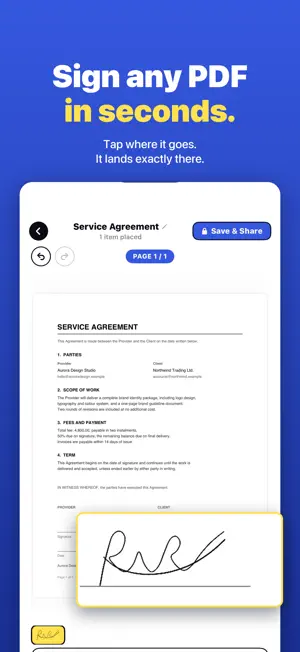

About Sign on pdf - Sign Documents
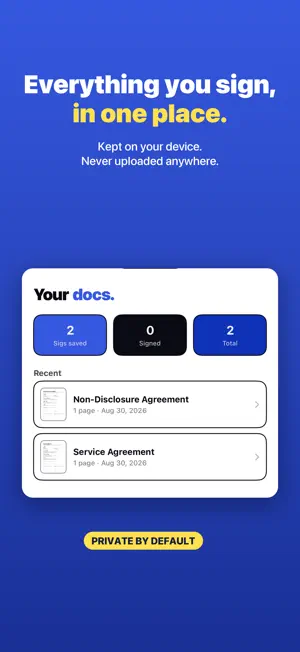
Sign on PDF – Sign Documents Use this PDF signer to add your signature to any document in seconds no printing, no scanning, no hassle. Sign contracts, fill forms, and scan paperwork right from your iPhone, with your documents kept private and secure on your device. The all-in-one PDF signer and document signer for everyday paperwork work contracts, HR forms, school permission slips, leases, and more. Fast, simple, and built to save you time. HOW IT WORKS 1. Import a PDF or scan a paper document 2. Tap to place your signature, text, or date 3. Save and share done in seconds TOP FEATURES • PDF signer — add signatures, text, and dates to any PDF in seconds • Document signer for contracts, forms, and agreements • Reusable signatures — save multiple signatures and apply them instantly • Create your signature — draw, type, or import your own • Built-in scanner — capture paper documents and turn them into PDFs • Document management — view, organize, and access all your files in one place • Private by design — your documents stay protected on your device • Clean, user-friendly interface built for speed POPULAR USE CASES • Sign business contracts and agreements • Fill and sign HR or onboarding forms • Sign school and permission forms • Complete lease and rental documents • Scan and sign printed paperwork on the go WHY CHOOSE SIGN ON PDF Sign on PDF – Sign Documents brings every essential PDF tool into one simple app. From managing and scanning to signing and sharing, everything is designed for speed, privacy, and ease of use. GET STARTED Download Sign on PDF – Sign Documents and sign your first document in seconds. Experience a smarter way to manage, sign, and scan your PDF documentsTitle: Savory All Access • Length: 1 year • Price: $5.99 per week, $39.99 per year and $79.99 Lifetime (auto-renews) • Terms of Use: https://www.apple.com/legal/internet-services/itunes/dev/stdeula/ • Privacy Policy https://docs.google.com/document/d/1BEjrJbCCzoT3zg93KfoluUAz3SbvsSlI/edit?usp=share_link&ouid=105049775202487025199&rtpof=true&sd=true
What’s new
Version 1.2 · Updated August 31, 2026
Bug fixes and performance enhancement
App privacy
The developer, Prince Boateng, reported these privacy practices to Apple.
Data Not Collected
The developer does not collect any data from this app.
Alternatives to Sign on pdf - Sign Documents
Looking for apps like Sign on pdf - Sign Documents? Here are 6 similar apps on the App Store. The highest rated is All Document Explor: PDF (5.0/5), and all 6 are free to download.
-
 Cashly: Finance Manager
-
 eSign - Easy Sign Documents
-
 All Document Explor: PDF
5.0
-
 Minutes: Meeting Note Taker
5.0
-
 EzBlock Studio
3.7
-
 Voice to Text AI: Parrot Notes
5.0
| App | Rating | Price | Last updated | Compare |
|---|---|---|---|---|
| Sign on pdf - Sign Documents | – | Free | August 31, 2026 | |
| Cashly: Finance Manager | – | Free | Jun 3, 2026 | Compare |
| eSign - Easy Sign Documents | – | Free | Apr 5, 2024 | Compare |
| All Document Explor: PDF | 5.0 / 5 (2) | Free | Feb 24, 2026 | Compare |
| Minutes: Meeting Note Taker | 5.0 / 5 (4) | Free | Nov 15, 2026 | Compare |
| EzBlock Studio | 3.7 / 5 (22) | Free | Oct 12, 2024 | Compare |
| Voice to Text AI: Parrot Notes | 5.0 / 5 (6) | Free | Aug 31, 2026 | Compare |