

MediaUtilityPro
Sanjay Korde Photo & Video iPhoneiPadiPod touch
MediaUtilityPro is a free Photo & Video app for iPhone and iPad by Sanjay Korde. Requires iOS 15.0. Updated October 6, 2026.
- Price
- Free
- on the App Store
- Size
- 10 MB
- Age 4+
- Updated
- Oct 6
- 2026 · v1.1
Screenshots


About MediaUtilityPro
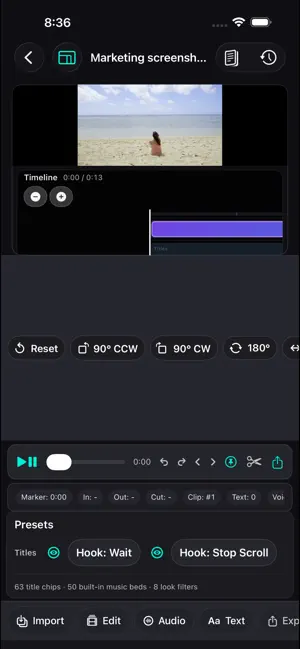
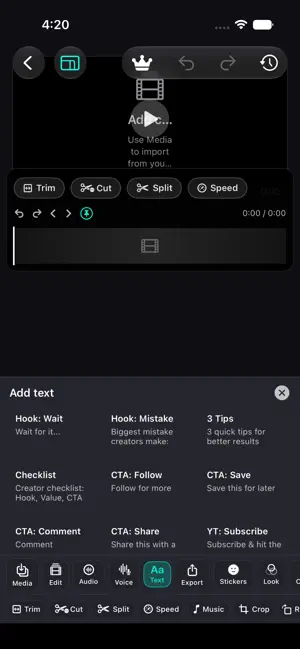
Media Utility Pro — Timeline Video Editor for Filmmakers & Creators on iPhone, iPad and Mac Edit videos on your phone, tablet, or Mac. Media Utility Pro is a multi-track timeline video editor for cutting and finishing clips, then exporting HD video—fast. Free forever • Timeline editing — Arrange clips and build your story. • Cut, trim & split — Core tools to shape each shot. • Speed — Change clip speed (constant speed). • Crop, rotate, flip & reverse — Adjust framing and playback. • Transitions — Simple transitions between clips. • Titles & stickers — Add text and stickers on your edit. • Captions — Add captions for clearer viewing. • Music, Film Sound & voiceover — Background music, Film Sound beds, VO, and ducking so speech stays clear. • Basic looks — Simple color filters. • Export — Share up to 1080p HD. • Optional iCloud — Access projects across devices when signed in. Filmmaker Pro — one-time unlock (no subscription) Only finishing tools that are ready to use: • Film looks — Cinematic grades that match on export. • 3D LUT — Built-in and imported .cube LUTs in preview and export. • Color grade & denoise — Exposure, contrast, temperature, vignette, grain, and denoise. • Dialogue cleanup — Clean and isolate voice on the timeline. • Speed ramp — Smooth speed changes on a clip. • Person mask — On-device person masking for selective looks. • 4K / Maximum export — Higher-quality delivery presets. • ProRes export — ProRes 422 edit masters for desktop handoff. Start free. Unlock Filmmaker Pro once when you need cinema finishing—no subscription.
What’s new
Version 1.1 · Updated October 6, 2026
• Filmmaker Pro — one-time unlock for film looks, 3D LUTs, color grade & denoise, dialogue cleanup, speed ramp, person mask, plus 4K / Maximum and ProRes export • Free studio stays free — cut, trim, split, speed, crop, rotate, flip, reverse, titles, stickers, captions, music, Film Sound, voiceover, ducking, basic looks, and 1080p export • Film Sound — cinematic music beds for your timeline • Stickers — place and move stickers on the preview canvas; rotation baked into export • Looks & text — improved Looks on iPhone; richer text controls (colors & film styles) • Captions — generate and edit captions on the timeline • Export — clearer export sheet with close/dismiss; orientation fixes on iPhone, iPad, and Mac • iPad & Mac — wider studio layout, more reliable inspector panels, and Mac Catalyst window/export improvements Start free. Unlock Filmmaker Pro once when you need cinema finishing—no subscription.
App privacy
The developer, Sanjay Korde, reported these privacy practices to Apple.
Data Not Collected
The developer does not collect any data from this app.
Alternatives to MediaUtilityPro
Looking for apps like MediaUtilityPro? Here are 6 similar apps on the App Store. The highest rated is FaceIdent: AI Face Finder (4.2/5), and 4 of the 6 are free to download.
-
 Video to Frames-Extract Photo
-
 Infrared Camera
-
 QuickFrame - True RAW Camera
3.7
QuickFrame - True RAW Camera
3.7
-
 One Souvenir
-
 FaceIdent: AI Face Finder
4.2
FaceIdent: AI Face Finder
4.2
-
 PresetCollection
| App | Rating | Price | Last updated | Compare |
|---|---|---|---|---|
| MediaUtilityPro | – | Free | October 6, 2026 | |
| Video to Frames-Extract Photo | – | Free | Sep 7, 2026 | Compare |
| Infrared Camera | – | 0.99 USD | Sep 2, 2026 | Compare |
| QuickFrame - True RAW Camera | 3.7 / 5 (3) | Free | Sep 1, 2026 | Compare |
| One Souvenir | – | Free | Aug 6, 2026 | Compare |
| FaceIdent: AI Face Finder | 4.2 / 5 (10) | Free | Sep 27, 2026 | Compare |
| PresetCollection | – | 0.99 USD | Oct 7, 2026 | Compare |
Compare MediaUtilityPro with the top alternatives: ratings, updates, ASO score and keyword gaps →