

CapyDo - One thing at a time
Camille LE LAN Productivity iPhoneiPadiPod touch
CapyDo - One thing at a time is a free Productivity app for iPhone and iPad by Camille LE LAN. Requires iOS 15.1. Updated October 28, 2026.
- Price
- Free
- on the App Store
- Size
- 62 MB
- Age 4+
- Updated
- Oct 28
- 2026 · v1.1.0
Screenshots



About CapyDo - One thing at a time
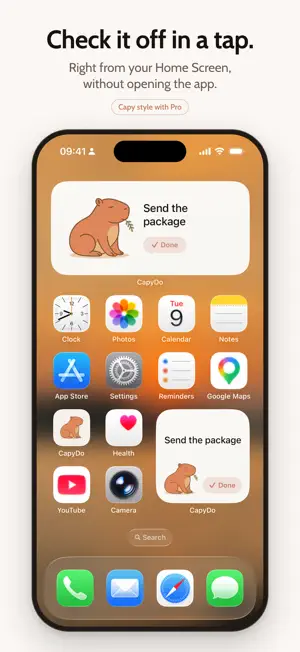
Your to-do list is stressing you out more than it's helping. CapyDo syncs with Apple Reminders and shows you one task at a time, so you can make progress without the pressure. Pick what matters, do it, then move on. At your own pace. WHY IT WORKS • One task on screen, fewer distractions • Small wins that help you build momentum • You stay in control of what comes next • A calm capybara keeps you company and cheers you on, and never judges A TIMER, IF YOU WANT ONE When you pick a task, CapyDo asks "Set yourself a timer?" Choose 5 minutes, 2 hours or anything in between, or skip it. The capybara stays on your Lock Screen and in the Dynamic Island, chewing its leaf while you work. Tap Done right there, without opening the app. When time's up, a gentle notification lets you know. Add 5 minutes or call it done. The timer is free for everyone. FINISH WHAT YOU PLANNED Most productivity apps help you do more. This one helps you finish what you planned. Line up more than five tasks for the day and CapyDo answers "5 tasks is already ambitious!" instead of pushing you on. Get to the end of your day and the capybara takes a bath, because there is nothing left to do. SYNCED WITH APPLE REMINDERS Your tasks are already in Reminders, and that is where they stay. Nothing to import. Add a task in CapyDo or with Siri, whichever you prefer. If you ever stop using CapyDo, everything is exactly where you left it. WIDGETS FOR iPHONE, iPAD & MAC Keep your current task where you can see it, like a sticky note you can tick off. Check it off right from the widget, without opening the app. Pick the Capy style and the capybara moves into your widget: it chews while you work, smiles when you tap Done and takes a bath once your day is done. Make it yours with light and dark themes, your own background photo, and five encouragement styles: Calm, Zen, Hype, Humor and Stoic. PLAN YOUR DAY Choose your tasks for the day, in the order you want. CapyDo feeds them to you one at a time. Skip anything, anytime. If the day changes course, Edit my day lets you add or remove tasks along the way. PRIVATE BY DESIGN No account. No login. Your tasks stay on your device and in your iCloud. We never read them. We only use anonymized diagnostics, such as crash reports and usage stats, to help improve the app. FREE, AND CapyDo PRO CapyDo is free for one task a day, timer included, and it stays free. That is enough to find out whether the approach works for you. CapyDo PRO unlocks unlimited tasks, Plan my day, all widgets and themes including the Capy style, and everything you got done in the last 30 days. The annual plan starts with a 2-week free trial, because building a habit takes time. • Monthly or annual subscription, or a one-time lifetime purchase • Payment is charged to your App Store account. Subscriptions renew automatically unless canceled at least 24 hours before the end of the current period, in your App Store account settings. Privacy Policy: https://capydo.app/privacy/ Terms of Use: https://capydo.app/terms/ One thing at a time. That's all you need.
What’s new
Version 1.1.0 · Updated October 28, 2026
A timer, if you want one When you pick a task, CapyDo can start a timer. The capybara stays with you on the Lock Screen and in the Dynamic Island, chewing its leaf, and you can tap Done right there. Free for everyone. A capybara in your widget (Pro) Choose the Capy style: it chews while you work, smiles when you tap Done and takes a bath once your day is done. Look back on your days Your counter and latest tasks are now in Profile for everyone. Pro shows everything you got done in the last 30 days. Edit my day Plans change. Add or remove tasks from today's plan without starting over. Plus many small fixes, especially to the widget's Done button.
App privacy
The developer, Camille LE LAN, reported these privacy practices to Apple.
Data Not Linked to You
The following data, which may be collected but is not linked to your identity, may be used for the following purposes:
- Purchases: Purchase History
- Identifiers: User ID
- Usage Data: Product Interaction
- Diagnostics: Crash Data, Performance Data
Used for: Analytics, App Functionality
Alternatives to CapyDo - One thing at a time
Looking for apps like CapyDo - One thing at a time? Here are 6 similar apps on the App Store. The highest rated is Mochi Buddy: To Do List Pet (5.0/5), and all 6 are free to download.
-
 Mochi Buddy: To Do List Pet
5.0
-
 First Thingy
-
 Petal: One Task at a Time
-
 Garden - Notes & Calm
5.0
-
 Seed Routine
-
 DumpFocus - AI Thought Journal
| App | Rating | Price | Last updated | Compare |
|---|---|---|---|---|
| CapyDo - One thing at a time | – | Free | October 28, 2026 | |
| Mochi Buddy: To Do List Pet | 5.0 / 5 (1) | Free | Oct 27, 2026 | Compare |
| First Thingy | – | Free | Apr 14, 2026 | Compare |
| Petal: One Task at a Time | – | Free | Jul 6, 2026 | Compare |
| Garden - Notes & Calm | 5.0 / 5 (1) | Free | May 5, 2026 | Compare |
| Seed Routine | – | Free | Mar 11, 2026 | Compare |
| DumpFocus - AI Thought Journal | – | Free | Nov 6, 2026 | Compare |